




 312
312 Like
Like Share
Share
 Report
D365FO provides two primary sets of APIs, Recurring Integration APIs & Data Management Platform (DMF) package APIs, to support file based integration scenarios. These APIs allow DMF data files as well as data projects to be imported and exported from Dynamics 365 for Operations.
This post is about importing the package using DMF REST API which can be used in both cloud deployments and on-premises deployments.
Below table describes the points to consider for deciding the approach

Given below the overall flow in my logic apps

The trigger starts as soon as the zipped file ( Data + manifest + PackageHeader) is dropped in the blob storage.
I created the zip file in ADF and used the output as the trigger point in logic apps. In my next post, I will give a walkthrough of file compression process in ADF.
Next step read the contents of the file in blob storage.
The GetAzureWritableUrl API is used to get a writable blob URL. The method includes a shared access signature (SAS) token that is embedded in the URL. You can use this method to upload a data package to the Azure Blob storage container

POST /data/DataManagementDefinitionGroups/Microsoft.Dynamics.DataEntities.GetAzureWriteUrl
BODY
{
    "uniqueFileName":"<string>"
}
The BlobURL denotes the location where the data packages should be uploaded.
‘Parse Json’ converts the above output to take out the value of ‘BlobURL’ .

Schema for the above step can be generated by clicking ‘Use sample payload’ option and pasting the output from ‘GetAzureWriteURL’.

With BlobURL value, we can upload the package to the blob using PUT in Http request.


Using ImportFromPackage API ,pass the blob associated with F&O instance to trigger the import process. Parameters are given below
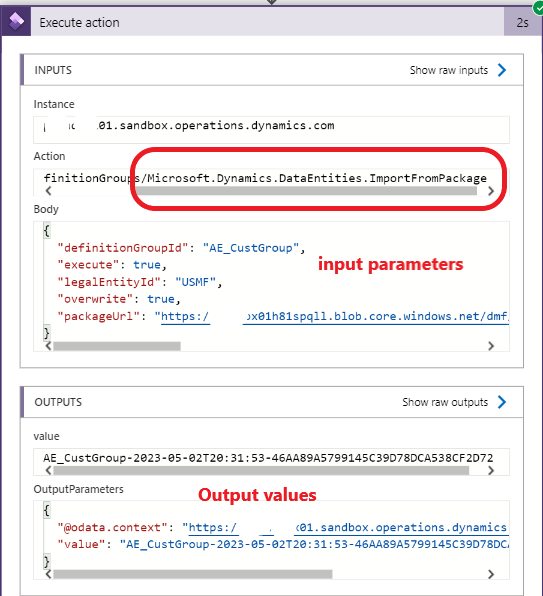
If the input parameter ‘definition group’ doesn`t exist in the environment, the API creates the new one and imports the data.
Using ‘GetExecutionSummaryStatus’, the flow can further be extended to check the status of the import and take action according to the output.
POST /data/DataManagementDefinitionGroups/Microsoft.Dynamics.DataEntities.GetExecutionSummaryStatus
BODY
{"executionId":"<executionId>"}
*This post is locked for comments