




 61,204
 Like
Like Share
Share
 Report
Commenting and uncommenting multiple lines of C/AL Code:
We can add and remove comment marks manually for each line till now.
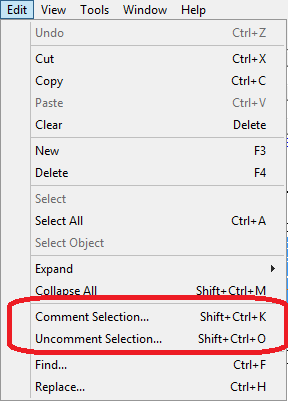
But from now the Comment Selection and Uncomment Selection options available in the Edit menu.
The Comment Selection and Uncomment Selection options enable you to comment or uncomment multiple lines of code all at once.
- To comment lines of code, select the lines, and then, in the Edit menu, choose Comment Selection (Shift+Ctrl+K).
- To uncomment lines of code, select the lines, and then choose Uncomment Selection (Shift+Ctrl+O).
*This post is locked for comments