




 1,947
1,947 Like
Like Share
Share
 Report
Summary
- Cookies are small files that remember settings or other information on websites and portals.
- Websites from European companies are required to provide a mechanism for visitors to provide consent to use cookies.
- Implementing Cookie Policy Acceptance in portals is easily achieved by adding a small piece of JavaScript to a portal web template.
Cookies
Cookies are used in websites and portals frequently to store small pieces of stateful information on the local user’s device via the browser. Cookies are used to track a variety of types of information such as what buttons were pressed, what items are added to a shopping cart, etc. Cookies can also store browsing history and other potentially “private” information. This is why you sometimes see a targeted advertisement in one site for a product that you may have looked at or searched for previously, answering the question of how does Facebook know that I am looking for new snow tires?
https://en.wikipedia.org/wiki/HTTP_cookie
Directive 2009/136/EC
Storing and reading this kind of private information got the attention of European lawmakers and with that came Directive 2009/136/EC. Also known as the “Cookie Law”.
The cookie law means that any website from the European Union must ask the user for consent to use cookies while browsing that website. This means a pop-up or some kind of prompt in which a user must click something to acknowledge that the site uses cookies.
Implementing Cookie Acceptance on Dynamics 365 Portals
Dynamics 365 Portals use cookies for a variety of features. Therefore, if you have a portal hosted in the European Union you need to implement some kind of cookie acceptance. Currently, Microsoft does not provide this as a feature of portals.
Thanks to a tip from Refresh the Cache co-host Colin Vermander, the following are steps to implement a free 3rd party tool to provide cookie consent in Dynamics 365 Portals.
Navigate to the Cookie Consent by Insites website
https://cookieconsent.insites.com/
 Cookie Consent by Insites
Insite provides website testing services and in order to comply with the cookie law, have decided to provide their tool for free. The reasoning is pretty clear:

Click on the “Download” button.
You can then go through the options to configure the look, feel and positioning of your cookie consent bar. Note that if you want advanced features (opt-in, opt-out) you will need to implement some more advanced coding.
 Configure Cookie Consent Bar
When you are satisfied with the look and feel, copy the resulting code.
 Copy Code
In Dynamics 365, navigate to the Portals Area (or Portals App) and choose Web Templates. Locate the “Header” web template.
 Header Web Template
Position the first 2 lines after the {% endsubstitution %} Liquid tag and before the line.
 First code section
Add the remaining code after the existing JavaScript function. Remove the extra “” tag.
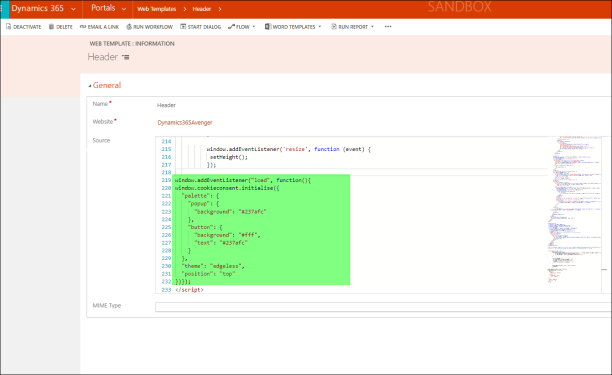 Second Code Section
Save the template, Refresh the Cache ™ and launch your Portal. You should now see a prompt asking you to accept the fact that this site uses cookies.
 Cookie Acceptance
You may need to do some additional configuration depending on your policies and uses of the portal. Hopefully, this provides you with an option should you need to implement cookie acceptance on your Portal.
Interested in Learning About Dynamics 365 Portals? Sign up for my Portals Bootcamp!
On November 7-8 I will be running a 2-day Portals Bootcamp in Oslo, Norway. This course is for the Dynamics 365 professional to learn how to implement successful portal projects! Space is limited and it would be great to meet up with you in Norway in November. Organized by none other than the CRM Viking!


CRMUG SUMMIT
I will also be speaking at the CRMUG Summit next week in a number of sessions.

Here are the sessions that I will be presenting/participating in:
User Groups Fostering Professional Development via Study Groups
BIR06 – Writing SSRS Reports in Dynamics 365 for fun and Profit
CCS08 – Crash Course in Dynamics 365 Portals
DEV07 – Extending the Dynamics 365 Portal
UI02 – A Tale of two (Dynamics 365) Upgrades
If you are a reader of this blog or listen to “Refresh the Cache” please do not hesitate to say “hi”
Nick Doelman is a Business Applications MVP and is totally off cookies for the month of October as he needs to cut weight for the upcoming Ontario Powerlifting Association Provincial Championships.
*This post is locked for comments