




 84,331
 Like
Like Share
Share
 Report
So I left this idea and begun develop own solution.
Solution will consist of 3 parts:
1. DataBase.
2. Plugin which will fill log database (it will registered on most usable messages - Execute, RetrieveMultiple, Retrieve, Create, Update, Delete).
3. Report which will display the data.
DataBase. I decided not to use the CRM database to store users' activity information because of performance. I've created table to store data. This table can be created with following script:
CREATE TABLE [dbo].[UserLog](
 [UserId] [uniqueidentifier] NULL,
 [UserName] [varchar](max) NULL,
 [OrgName] [varchar](max) NULL,
 [RecordDateTime] [datetime] NULL,
 [SourceHost] [varchar](max) NULL
) ON [PRIMARY]

GO
Plugin
Plugin function is to retrieve information about user, organization and IP address of the user's computer. The code of the plugin:
using System;
using System.Collections.Generic;
using System.Text;
using Microsoft.Crm.Sdk;
using Microsoft.Crm.SdkTypeProxy;
using Microsoft.Crm.Sdk.Query;
using System.Data.SqlClient;
using System.Web;

namespace UserActionsLogger
{
    public class UALogger : IPlugin
    {

        #region Privates

        private readonly string _connectionString = string.Empty;

        #endregion Privates

        #region CTOR

        public UALogger(string config, string secureConfig)
        {
            _connectionString = config;
        }

        #endregion CTOR

        #region IPlugin Members

        public void Execute(IPluginExecutionContext context)
        {
            //Check that author is application (not async service or webservice)
            if (context.CallerOrigin == CallerOrigin.AsyncService ||
                context.CallerOrigin == CallerOrigin.WebServiceApi)
                return;

            try
            {
                //IP retrieving
                string hostname = string.Empty;
                HttpContext webContext = HttpContext.Current;
                if (webContext != null)
                    hostname = webContext.Request.UserHostName;
                if (webContext != null && hostname != string.Empty)
                    hostname = webContext.Request.UserHostAddress;

                //User Name retrieving
                Guid curentUserId = context.UserId;
                ICrmService crmservice = context.CreateCrmService(true);
                systemuser su = (systemuser)crmservice.Retrieve(EntityName.systemuser.ToString(), curentUserId, new ColumnSet(new string[] {"fullname"}));
                string username = su.fullname;

                //Removing of system accounts
                if (username.ToUpper() == "SYSTEM" ||
                    username.ToUpper() == "INTEGRATION")
                    return;

                //Savig of the data
                using (SqlConnection connection = new SqlConnection(_connectionString))
                {
                    connection.Open();

                    using (SqlCommand cmd = new SqlCommand("", connection))
                    {
                        cmd.CommandText = "Insert Into UserLog(UserId, UserName, OrgName, RecordDateTime, SourceHost) Values(@UserId, @UserName, @OrgName, @recordDateTime, @SourceHost)";
                        cmd.Parameters.AddWithValue("@UserId", curentUserId);
                        cmd.Parameters.AddWithValue("@UserName", username);
                        cmd.Parameters.AddWithValue("@OrgName", context.OrganizationName);
                        cmd.Parameters.AddWithValue("@RecordDateTime", DateTime.Now);
                        cmd.Parameters.AddWithValue("@SourceHost", hostname);

                        cmd.ExecuteNonQuery();
                    }

                    connection.Close();
                }
            }
            catch { }
        }

        #endregion IPlugin Members
    }
}
It is required to pass connection string to log DB in config property at the plugin's step registration. Sample how to register the plugin's step:
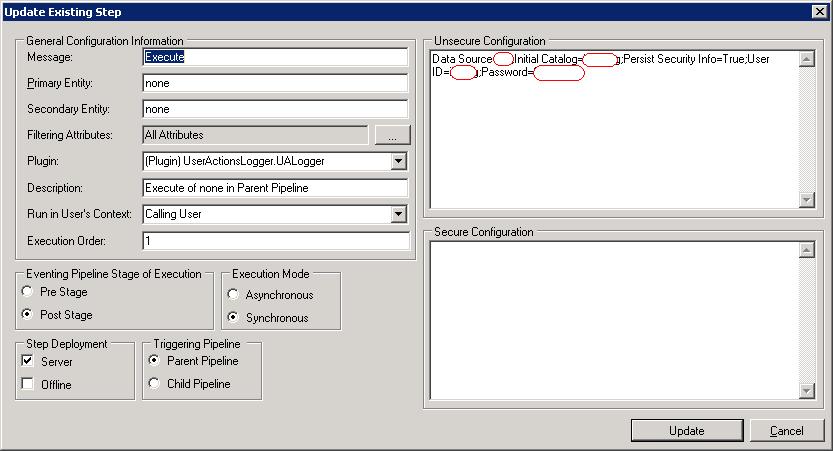
Report
SQL Query of the report:
--Creation of temp table to store time intervals
Create Table #TimeTable(StartDate DateTime, EndDate DateTime)

--Filling time intervals table
while @StartDate < @EndDate
Begin
    Insert Into #TimeTable
    Values(@StartDate, DATEADD(minute, @Delta, @StartDate))

    Set @StartDate = DATEADD(minute, @Delta, @StartDate)
End

--Retrieving data for reports
Select
    Distinct
    t.StartDate
    ,t.EndDate
    ,UserName
    ,SourceHost
From
    #TimeTable t
    Inner Join UserLog u
        on u.RecordDateTime > t.StartDate
        And u.RecordDateTime <= t.EndDate

--Temp table's deletion
Drop Table #TimeTable
Result:
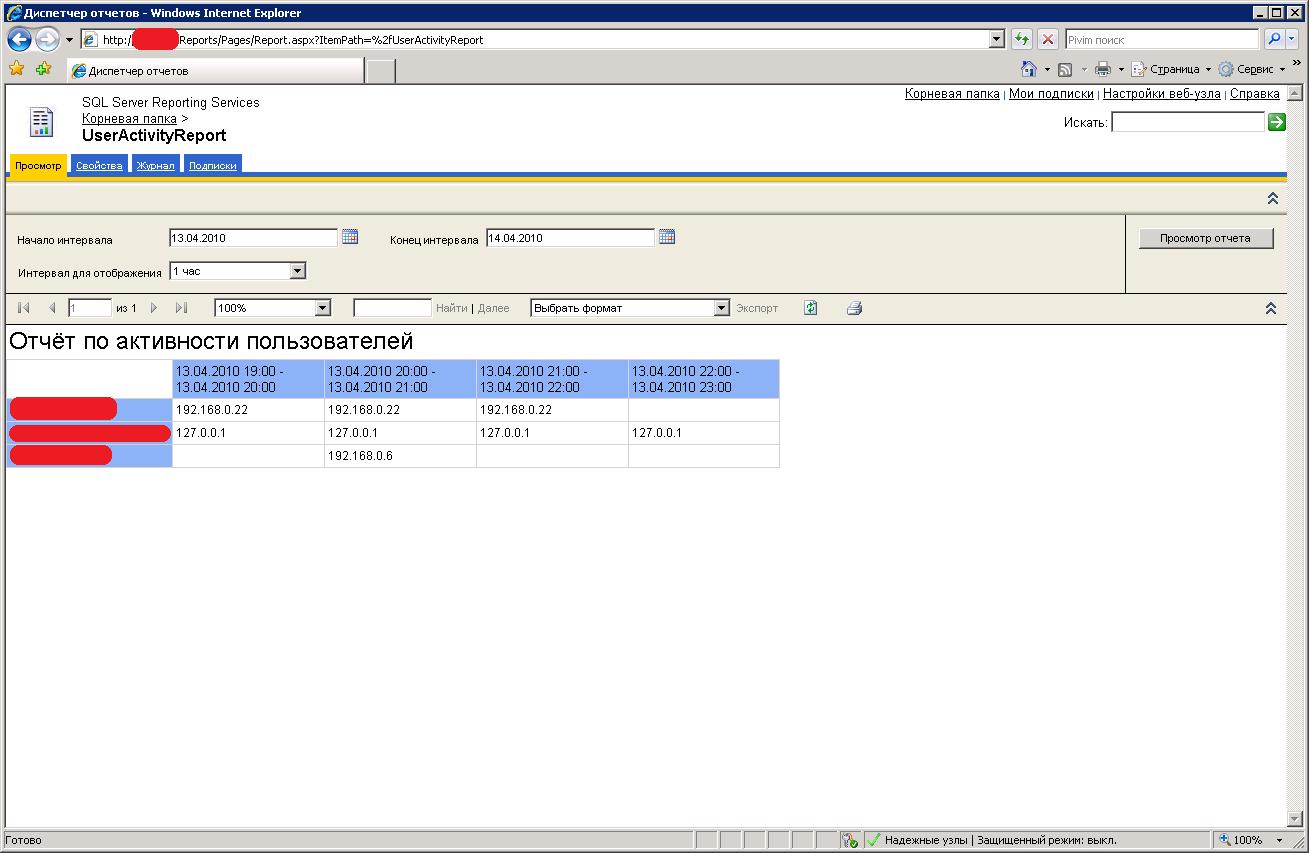
Source code of plugin and report:

*This post is locked for comments