




 401
401 Like
Like Share
Share
 Report
The adjust exchange rate batch job is typically run on Month End. It will calculate differences for the individual currency balances for each open foreign currency transaction and post it to the unrealised gains/losses account. This will also adjust the sub-ledger entries (i.e., Vendor, Customer, Bank Ledger Entries).
To run Adjust Exchange Rate navigate to the Currencies List > Actions as shown below:
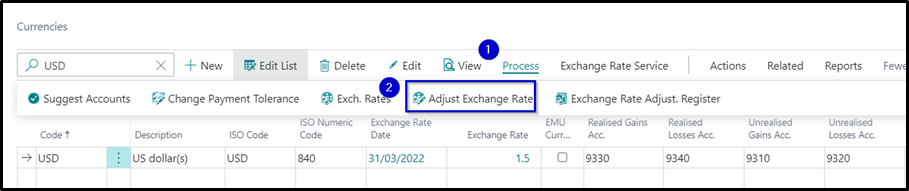

Note: The Posting Date is important as this will determine the effective exchange rate that will be the basis of calculating the currency fluctuations.
Once the batch job processing is completed, it will be posting the entries to reflect the unrealised gains/loss.
In the example above, the purchase invoice posted on 1/03/22 has recorded $5,200 AUD in the payable account. With the new exchange rate on 31/03/22, your payable account balance for the unpaid purchase invoice must be $6,000 AUD. Business Central posts an Unrealised Foreign Currency Gain and increased the receivables account by $800 AUD to achieve this.
Currency Exchange Rates

General Ledger Entries


*This post is locked for comments