




 16,444
 Like
Like Share
Share
 Report
Hi Guys
As you know, Microsoft released D365FO Local Business Data, aka On-Premise release.
Here the link Set up and deploy on-premises environments
I played around and I found the first issues.
During the creation of the group managed service accounts (gMSAs) through the Powershell scripts, "Create gMSAs" section, you can raise the follow error: "Key not found"
In this case you have to create a "KDS root key" using the following commands:
1- Add-KDSRootKey –EffectiveImmediately
2- Add-KdsRootKey –EffectiveTime ((get-date).addhours(-10));
During the ClusterConfig.json file generation, you can raise the following error, “Failed to Download Cluster Configuration Template”, see below error.
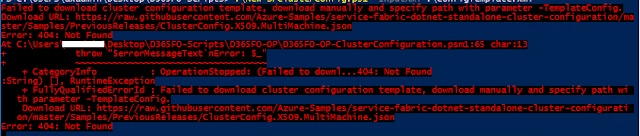
In this case you have to download the Service Fabric standalone installation package and copy the "ClusterConfig.X509.MultiMachine.json" file into the LCS InfrastructureScripts folder.
Again run the .\New-SFClusterConfig.ps1 -InputXml .\ConfigTemplate.xml command.
Finally, I test the ClusterConfig file through the command .\TestConfiguration.ps1 -ClusterConfigFilePath .\clusterConfig.json
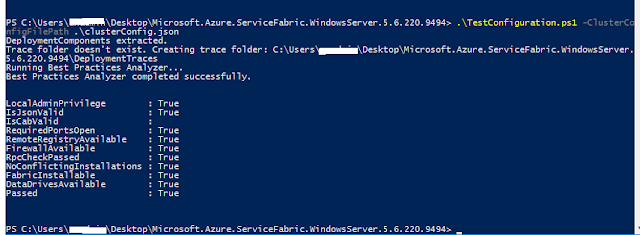
Next step is Deploy the Cluster!
Till soon!
As you know, Microsoft released D365FO Local Business Data, aka On-Premise release.
Here the link Set up and deploy on-premises environments
I played around and I found the first issues.
During the creation of the group managed service accounts (gMSAs) through the Powershell scripts, "Create gMSAs" section, you can raise the follow error: "Key not found"
In this case you have to create a "KDS root key" using the following commands:
1- Add-KDSRootKey –EffectiveImmediately
2- Add-KdsRootKey –EffectiveTime ((get-date).addhours(-10));
During the ClusterConfig.json file generation, you can raise the following error, “Failed to Download Cluster Configuration Template”, see below error.
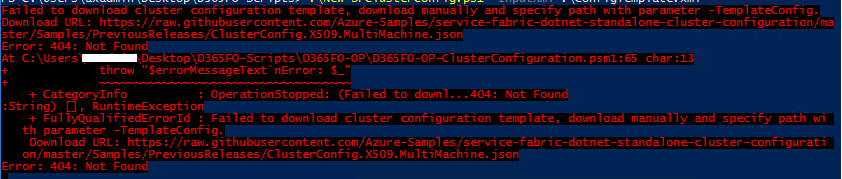
In this case you have to download the Service Fabric standalone installation package and copy the "ClusterConfig.X509.MultiMachine.json" file into the LCS InfrastructureScripts folder.
Again run the .\New-SFClusterConfig.ps1 -InputXml .\ConfigTemplate.xml command.
Finally, I test the ClusterConfig file through the command .\TestConfiguration.ps1 -ClusterConfigFilePath .\clusterConfig.json
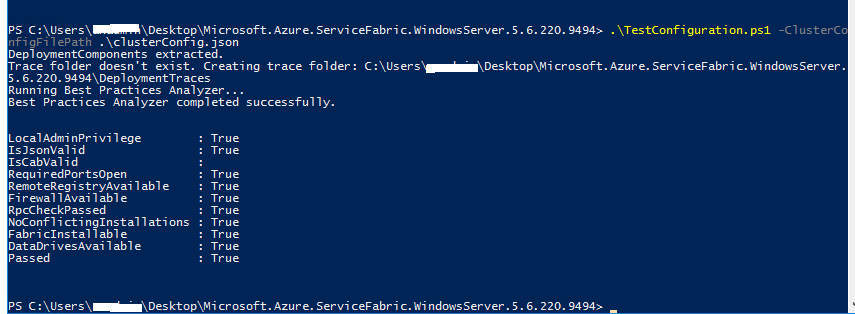
Next step is Deploy the Cluster!
Till soon!
*This post is locked for comments