




 958
958 Like
Like Share
Share
 Report
Dynamics 365 Power Pane:
When working with a big form (as a developer) in CRM you might have the following tasks to do.
- Enable and enter data for a locked field for testing purposes
- Copy GUID for a record
- Copy URL of record
- View schema name of attributes in form
- View option set value for all option set fields
- Show all hidden fields
- ...
By default, you need to change the config of the form to show hidden fields or unlock a field. And you have to go to System Customization to check the field schema name or option set value.
The developer tool Dynamics 365 Power Pane will help you with all above tasks without changing any customizations
This is a Chrome extension, you can install it here Dynamics 365 Power Pane
For Firefox you can install it here Dynamics 365 Power Pane
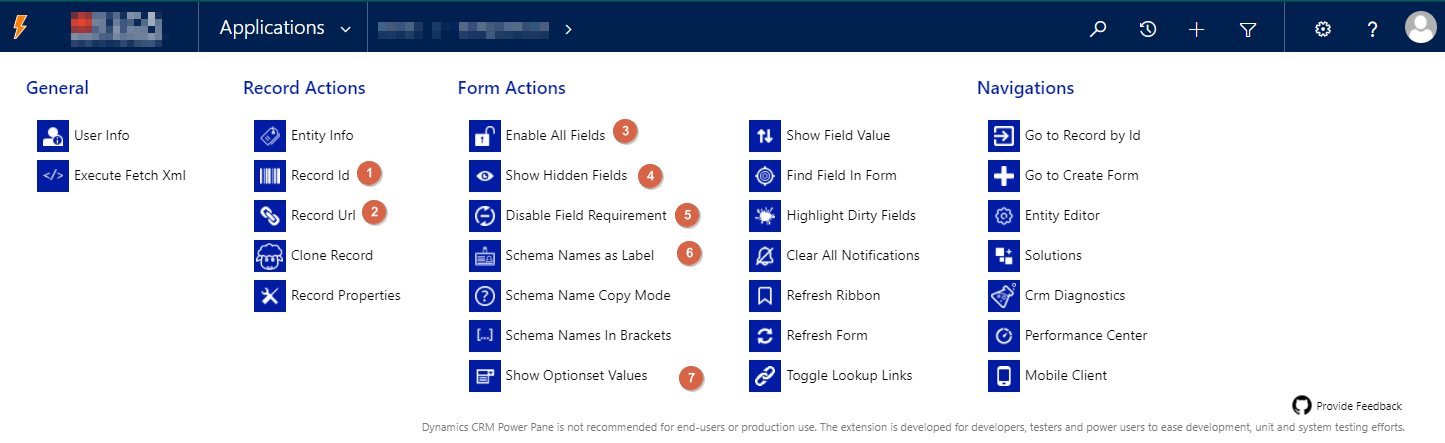
Here are some common actions that you can do with this tool
- Copy record GUID

- Copy record URL

- Enable all fields
- Show hidden fields
- Disable field requirement
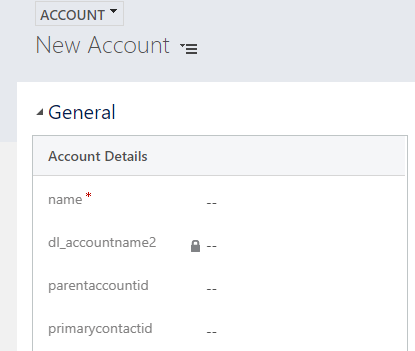
- Show schema name of fields in the form
- Show option set value

Note: Dynamics CRM Power Pane is not recommended for end-users or production use. The extension is developed for developers, testers, and power users to ease development, unit and system testing efforts.
*This post is locked for comments