




 Like
Like Share
Share
 Report
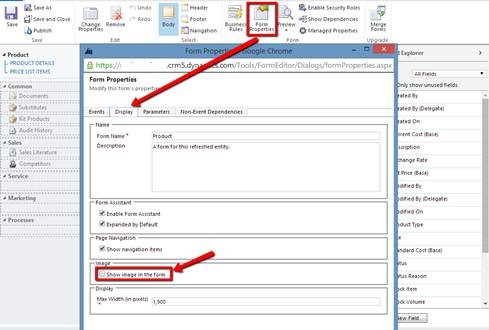
Entity Image is introduced Dynamics CRM 2013. This is a really useful feature where we could have better presentation to quickly glance on the record. As the adage says: “A picture is worth a thousand words”. It seems quite common requirements for customizing the form, but it is not automatically enabled on the form. To get the entity image to be displayed on the form: Navigate to the entity form customization > Form Properties > Display tab > check the “Show image in the form” option > Click OK > Save and publish the customization.
This tip is brought to you by Andre “I’ve got 88 in my handle” Margono.
This was originally posted here.
*This post is locked for comments