




 1,614
1,614 Like
Like Share
Share
 Report
What is Round Robin?
It is rotation of tasks through a group. A task could be a lead, case etc. Round Robin term frequently used when to assign tasks to team members. Leads and cases are commonly assigned through “Round Robin” implementation, but it can used for other entities too.In this blog, I have discussed Round Robin assignment for leads in Microsoft Dynamics CRM, but the concept is same for other entities too.
In this example, we assign newly generated lead to a member of specific team (SalesTeam), instead of doing it manually we have done it through round robin. Here "SalesTeam" can have variable members, and team size can change any time (member(s) can be added or deleted).
All this is achieved through a custom entity "counter", workflow and custom activity.
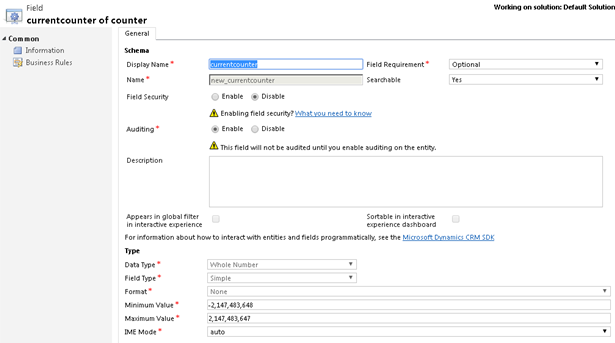
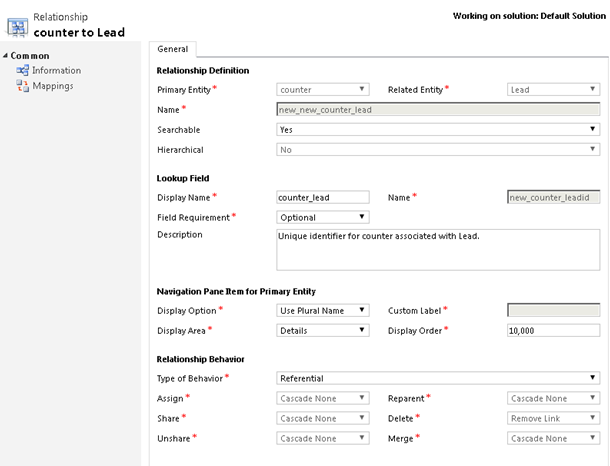
Custom Entity: "counter" entity will have integer value in a field "currentcounter" and 1:N relationship between "counter" and "lead" entity. This "currentcounter" will be pointer to a member of "SalesTeam" to whom new lead should get assigned. When "currentcounter" values reaches to threshold i.e. Count of Member of "SalesTeam", it will get reset.
Custom Activity: It provides a user(member) entity record which belongs to "SalesTeam" based on "currentcounter" value of "counter" entity and also provides next "currentcounter" value calculated based on no of members in team ("SalesTeam").
Workflow: Assign lead to a user and update "currentcounter" value in "counter" entity by the value returned from custom activity.
Lead | Sales Team Member | CurentCounter | Remarks |
1 | “counter” and “lead” has 1:N relationship, a record has added in “counter” entity with “currentcounter” value set as 1, which is pointer to first member of “SalesTeam” | ||
Lead1 | USER1 | 2 | Condition: CountofMembers(SalesTeam)!=currentcounter Action: INCREMENT currentcounter by 1 |
Lead2 | USER2 | 3 | Condition: CountofMembers(SalesTeam)==currentcounter Action: RESET currentcounter to 1 |
Lead3 | USER3 | 1 | Condition: CountofMembers(SalesTeam)!=currentcounter Action: INCREMENT currentcounter by 1 |
Lead4 | USER1 | 2 | Condition: CountofMembers(SalesTeam)!=currentcounter Action: INCREMENT currentcounter by 1 |
Lead5 | USER2 | 3 | One more member added to team (user4) Condition: CountofMembers(SalesTeam)!=currentcounter Action: INCREMENT currentcounter by 1 |
Lead6 | USER3 | 4 | Condition: CountofMembers(SalesTeam)==currentcounter Action: RESET currentcounter to 1 |
Lead7 | USER4 | 1 | Condition: CountofMembers(SalesTeam)!=currentcounter Action: INCREMENT currentcounter by 1 |
Lead8 | USER1 | 2 | Two members are deleted from team (User2 and User3) Condition: CountofMembers(SalesTeam)==currentcounter Action: RESET currentcounter to 1 |
Initially system will have one record inserted for counter entity and have value "1" for "currentcounter" field. Based on team size the "currentcounter" value will be updated.
*Note: Team name "SalesTeam" is hard coded and case sensitive in this example. In case you are implementing it for a different team, change its name accordingly.
Implementation Round Robin
A. Customization
Create Custom Entity “Counter”

Add Field “currentcounter” to Custom Entity “counter”
Create 1:N relationship between “counter” and “lead” Entity
1. Customize “lead” Entity Form
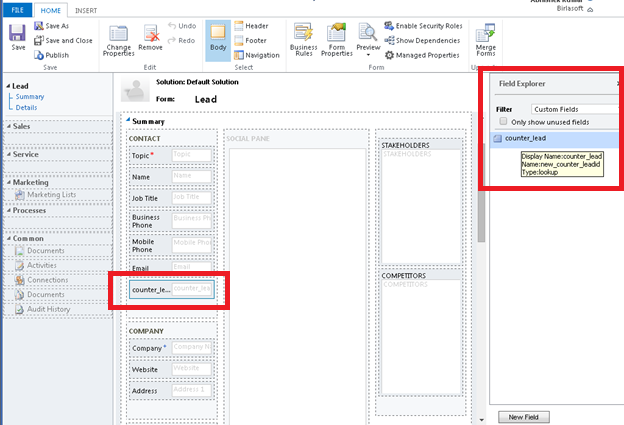
Add relational lookup to the lead entity form and change its visibility setting from field properties.

Save and Publish your changes, and add an entity record for counter entity

B. SDK - Custom Activity
Create custom activity and register it in Plug-in Registration Tool.
usingMicrosoft.Xrm.Sdk;
usingMicrosoft.Xrm.Sdk.Query;
usingMicrosoft.Xrm.Sdk.Workflow;
usingSystem;
usingSystem.Activities;
usingSystem.Collections.Generic;
usingSystem.Linq;
usingSystem.Text;
usingSystem.Threading.Tasks;
namespace POC.AssignCounter
{
public sealed partial class GetUseronCounter : CodeActivity
{
protected override void Execute(CodeActivityContext executionContext)
{
try
{
IWorkflowContextcontext = executionContext.GetExtension<IWorkflowContext>();
IOrganizationServiceFactory serviceFactory =
executionContext.GetExtension<IOrganizationServiceFactory>();
IOrganizationServiceservice =
serviceFactory.CreateOrganizationService(context.UserId);
//Get entity from InArgument
Entity counter = service.Retrieve("new_counter",
this.InputEntity.Get(executionContext).Id, new ColumnSet("new_currentcounter"));
if (counter.Contains("new_currentcounter"))
{
//Fetch xml to get users of a team. Here one user will be returned per page and page position will be
//decided on current counter value.
stringxmlquery = "<fetch version=\"1.0\" mapping=\"logical\" distinct=\"true\" page=\"" + (int)counter["new_currentcounter"] + "\" count=\"1\" returntotalrecordcount=\"true\">" +
"<entity name=\"systemuser\">"+
"<attribute name=\"systemuserid\" />"+
"<order attribute=\"fullname\" descending=\"false\" />" +
"<link-entity name=\"teammembership\" from=\"systemuserid\" to=\"systemuserid\" visible=\"false\" intersect=\"true\">"+
"<link-entity name=\"team\" from=\"teamid\" to=\"teamid\" alias=\"aa\">" +
"<filter type=\"and\">"+
"<condition attribute=\"name\" operator=\"eq\" value=\"SalesTeam\" />"+
"</filter>" +
"</link-entity>" +
"</link-entity>" +
"</entity>" +
"</fetch>";
FetchExpression query = new FetchExpression(xmlquery);
EntityCollection users = service.RetrieveMultiple(query);
//Set out argument OutputEntity- first user entity of resultset.
this.OutputEntity.Set(executionContext, new EntityReference("systemuser", new Guid(users[0].Attributes["systemuserid"].ToString())));
intnewcounter = 1;
//Counter value should not exceed to total member count of team, in case if it exceeds
//that means user has been deleted from team.
if ((int)counter["new_currentcounter"] >= users.TotalRecordCount)
{
//Set default value 1
newcounter = 1;
}
else
{
//Increment by 1 current counter value
newcounter = (int)counter["new_currentcounter"] + 1;
}
//Set out argument OutputCounter- new counter value, that will be further
//used by workflow to update counter entity.
this.OutputCounter.Set(executionContext, newcounter);
}
}
catch (Exception ex)
{
throw new InvalidPluginExecutionException("GetUseronCounter ERROR>>>>>: "+ ex.StackTrace.ToString(), ex);
}
}
[RequiredArgument]
[Input("Counter")]
[ReferenceTarget("new_counter")]
public InArgument<EntityReference> InputEntity { get; set; }
[Output("user")]
[ReferenceTarget("systemuser")]
public OutArgument<EntityReference> OutputEntity { get; set; }
[Output("NewCounter")]
public OutArgument<int> OutputCounter { get; set; }
}
}
C. Workflow Creation
Create a synchronous workflow

When a new lead is created in system, this real time workflow will get triggered. And all the steps defined will execute in order.
Step 1: Set a counter value for newly created lead. A lead can be created from web forms or through SDK calls. We don't want user to select counter entity every time whenever a new lead is created in system. Also there is a relationship between counter and leads, therefore a counter record needs to be set for lead and round robin implementation.
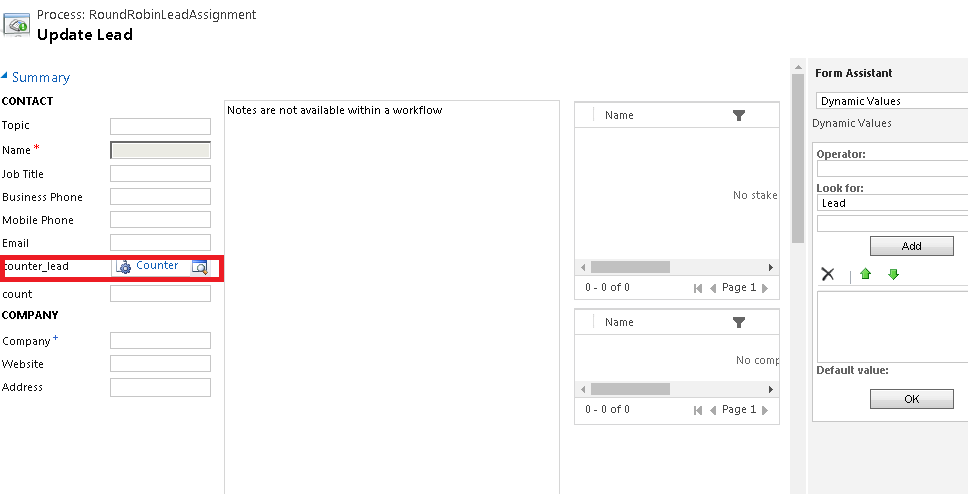
Step 2: Custom activity will be called, it takes the counter entity assigned to the lead.

The above activity will be returning two parameter, one will be the user to whom leads should be assigned and the other will the next "currentcounter" value
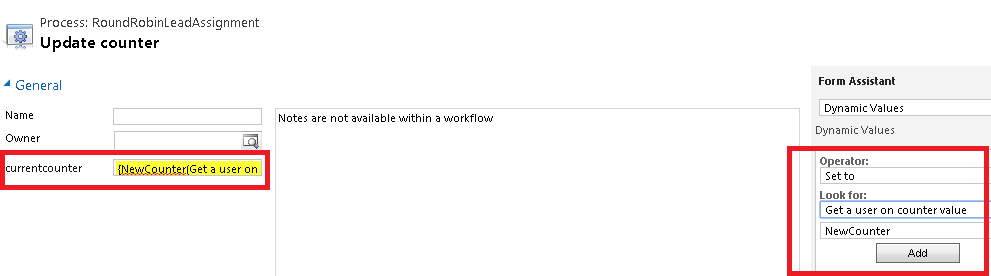
Step 3: Update the "counter" entity's "currentcounter" field value by the updated value returned from Step2.
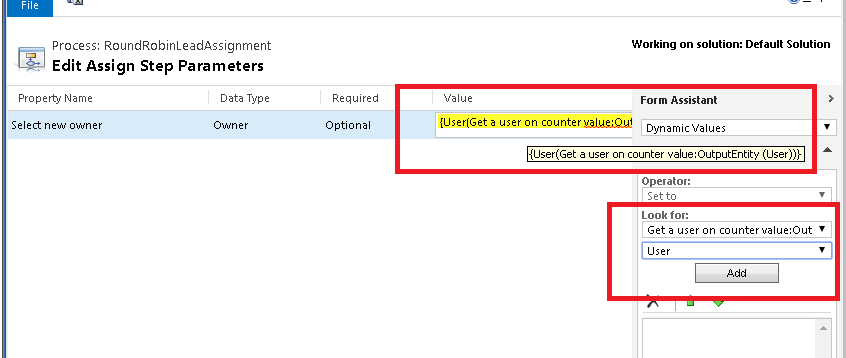
Step 4: Assign lead to the returned system user from custom workflow activity Step 2.
Step 5: Stop the workflow with "Success"
Step 6: Save and Activate workflow.
Test - Implementation Round Robin
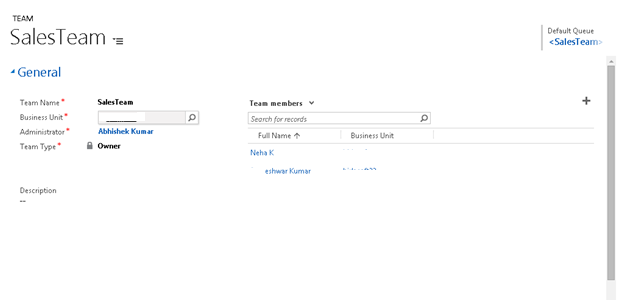
Create Sales Team and add members
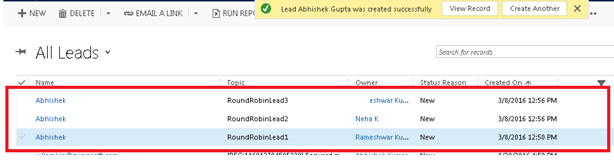
Create leads in system it will be auto assigned to Sale’s team members.
You can add or delete members to team, round robin will assign leads to a member of team.
*This post is locked for comments