




 14,419
 Like
Like Share
Share
 Report
Hi all,

I just looked at the video by Kerry Rosvold , an article from Mark Brummel & an article from Mohana on how to make a pipe filter in excel.
Link To Kerry Rosvold Video.
Link To Kerry Mark Brummel Article.
Link to Mohana Article
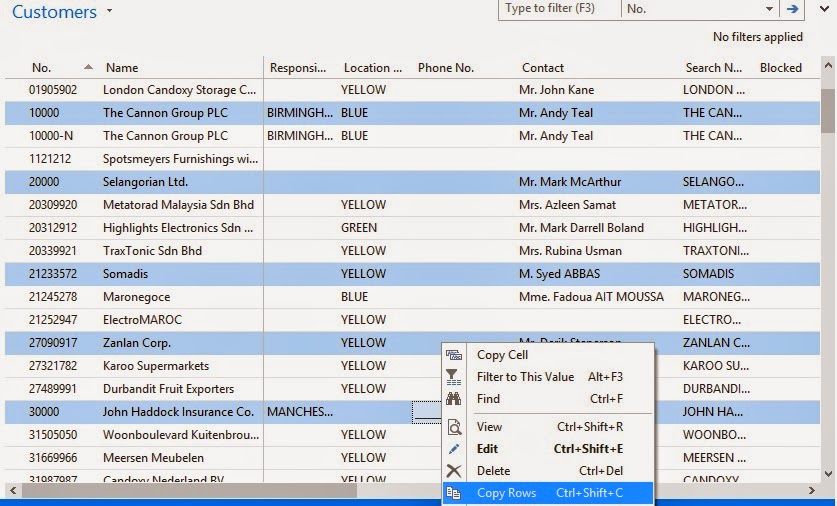
I copy a few lines to excel like this:
And in Excel I paste, and copy the number column -

And I paste and Move First customer to Next column but in same row -

In Second Row use a Concatenate Formula -
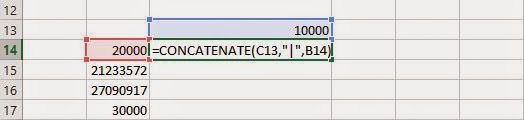
Drag / Copy to Formula till last customer -

The Last row now can be copied and pasted as Value in different cell to get Filter.
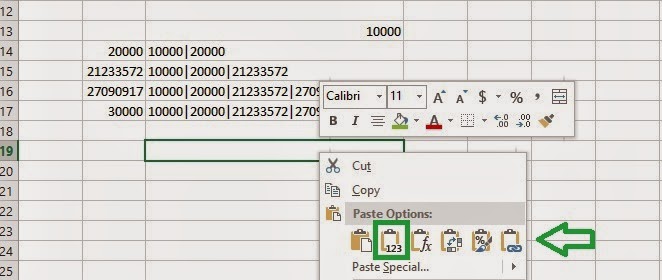
There I have the filter.
Now we have three options. Maybe there are more.
Thanks again Kerry!, Mark! & Mohana!
Stay tuned!.
Regards,
Saurav Dhyani
saurav-nav.blogspot.com
I just looked at the video by Kerry Rosvold , an article from Mark Brummel & an article from Mohana on how to make a pipe filter in excel.
Link To Kerry Rosvold Video.
Link To Kerry Mark Brummel Article.
Link to Mohana Article
I do it in a different way which is kind of similar to Kerry & Mohana , I used it for quite some time for Filtering objects in object designer While Merging a Rollup.
So this is how I do it, for example i will stick to same Records i.e customers as Kerry & Mark used.
I copy a few lines to excel like this:
And in Excel I paste, and copy the number column -
And I paste and Move First customer to Next column but in same row -
In Second Row use a Concatenate Formula -
Drag / Copy to Formula till last customer -
The Last row now can be copied and pasted as Value in different cell to get Filter.
There I have the filter.
Now we have three options. Maybe there are more.
Thanks again Kerry!, Mark! & Mohana!
Stay tuned!.
Regards,
Saurav Dhyani
saurav-nav.blogspot.com
*This post is locked for comments