




 4,481
4,481 Like
Like Share
Share
 Report
Overview
When you first sign up for Microsoft Dynamics 365 For Business, you will get a very simple application that will most likely satisfy only the most basic accounting needs.
Using only the basic accounting functions is NOT the reason why you signed up for Dynamics 365 for Business. You signed up for D365 because you want an ERP software for the cost of an accounting software!
Unlock the POWER!
To unlock the full feature of Dynamics 365 for Business, you will need to do the following:
- Go to Company Information (you can use the search function)
- Expand the User Experience Fasttab
- Change the Experience to Advanced
Now when you open the sales order, you’ll be able to have the ability to print simple pick tickets to enabling full manufacturing and warehousing features of Dynamics NAV!
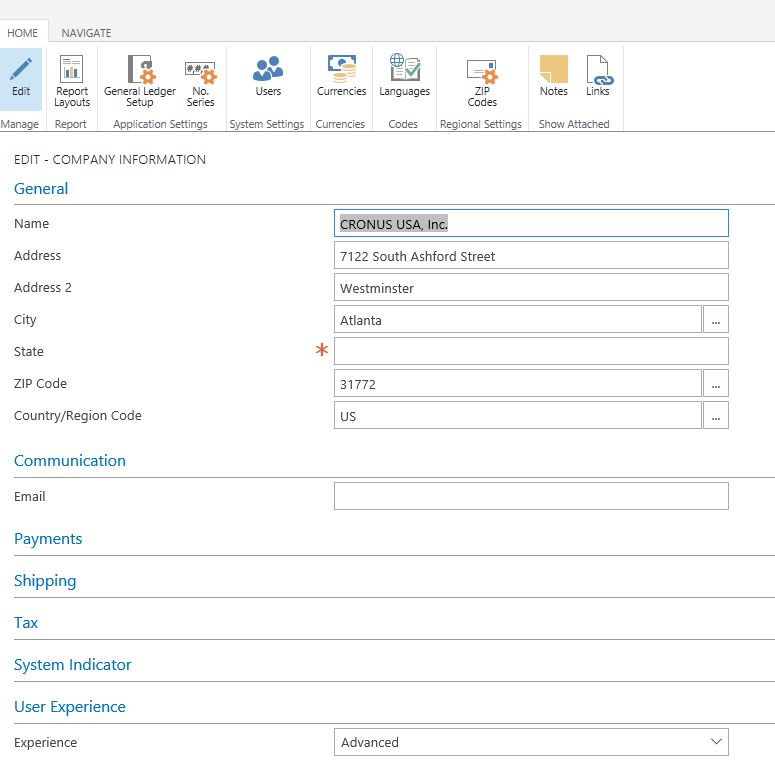
Change User Experience
Before and After
You can see the difference in the sales order heading when you leave the Experience as Basic verses Advanced.

Sales Order Page on Basic Setting on D365
Here’s with the Advanced Setting
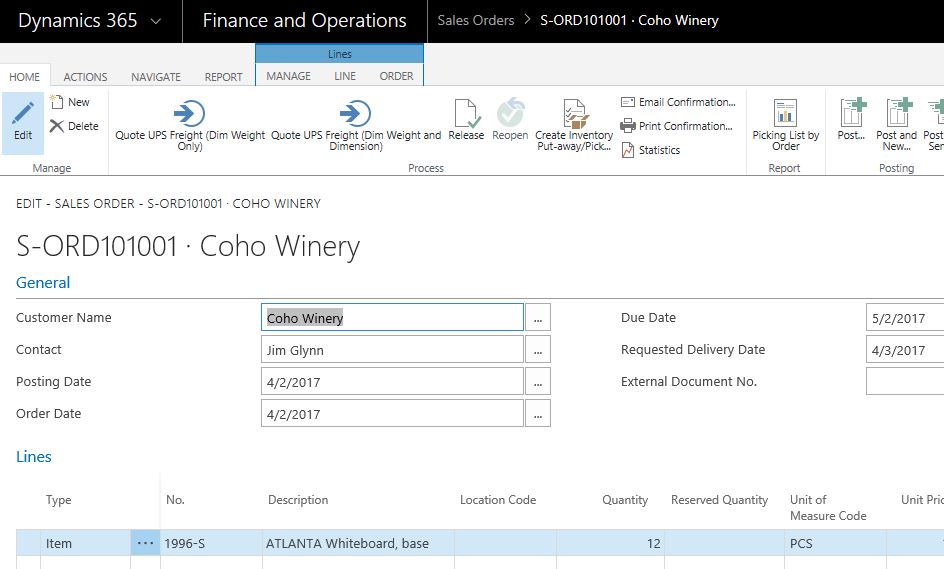
Sales Order Page with Advanced Setting in D365
Conclusion
There are a lot more features that are unlocked when you change the Experience. For most businesses that signed up for D365 in the first place, I can’t imaging them sticking with the Basic user experience.
Nonetheless, contact your solution provider to find out more features between the difference experiences.
Enjoy the ride!
*This post is locked for comments