




 14,419
 Like
Like Share
Share
 Report
Hi all,
I am in process of upgrading a database from NAV 2009 SP1 to NAV 2013 R2 in one step. Earlier the One Step was not working for me but i hope this time i will be able to complete it. Keeping my finger crossed.
During upgrade step 1 i faced a issue that i would like to share with you all. After Step 1 of Data Migration when i tried to open the database in NAV 2013.
NAV 2013 gave me below error -
Error: [Microsoft][ODBC Driver Manager] Data Source name not found and no default driver specified. State ID: IM002

Reason for Error -
The SQL Server Native Client was not installed.
Resolution -
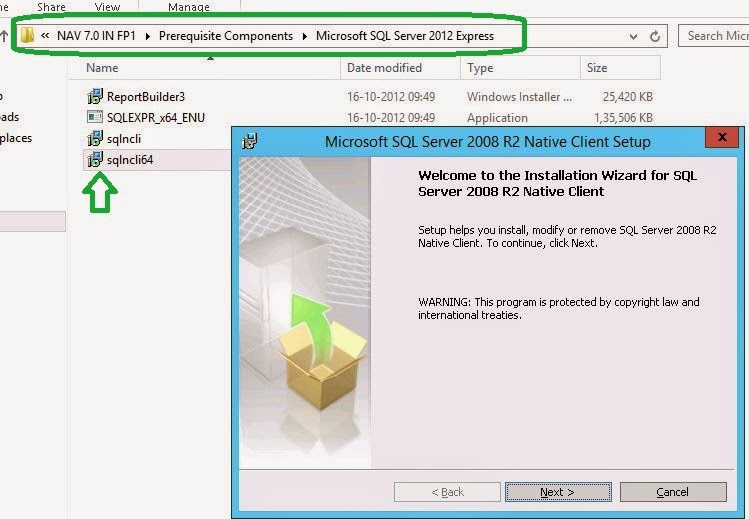
1. Open the product DVD of NAV 2013.
2. Navigate to the Pre- requisites Component Folder.
3. Open Microsoft SQL Server 2012 Express.
4. Install the sqlncli64 (Native Client for SQL) as shown below.
I hope if someone will face the issue, will be able to resolve same using above steps.
Will keep you updated if the Upgrade Process from NAV 2009 SP1 to NAV 2013 R2 is completed.
Wish me luck.
"These postings are provided "AS IS" with no warranties and confer no rights. You assume all risk for your use."
Regards,
Saurav Dhyani
saurav-nav.blogspot.com
I am in process of upgrading a database from NAV 2009 SP1 to NAV 2013 R2 in one step. Earlier the One Step was not working for me but i hope this time i will be able to complete it. Keeping my finger crossed.
During upgrade step 1 i faced a issue that i would like to share with you all. After Step 1 of Data Migration when i tried to open the database in NAV 2013.
NAV 2013 gave me below error -
Error: [Microsoft][ODBC Driver Manager] Data Source name not found and no default driver specified. State ID: IM002
Reason for Error -
The SQL Server Native Client was not installed.
Resolution -
1. Open the product DVD of NAV 2013.
2. Navigate to the Pre- requisites Component Folder.
3. Open Microsoft SQL Server 2012 Express.
4. Install the sqlncli64 (Native Client for SQL) as shown below.
I hope if someone will face the issue, will be able to resolve same using above steps.
Will keep you updated if the Upgrade Process from NAV 2009 SP1 to NAV 2013 R2 is completed.
Wish me luck.
"These postings are provided "AS IS" with no warranties and confer no rights. You assume all risk for your use."
Regards,
Saurav Dhyani
saurav-nav.blogspot.com
*This post is locked for comments