




 831
831 Like
Like Share
Share
 Report
As a Dynamics AX Upgrade Factory and ISV Development Center, we find rare and unusual issues when working on the numerous upgrade and development projects we undertake each year. In this series, Dynamics AX Obscurities, we share our experiences, insights and workarounds for these unkowns in hopes to save you time, headaches and costs in your future Dynamics AX upgrade and development project.
Issue:
After standard data upgrade from AX 2009 to AX2012, a partially invoiced Purchase Order has approval status Approved. Some lines of this purchase order are Invoiced and some have status Open order.
The situation complicates when there is a need to confirm such a Purchase Order. The error appears:
Function “SourceDocumentLineStateModel.getValidTargetSourceDocLineAccStatus” has been incorrectly called.
The problem is that the standard AX code requires sourceDocumentLine table to hold a record with status “Finalized“, but there is a status “Completed“.
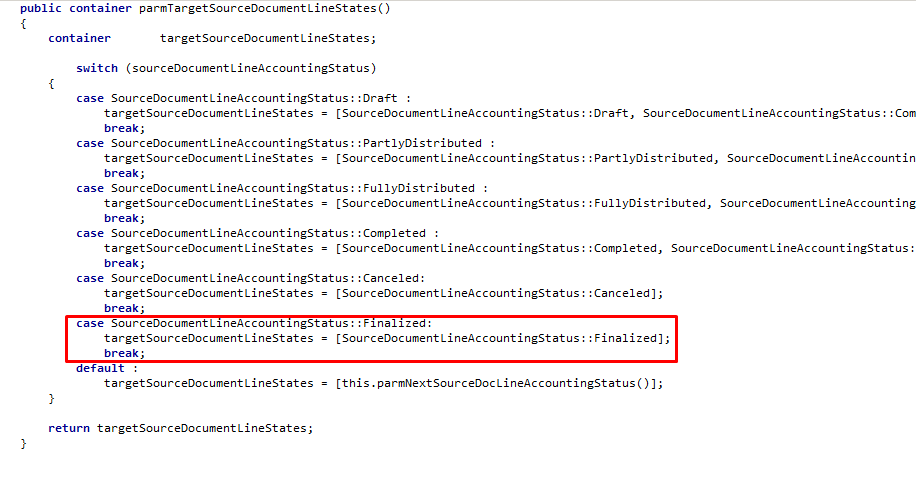
Image 1: Source Document Line Accounting Status:Finalized
Solution:
Change the code in the SourceDocumentLineStateModel.parmTargetSourceDocumentLinesStates() method:

Image 2: SourceDocumentLineStateModel.parm
and then confirm the Purchase Order.
If you run into a Dynamics AX Obscurity you’d like us to investigate, email our team at: services@1ClickFactory.com.
*This post is locked for comments