




 3,569
3,569 Like
Like Share
Share
 Report
 In other posts, we saw how to change the selected view of a subgrid and how to refresh a subgrid in JavaScript.
In this post, I will talk about how to filter a subgrid using JavaScript in Dynamics 365 and display the needed records .
For the sake of this post, I will take the example of an account record and its related cases that are displayed in a sub-grid component.
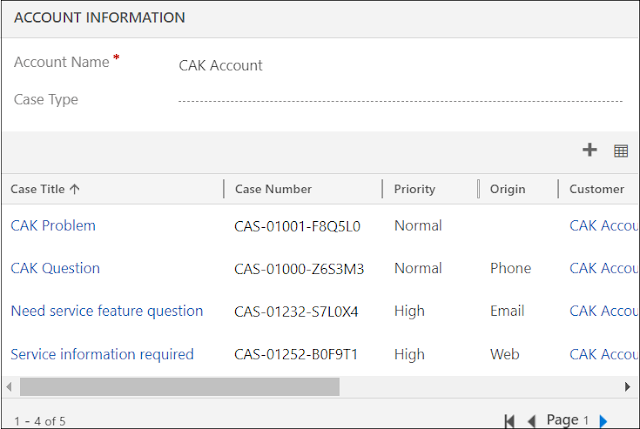
- In the account record, a field called Case Type that contains three options (Problem, Question, Request)
- Based on the case type selected, the sub-grid should be filtered and show the appropriate cases records
- To apply a filter on the subgrid, a fetchXml needs to be injected in the sub-grid and filtered based on the case type selected
- Therefore, go to the Case form and open Case Type field properties
- Under the Events tab, add the onchange event handler and call the function that will do the filter
- Save and Publish the form
function filterSubgrid(executionContext) {
var formContext = executionContext.getFormContext();
var caseType = formContext.getAttribute("cak_casetypecode").getValue();
var fetchXml = '<fetch version="1.0" output-format="xml-platform" mapping="logical" distinct="false">'
+ '<entity name="incident">'
+ '<attribute name="title" />'
+ '<attribute name="ticketnumber" />'
+ '<attribute name="caseorigincode" />'
+ '<order attribute="title" descending="false" />'
+ '<filter type="and">'
+ '<condition attribute="casetypecode" operator="eq" value="XXX" />'
+ '</filter>'
+ '</entity>'
+ '</fetch>';
if (caseType === 100000000) { // Problem
fetchXml = fetchXml.replace("XXX", "2");
}
else if (caseType === 100000001) { // Question
fetchXml = fetchXml.replace("XXX", "1");
}
else if (caseType === 100000002) { // Request
fetchXml = fetchXml.replace("XXX", "3");
}
formContext.getControl("cases").getGrid().setParameter("fetchXml", fetchXml);
formContext.ui.controls.get("cases").refresh();
}
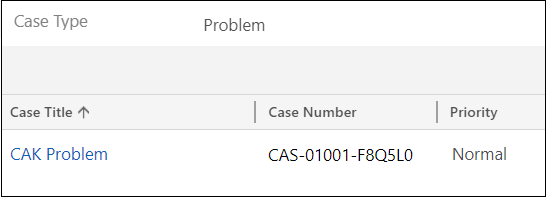
- Subgrid filtered based on Case Type = Problem
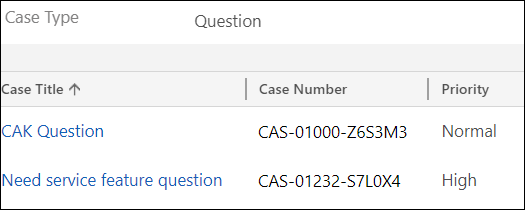
- Subgrid filtered based on Case Type = Question
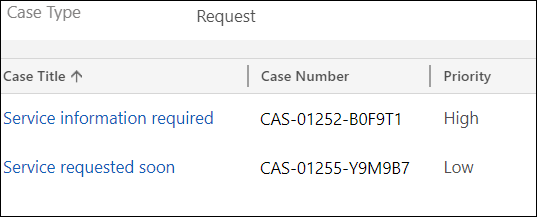
- Subgrid filtered based on Case Type = Request
Bonus Tips:
- The above code work in the classic interface, but not on the UCI; however it still not supported
- There are multiple solutions on the web to make this working on the UCI, but, be careful in using them because they are unsupported
- If you think this is an interesting thing to have and be supported in future releases, you can vote for the idea here
Hope This Helps!
*This post is locked for comments