




 Like
Like Share
Share
 Report
Introduction:
In this blog, I will be addressing some of the Table properties in Microsoft Business Central.
Pre-requisites:
- VS Code
- AL Language Extension
- Microsoft Dynamics NAV / Business Central
Properties:
1. CharAllowed
- It sets which characters are allowed in the field.
- This property can be applied to Table and Page fields.
- Charalowed takes parameters in a combination of two characters as shown below, where characters “1 to 4 “, “7 to 9” and “a to d” are allowed.
- An example of this property is given below.
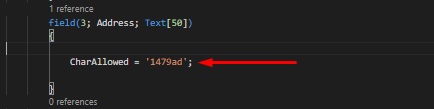 |
| Definition |
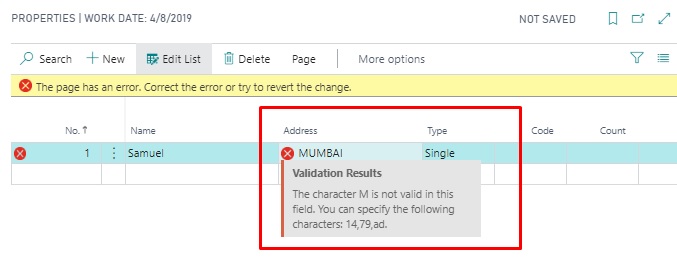 |
| Error |
2. DataPerCompany
- It sets whether the table data applies to all companies in the database or only the current company.
- The default value for this property is true.
- This property can only be applied to Tables.
- The User table is an example where Datapercompany is false.
3. DataCaptionFields
- Sets fields defined on the Top Left Position of the Card page.
- It can be applied in Table.
- Syntax: DataCaptionfields= Field1,Field2,Field3;
- In below example, I have used No, Name and Type fields for Caption.
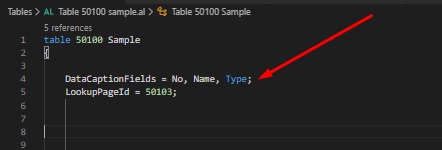 |
| Definition |
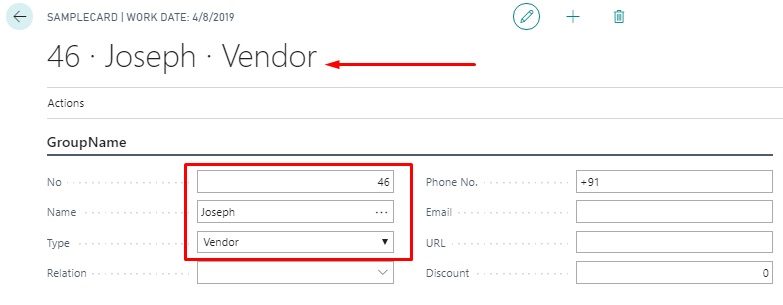 |
| Result |
4. Enabled
- Sets a value that indicates whether a field is enabled or disabled.
- It can be applied to Page fields, Table fields, and Actions.
- In the below example, I have set Enabled Property to True on Name field, therefore Name is field is visible to users but it is not editable and it is displayed Gray in color making it less highlighted than other fields.
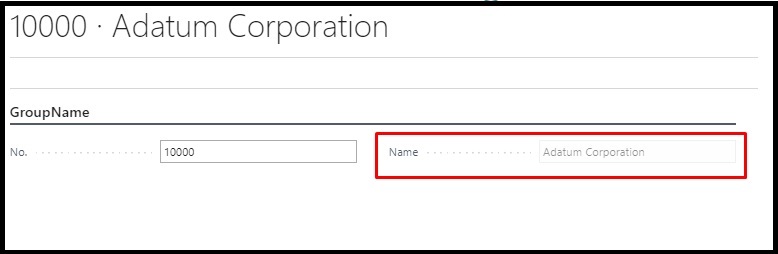 |
| Enable = False |
Hope this helps!
The post Table Properties in Business Central appeared first on Cloudfronts - Microsoft Dynamics 365 | Power BI | Azure.
*This post is locked for comments