




 2,780
2,780 Like
Like Share
Share
 Report
 The product thumbnails within Dynamics AX are great, except for only one thing. The developers seem to have taken the thumbnail size to the extreme, and they are a little too small to see in detail. There isn’t a simple flag in the system that allows you to resize the image to make it more readable, but if you want to live life on the edge, there is a tiny coding change that you can do that will solve the problem.
You don’t have to be stuck in an episode of Land Of The Giants any more.
How To Do It…
Starting off, by default the thumbnails are just a little too thumbnail.

To fix the problem, open up AOT, and expand the Classes folder.

Then scroll down until you find the EcoResProductImageManagement class, expand it so that you can see all of the methods, and then double click on the loadProductImage method.

When the method is displayed, look at the first line of the code that has the call to the getProductThumbnailImage() function.

Change it to getProductMediumImage().

Now click on the Save button (or press CTRL+S) to save your changes and exit from AOT.

How It Works…
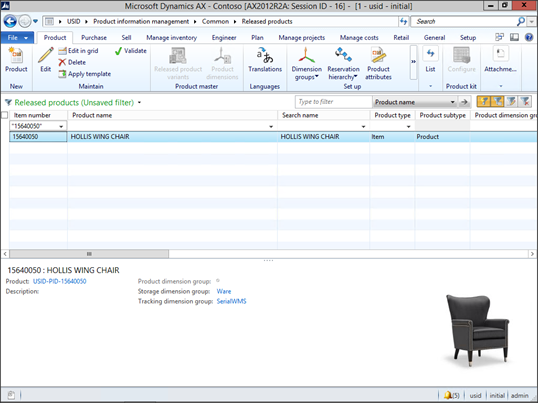
Now when you return to your Released Products list page you have a supersized thumbnail.
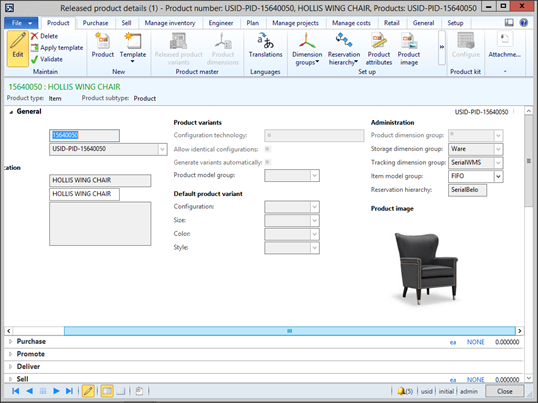
Also when you open up the documents form the image is a lot easier to see as well.
Now that wasn’t hard at all…


*This post is locked for comments