Managing deployments via DevOps pipelines is an excellent way to implement your project’s ALM. However, I encountered an unusual issue where some cloud flows were automatically deactivated after deployment.
Initially, I suspected this was due to a missing connection in the target environment, but this was not the case, as the cloud flows had been running successfully before the deployment.
When a new solution-aware cloud flow is created in the DEV environment using a Cloud Flow Connector, the platform prompts the user to create a connection for the selected connector. This action automatically creates a Connection Reference.
The Connection Reference acts as an intersect component between Cloud Flows and Connectors.
Fig. 1 Connection Reference Role The Connection component stores authentication credentials needed to access a data source, giving it an ownership aspect. This means the Connection is accessible only by its creator and not by other system users, and it cannot be deployed to other environments.
Cloud Flows may use premium connectors that require a specific Power Automate license. While this isn’t an issue in the DEV environment, where each developer has the necessary licenses, in the PROD environment, Connections might use a single service account with a Power Automate license.
Let’s imagine a scenario when a Connection Reference for the Dataverse Connector is created in DEV and later deployed to PROD.
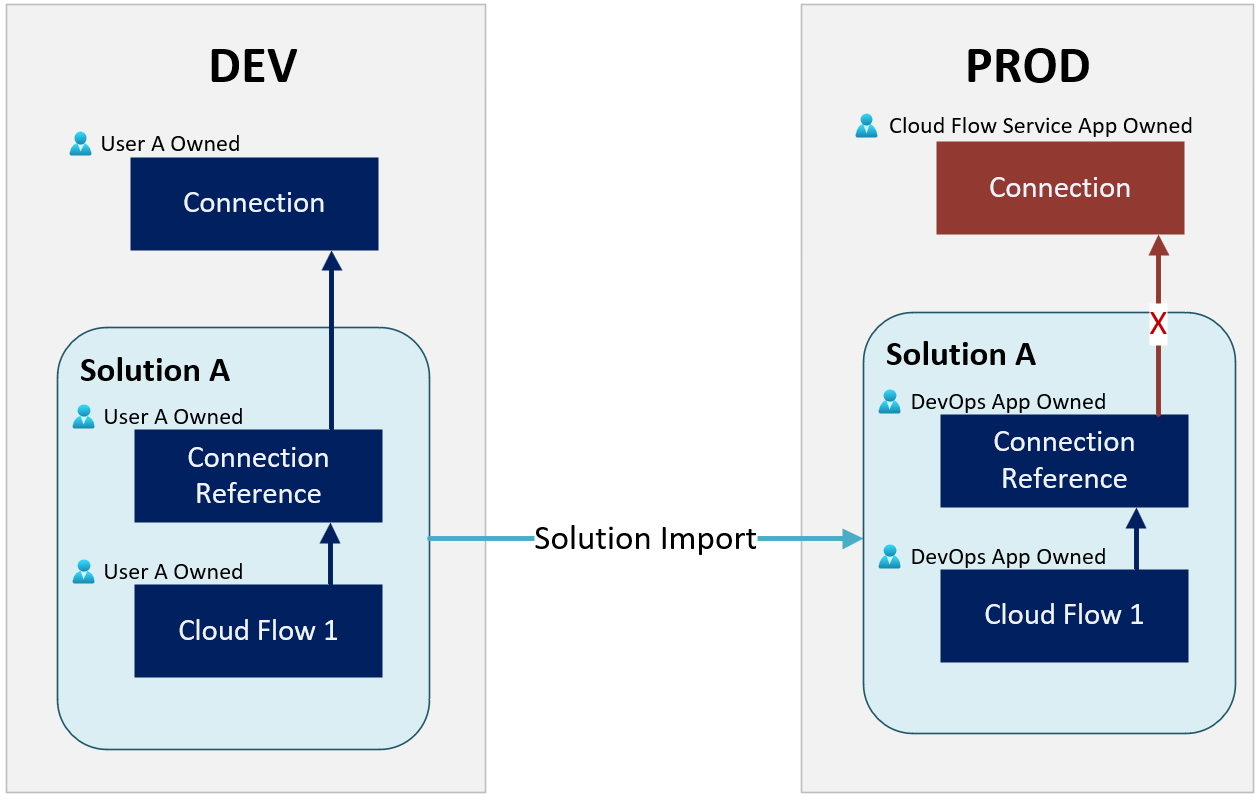
If the Connection Reference and the related Cloud Flow are part of Solution A, deploying Solution A to PROD via DevOps ALM will result in the solution components being owned by the Application User (Service Principal) used by the DevOps pipelines.
As a result, after the initial deployment, the Connection Reference and the Cloud Flow will be owned by the DevOps Application User in the PROD environment.
The imported Connection Reference in PROD will reference a Connection in DEV using the Connection ID. This will break the Cloud Flow execution upon first import. Although the platform allows relinking broken Connection References via Solution Explorer, future solution deployments might break these Connection References again.
Fortunately, Microsoft provides a mechanism that enables the DevOps pipeline to link Connection References to a valid Connection ID in the target system during deployment via configurations.
Official Documentation: https://learn.microsoft.com/en-us/power-platform/alm/conn-ref-env-variables-build-tools
In another post, I explained how to use the Deployment Settings with Power Platform Build Tools to update the Connection References via Release Pipelines.
Optimizing ALM for Dynamics 365 with DevOps Pipelines and Deployment Settings
However, simply pointing a Connection Reference to a valid Connection in PROD is not a complete solution. This is because the Connection Reference is updated by the DevOps Application User, who does not have access to the Connections owned by the Cloud Flow Service Account (necessary for premium Connectors). As a result, while the cloud flow will be imported, the import process will disable it.
The solution to this problem is to share the connection created by the Cloud Flow Service Account in the production environment with the DevOps Application User.
Fig. 3 Sharing Connection The Connection can be shared exclusively with Service Principals, but not with regular users.
Fig. 4 Selecting Service Principal For this scenario, granting the DevOps Application User ‘Can Use’ permissions will be sufficient.
Fig. 5 Selecting the Connection Permissions The Cloud Flows are now correctly imported through the DevOps pipelines.


