web
You’re offline. This is a read only version of the page.
close
Skip to main content

Announcements

No record found.

News and Announcements icon
Community site session details

Community site session details

Session Id :
Small and medium business | Business Central, N...
Suggested Answer

How to create a Unit Group in Business Central?

(6) ShareShare
ReportReport
Posted on by 1,425
I integrated Business Central with D365 Sales. I'm having issues integrating/syncing Products, UOM, Unit Groups. I wonder how I can create a Unit Group manually in D365. I'm a beginner and not well-versed with Business Central. 
 
I'm planning to create a new Unit Group and then couple it to D365 Sales manually, hoping that it will sort my issue. 

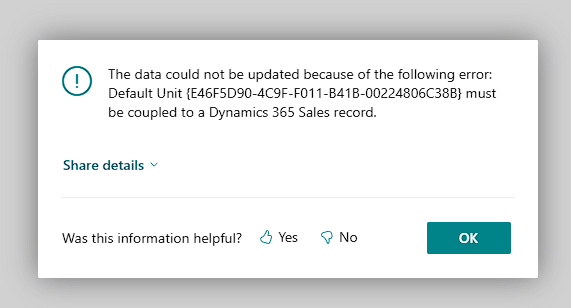
Here's the error that I'm trying to fix. 
I have the same question (1)
  • Suggested answer
    CU12021113-0 Profile Picture
    9 on at
     
  • Suggested answer
    Tech-Lucky Profile Picture
    1,271 Moderator on at
    The error indicates that the Default Unit of Measure assigned to the Product (Item) in Business Central is not coupled with a corresponding Unit record in Dynamics 365 Sales.
     
    To resolve this, open Units of Measure in Business Central, identify the Unit of Measure used on the Item, select that Unit and choose the option Couple to Dynamics 365 Sales to manually link it to the appropriate Unit in D365 Sales.
     
  • Suggested answer
    OussamaSabbouh Profile Picture
    10,875 Super User 2026 Season 1 on at
    Hello,
     
    Your error happens because the Unit of Measure and Unit Group from BC are not coupled in D365 Sales, so the Product cannot sync.
    Do not create Unit Groups manually in Sales, instead:
    Sync Unit Groups from BC to Sales
    Sync Units of Measure
    Then sync your Products
    Once the UOM is coupled, the product sync error disappears.
     
    Regards,
    Oussama Sabbouh
  • Suggested answer
    Pallavi Phade Profile Picture
    5,292 Super User 2026 Season 1 on at
    Namaste @MRVIX
     
     
    In Business Central , we say it as Unit of measure which is attached to Item , Resource 
     
    Sequence  in BCE if done manualy is
    UOM ->, Item --> Then  Unit Of Measure (UOM) is attached to Item Unit of Measure
    UOM which will be synced from unit groups
     
    ITem - which wll be synced from Product master 
     
     
    ITem UOM - Item wise UOM which will be item unit group
    Item Unit Group List
     
    As per above error , UOM is not synced .
     
    Can you check the configuation of coupling . and integration table mappings 
     
     
    This is below link which will help you to work on multiple UOM
     
    This issue is solved in this thread . Can you verify once 
     
    Regards
    Pallavi Phade
     
  • Gerardo Rentería García Profile Picture
    25,545 Most Valuable Professional on at

    Hi, good day
    I hope this can help you, and give you some hints.

    Integrating with Dynamics 365 Sales - Business Central | Microsoft Learn


    Best Regards
    Gerardo

  • Suggested answer
    Jainam M. Kothari Profile Picture
    15,666 Super User 2026 Season 1 on at
    Hello,
     
    To resolve the error, you need to create a Unit Group in D365 Sales (via Advanced Settings → Product Catalog → Unit Groups), define a Primary Unit (e.g., Piece), and then add any additional units if needed.
     
    After saving, go to Business Central, open Units of Measure, and couple the default UOM to the corresponding unit in D365 Sales.
     
    This coupling is required because every product in D365 Sales must belong to a Unit Group, and the default unit in Business Central must be linked to a Dynamics Sales record for synchronization to work.
  • MRVIX Profile Picture
    1,425 on at
    Hi , I tried your suggestion. However, from the UOM table, there's no option to couple. 
     
  • MRVIX Profile Picture
    1,425 on at
    Hi guys, can you advice if I'm doing this correctly? I'm able to sync a Unit Group. However, I had to created two items in BC before it synced. 
     
    Items I manually created, 
     
    Created this coupled one, but now obviously, I have two Unit Groups that were created from the items I added. Also, I'm confused about the following, 
    1. Why do I need to create items to sync this Unit Group?
    2. Why is the Code and Item Description empty, do I need to populate those?
    3. Should I now delete the items I created, or do I need to keep them in BC?
    4. Why is the Item No.'s value is "Primary Unit", while, when i navigate to D365 Sales, the Name of the Unit Group is "Default Unit"
     
  • Suggested answer
    Pallavi Phade Profile Picture
    5,292 Super User 2026 Season 1 on at
    Namaste @MRVIX


    Can you check the integration table mappings . Check the direction of syncronization . Is coupling enabled ? 
     
     
    Items can be blocked if ledger entries are posted in business central 
    Items can be deleted if ledger entries are not posted in business central not in any open Orders .
     
     
    Warm Regards
    Pallavi Phade
  • MRVIX Profile Picture
    1,425 on at
    Hi , here are the mappings and the coupling settings. I'm getting so confused with the equivalent of the tables and data structure between D365 Sales and BC. 


Under review

Thank you for your reply! To ensure a great experience for everyone, your content is awaiting approval by our Community Managers. Please check back later.

Helpful resources

Quick Links

Introducing the 2026 Season 1 community Super Users

Congratulations to our 2026 Super Stars!

Congratulations to our 2025 Community Spotlights

Thanks to all of our 2025 Community Spotlight stars!

Leaderboard > Small and medium business | Business Central, NAV, RMS

#1
OussamaSabbouh Profile Picture

OussamaSabbouh 2,161 Super User 2026 Season 1

#2
YUN ZHU Profile Picture

YUN ZHU 1,046 Super User 2026 Season 1

#3
Dhiren Nagar Profile Picture

Dhiren Nagar 932 Super User 2026 Season 1

Last 30 days Overall leaderboard

Featured topics

Product updates

Dynamics 365 release plans
