Hi Folks,
I have added two custom fields (Price and Unit) to the WHSCycleCountingWarehouseWorkLineV3Entity via an entity extension. The fields are working correctly — I have verified the data directly via SQL query and the OData endpoint is also returning the fields with correct values.
The issue is with the Excel Add-in (Open in Excel) functionality:
1. The Cycle Count Work V3 template was not available by default in Document Templates (Organization Administration → Setup → Office Integration → Document Templates). I had to create and register it manually.
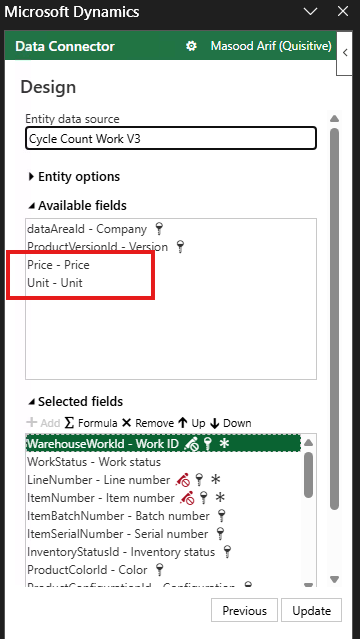
2. Even after registering the template, my custom fields (Price and Unit) do not show by default when users open the Excel file. Users have to manually go into Design mode and add the fields every single time, which is not practical for end users.
What I have done so far:
- Added fields to the entity extension and view extension
- Verified data via SQL and Excel add in
- Created and uploaded a custom template in Document Templates
- Added fields via Design pane in Excel and saved the file
Has anyone faced this issue? How can I make the custom fields show by default without users having to add them manually each time?
Any help is appreciated. Thanks!



 26
26









 Share
Share Report
 All responses (
 Answers (






