Hi Everyone,
I am trying to create Contact Business Relations using a custom API page in Microsoft Dynamics 365 Business Central. I have created and published the API page in a sandbox environment, but when I try to call the endpoint I receive the following error:
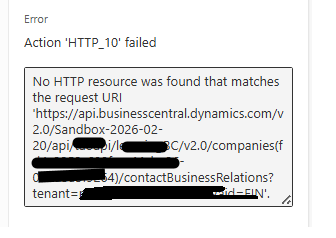
No HTTP resource was found that matches the request URI
Request URL used:
https://api.businesscentral.dynamics.com/v2.0/Sandbox-2026-02-20/api/xxxapi/xxxxgBC/v2.0/companies(fxxxxx-xxxx-xxxx-xxxx-xxxxxxxxxxx)/contactBusinessRelations
AL Code for Custom API Page:
page 50122 BusinessRelationship
{
    APIGroup = 'xxxxxxxBC';
    APIPublisher = 'xxxapi';
    APIVersion = 'v2.0';
    ApplicationArea = All;
    Caption = 'businessRelationship';
    DelayedInsert = true;
    EntityName = 'ContactBusinessRelation';
    EntitySetName = 'ContactBusinessRelations';
    PageType = API;
    SourceTable = "Contact Business Relation";

    layout
             {
area(content)
{
repeater(Group)
{
field(contactNo; "Contact No.")
{
}
field(linkToTable; "Link to Table")
{
}
field(no; "No.")
{
}
field(businessRelationCode; "Business Relation Code")
{
}
}
}
}
}


The Body of HTTP request is as follow
{
"no": "xxxxx",
"contactNo": "xxxxx",
"businessRelationCode": "Vendor",
"linkToTable": "Vendor"
}
The extension is published successfully and other custom APIs in the same extension are working correctly. However, this API for the Contact Business Relation table is not accessible through the endpoint.
Is there anything special required when exposing the Contact Business Relation table through a custom API (for example adding fields like SystemId or defining ODataKeyFields), or could the issue be related to the API endpoint URL format or the EntitySetName?
Any suggestions or guidance would be appreciated.