web
You’re offline. This is a read only version of the page.
close
Skip to main content

Notifications

Announcements

Community site session details

Community site session details

Session Id :
Supply chain | Supply Chain Management, Commerce
Unanswered

Purchase order quantity change after running the Purchase order workflow

(3) ShareShare
ReportReport
Posted on by 31
Good Afternoon D365 Community :)
 
We try to use Purchase order workflow and we face some strange things with the Remainder quantity and ordered quantity.
print screen below are for one item only, with different delivery scheduled done manually or with Landed cost module.
 
This is the quantity we have when we make modification on PO, so status is in Draft:
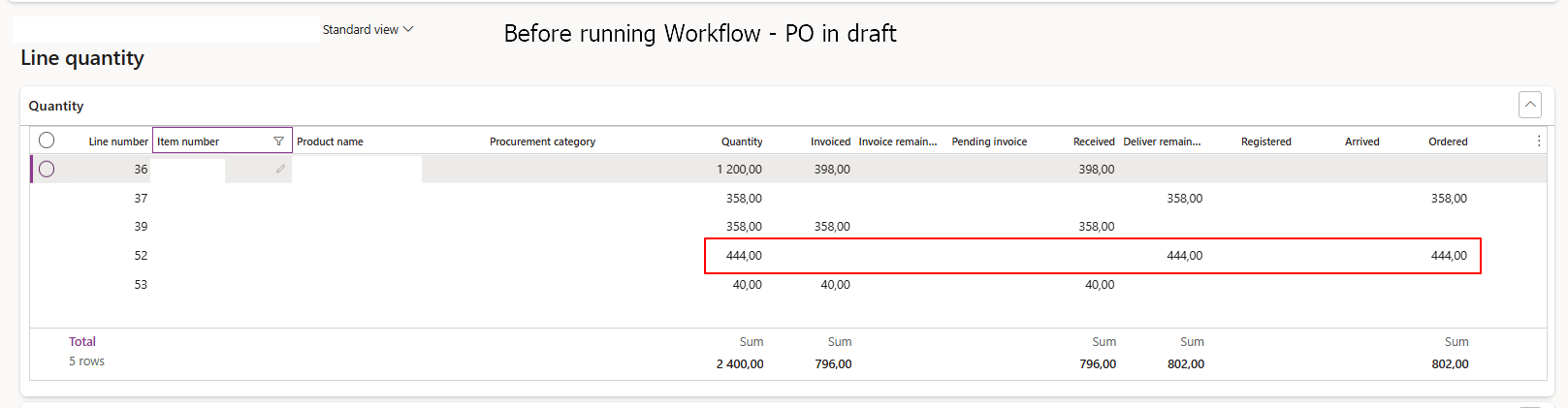
 
without any modification, we submit workflow again, status change to approved without any error, and now quantities looks like that :
 
Do you have any idea about what can change this by running the workflow ? 
We have a test environnment but I can't reproduce this... test environnement was refresh a few months ago, should not have any difference in the setup. I compare both worfklow and not difference at all. it is quite basic with automatic approval if amount of PO is less than 100k and more than 100k less than 400k purchase manager needs to approve and more than 400k purchase manage and director must approve PO. 
We add a purchasing policies to make an automatic approval if nothing change on the PO, only a change on the vendor will need a new approval from purchase manager and director according to the amount...
 
Many thanks in advance for your suggestion and help.
Have a nice day,
 
 
I have the same question (0)
  • André Arnaud de Calavon Profile Picture
    301,486 Super User 2025 Season 2 on at
    Hi,
     
    Is this happening for all orders in case you perform a workflow resubmission? You mentioned that this can't be replicated in another environment. Was this just one incident or is it happening often?
    I haven't seen this before.
  • AS-20091844-0 Profile Picture
    31 on at
    Hi André, 
     
    thanks for your reply. 
     
    I have 129 lines concerned by similar cases... 
    in this for exemple, we go one first delivery of 69 pieces and we are waiting for 31 pieces. we can see down that in transactions we have 61 pieces. line is twice and with same lot ID. 
     
    we face other case like that with partial delivery, one line open and transactions lines are twice with same Lot ID but quantity aren't the same :(
     
    no way to reproduce this result in test environment used with same workflow.
     
    we thought about the workflow but we face the same problem with a PO without active change management, no worfklow. 
    First quantity we ordered was 68 then supplier asked for 70 pieces. we change the quantity but it was changed on purchase order quantity only, not in inventory quantity. 
     
    I tried to reproduce this case too, but if you use update line - deliver remainder, the quantity change automatically in both fields...
     
    I should missed something but I don't know what
  • André Arnaud de Calavon Profile Picture
    301,486 Super User 2025 Season 2 on at
    Hi,

    Can you try to find a pattern? E.g. the item number, unit conversions? Have you also checked for known issues?
  • AS-20091844-0 Profile Picture
    31 on at
    Hi André,
     
    At the moment I can't find the similtude between all cases. many cases are linked to a deliver remainder on a purchase order delivery schedule but not all. And I made a lot of test in test environment but I can't reproduce it. Still working on it but I'm out of ideas.
     
    Thanks for taking care of my question anyway :)
  • André Arnaud de Calavon Profile Picture
    301,486 Super User 2025 Season 2 on at
    Hi,
     
    In case you know more about this, feel free to update this thread again with more information.
  • HardikPatel523 Profile Picture
    76 on at

    Hi,
    If this is happening frequently and you’re not able to identify a clear pattern, what I would do is add custom logging to capture when the quantity mismatch occurs, along with the call stack. That way you can see when it happens and which code path is responsible. I’ve used this approach a couple of times in similar situations where the source of the corruption wasn’t clear, and it helped me identify the root cause both times.

Under review

Thank you for your reply! To ensure a great experience for everyone, your content is awaiting approval by our Community Managers. Please check back later.

Helpful resources

News and Announcements

Season of Giving Solutions is Here!

Quick Links

Responsible AI policies

As AI tools become more common, we’re introducing a Responsible AI Use…

Neeraj Kumar – Community Spotlight

We are honored to recognize Neeraj Kumar as our Community Spotlight honoree for…

Leaderboard > Supply chain | Supply Chain Management, Commerce

#1
Laurens vd Tang Profile Picture

Laurens vd Tang 221 Super User 2025 Season 2

#2
André Arnaud de Calavon Profile Picture

André Arnaud de Cal... 151 Super User 2025 Season 2

#3
Sumit Singh Profile Picture

Sumit Singh 46

Last 30 days Overall leaderboard

Product updates

Dynamics 365 release plans
