web
You’re offline. This is a read only version of the page.
close
Skip to main content

Announcements

Community site session details

Community site session details

Session Id :
Small and medium business | Business Central, N...
Suggested Answer

Custom field in a list page showing wrong records when filtered

(1) ShareShare
ReportReport
Posted on by 300
I have a status field with options (Open, Partials, Finished, Blank) in a list page which updates based on multiple conditions, its working fine but when I filtered the status Open its showing records of other status as well , please check below screenshots
 
see i have set the status to open the condition for open status is when Folding Glueing Glued Pcs is 0 the status will be open
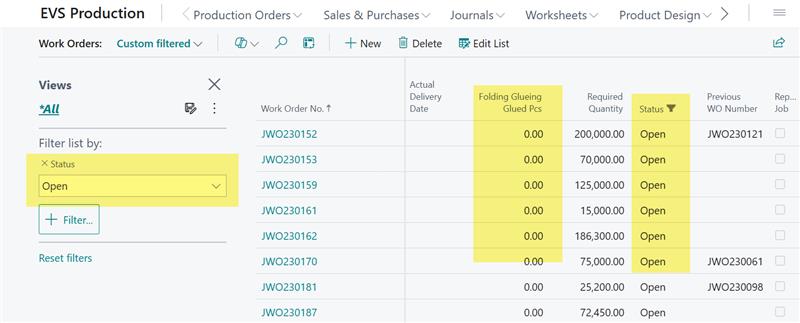
 

but see the status is Open where there is value in Folding Glueing Glued Pcs but see the Work Order No
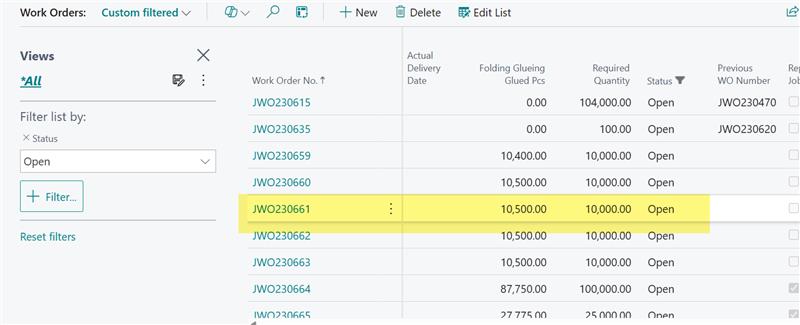
 

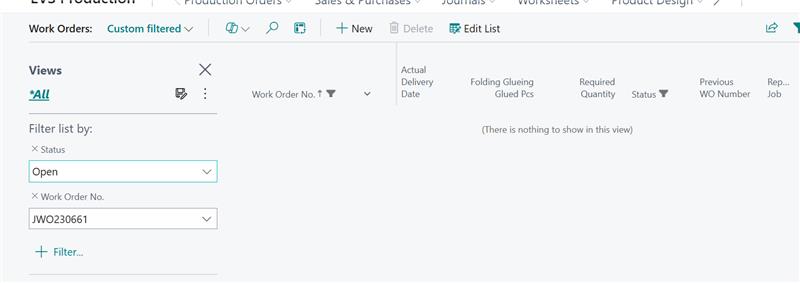
when i filtered the Work Order No the Line vanishes


but then i removed the filter of status the line is showing with status blank which is correct as the condition for blank status is Folding Glueing Glued Pcs greater than Required Quantity
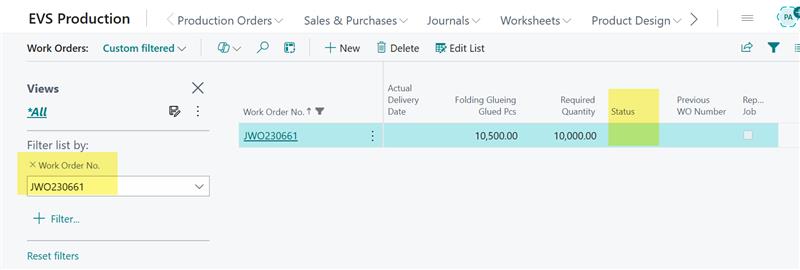
 

So this is the issue the status is calculating properly but on filtering its showing wrong records


the code done is below, please guide what to do to resolve this issue or whats done wrong here.

trigger OnAfterGetRecord()
    var
        myInt: Integer;
    begin
        UpdateStatus(rec."Work Order No");
    end;
 
local procedure UpdateStatus(WorkOrderNo: Code[20])
    var
        tblWorkOrder: Record EVS_WorkOrderHeader;
    begin
        tblWorkOrder.Init();
        tblWorkOrder.Reset();
        tblWorkOrder.SetRange(tblWorkOrder."Work Order No", WorkOrderNo);
        if tblWorkOrder.FindSet() then begin
            if tblWorkOrder."Word Order Status" <> tblWorkOrder."Word Order Status"::Finished then begin
                if tblWorkOrder."FG Glued Pcs" = 0 then begin
                    tblWorkOrder."Word Order Status" := tblWorkOrder."Word Order Status"::Open;
                end else if tblWorkOrder."FG Glued Pcs" < tblWorkOrder."Required Quantity" then begin
                    tblWorkOrder."Word Order Status" := tblWorkOrder."Word Order Status"::Partial;
                end else if tblWorkOrder."FG Glued Pcs" = tblWorkOrder."Required Quantity" then begin
                    tblWorkOrder."Word Order Status" := tblWorkOrder."Word Order Status"::Finished;
                end else if tblWorkOrder."FG Glued Pcs" > tblWorkOrder."Required Quantity" then begin
                    tblWorkOrder."Word Order Status" := tblWorkOrder."Word Order Status"::" ";
                end;
                tblWorkOrder.Modify();
            end;
        end;
    end;
 
 
I have the same question (0)
  • Suggested answer
    OussamaSabbouh Profile Picture
    9,947 Super User 2026 Season 1 on at
    Hello ,
     
    What’s “wrong” here is *where* you update the status: you’re calling `Modify()` inside **OnAfterGetRecord** (i.e., while the page is reading/displaying records). The list is filtered by SQL **before** OnAfterGetRecord runs, then you change the status afterward — so the UI can show a line that *was Open when it was fetched*, but becomes Blank/Partial after your code runs. When you add another filter (Work Order No.), the page re-queries/refreshes and the line “vanishes” because the stored status has now changed and no longer matches the original filter.
    Fix: **never modify the record in OnAfterGetRecord**. Either (A) calculate a **display-only** status (page variable / unbound field) and don’t store it, or (B) store the status but update it **when the driving fields change** (e.g., in table OnValidate of “FG Glued Pcs” / “Required Quantity”, or in the posting/process codeunits that update those fields), or via a scheduled job — then filtering will work consistently because the stored field is always correct *before* the list query runs.
     
    Regards,
    Oussama Sabbouh
     
  • Suggested answer
    Mahek Mehta Profile Picture
    199 on at
    The issue arises because you’re modifying the record inside OnAfterGetRecord. In Business Central, filtering is applied by the database before OnAfterGetRecord runs. Since you are updating the status after the query has been applied, the UI can show records that no longer match the filter after modification.
    You should never modify data in OnAfterGetRecord. Instead:
    • Calculate the status in a display-only field (no Modify), or
    • Update and save status earlier — e.g., in table OnValidate triggers for the fields that determine status, or via a background process.
    This ensures filtering works correctly because the status in the database already matches the expected values before the list is filtered. The code in your page is doing this:

    trigger OnAfterGetRecord()
      UpdateStatus(rec."Work Order No");
     
    Inside that procedure you modify the record:
    tblWorkOrder.Modify();

Under review

Thank you for your reply! To ensure a great experience for everyone, your content is awaiting approval by our Community Managers. Please check back later.

Helpful resources

Quick Links

Introducing the 2026 Season 1 community Super Users

Congratulations to our 2026 Super Stars!

Congratulations to our 2025 Community Spotlights

Thanks to all of our 2025 Community Spotlight stars!

Leaderboard > Small and medium business | Business Central, NAV, RMS

#1
OussamaSabbouh Profile Picture

OussamaSabbouh 2,029 Super User 2026 Season 1

#2
YUN ZHU Profile Picture

YUN ZHU 1,044 Super User 2026 Season 1

#3
Dhiren Nagar Profile Picture

Dhiren Nagar 1,026 Super User 2026 Season 1

Last 30 days Overall leaderboard

Featured topics

Product updates

Dynamics 365 release plans
