web
You’re offline. This is a read only version of the page.
close
Skip to main content

Announcements

No record found.

News and Announcements icon
Community site session details

Community site session details

Session Id :
Small and medium business | Business Central, N...
Suggested Answer

Re: Issue in deleting Sales order records

(6) ShareShare
ReportReport
Posted on by 164

Sales orders were created in Dynamics 365 Business Central, where the records received from the D365 CRM system through an integration between ERP and CRM.

Some of the sales orders were created without associated contact information (Blank records). When I attempted to delete these sales order records, Business Central displayed an error message, as shown in the screenshots below.
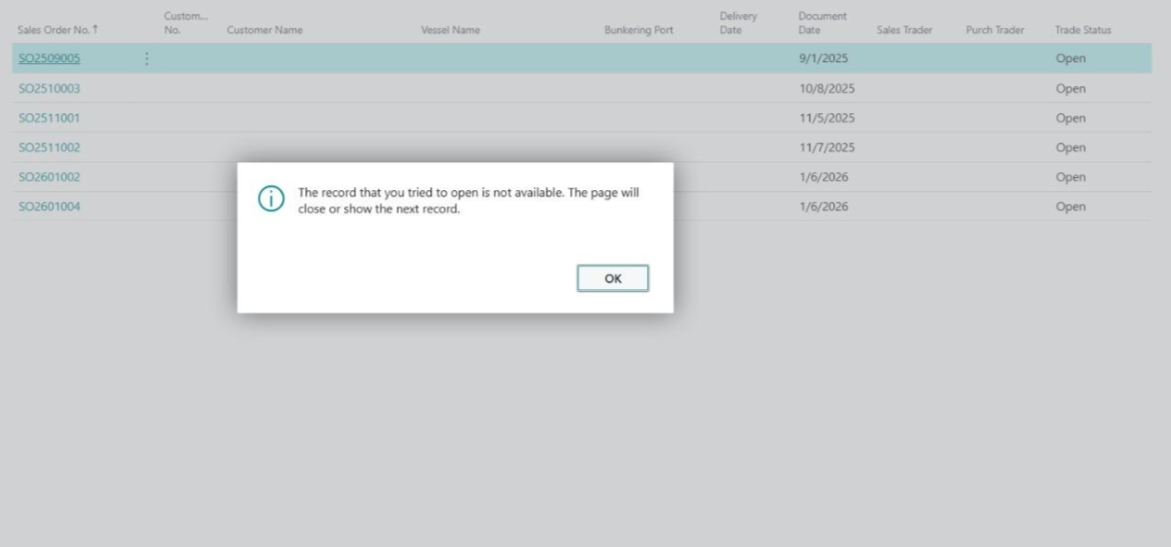
 

Kindly suggest me a possible approach to overcome this issue. 
I have the same question (0)
  • Greg Kujawa Profile Picture
    787 on at
    If you can identify these specific records, as if associated contact information can be determined, then you could apply a configuration package to the sales headers. Export the filtered record list to Excel, edit the Excel sheet so the contact fields are populated, and import the Excel sheet back into the configuration package. That would be my recommendation if the records _should_ have contact information but were created without them.
  • Suggested answer
    OussamaSabbouh Profile Picture
    11,495 Super User 2026 Season 1 on at
    Hello,
     
    The error isn’t a deletion issue but a result of incomplete Sales Orders created via CRM integration (missing Contact/Sell-to data), which causes the Sales Order card page to fail on open, triggering “record not available.” The practical fix is to delete those orders without opening the card—either from a filtered list using Select → Delete, or more reliably via a small admin report/page that deletes the Sales Header directly in code. After cleanup, fix the CRM → BC integration mapping to always send mandatory contact data (or relax it only during integration) and remove CRM coupling if needed, otherwise the problem will recur.
    Regards,
    Oussama Sabbouh
  • Suggested answer
    YUN ZHU Profile Picture
    98,306 Super User 2026 Season 1 on at
    This doesn't seem to be a standard Sales Order List.
    You could try syncing it, and then deleting it.
     
    PS: Dynamics 365 Business Central: How to bulk delete data on a list page that includes a Card page (For example, bulk delete items on the Item List page)
     
    Hope this helps.
    Thanks.
    ZHU
  • Suggested answer
    RockwithNav Profile Picture
    8,856 Super User 2026 Season 1 on at
    What is the syncing timeframe?
    If its happening every couple of minutes then wait for the process to be completed and then try, maybe some process is running behind the scene.

Under review

Thank you for your reply! To ensure a great experience for everyone, your content is awaiting approval by our Community Managers. Please check back later.

Helpful resources

Quick Links

Introducing the 2026 Season 1 community Super Users

Congratulations to our 2026 Super Stars!

Congratulations to our 2025 Community Spotlights

Thanks to all of our 2025 Community Spotlight stars!

Leaderboard > Small and medium business | Business Central, NAV, RMS

#1
OussamaSabbouh Profile Picture

OussamaSabbouh 1,986 Super User 2026 Season 1

#2
YUN ZHU Profile Picture

YUN ZHU 1,071 Super User 2026 Season 1

#3
Dhiren Nagar Profile Picture

Dhiren Nagar 975 Super User 2026 Season 1

Last 30 days Overall leaderboard

Featured topics

Product updates

Dynamics 365 release plans
