Hi Subramani Sivan,
Thank you for your suggestion.
I tried using the intialilizing event as well, but it is still not working for the New/Edit/Delete buttons while opening the form.
Currently, I am using the OnActivated event, and the role validation logic is working correctly. The debugger also hits properly, and other controls are getting updated based on the role assignment.
However, these two buttons are not getting disabled when the user role is not assigned. They remain enabled while opening the form and only reflect after activating/clicking the form again.
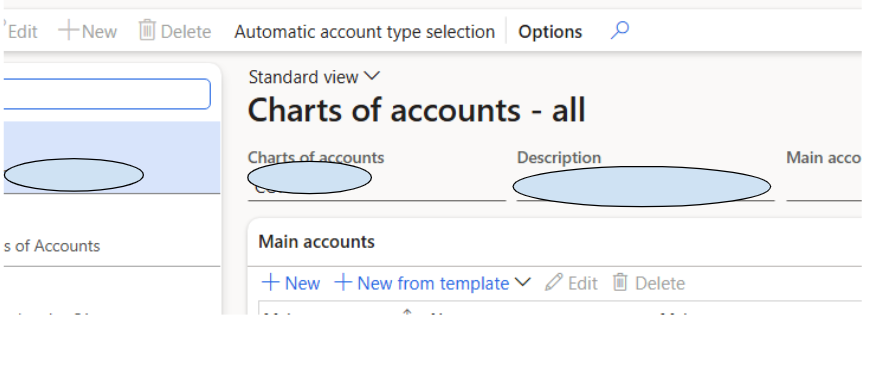
In this image, the system-generated button is becoming disabled correctly. However, the below New and New template buttons are still enabled.
I want to disable these buttons as well when the user role is not assigned.
Current Code:
internal final class TPZ_MainAccount_EventHandler
{
/// <summary>
///
/// </summary>
/// <param name="sender"></param>
/// <param name="e"></param>
[FormEventHandler(formStr(MainAccount), FormEventType::Activated)]
public static void MainAccount_OnActivated(xFormRun sender, FormEventArgs e)
{
FormCommandButtonControl editButton, deleteButton, newButton;
#SysSystemDefinedButtons
UserInfo userInfo;
SecurityRole securityRole;
SecurityUserRole securityUserRole;
;
newButton= sender.control(sender.controlId(#SystemDefinedNewButton)) as FormCommandButtonControl;
editButton= sender.control(sender.controlId(#SystemDefinedViewEditButton)) as FormCommandButtonControl;
deleteButton= sender.control(sender.controlId(#SystemDefinedDeleteButton)) as FormCommandButtonControl;
FormDataSource mainAccount_ds = sender.dataSource(formDataSourceStr(MainAccount, MainAccount));
Select firstonly securityRole
where //securityRole.Name == "System administrator" ||
securityRole.Name == "Role to enable new/edit./del button in MA"
join securityUserRole
where securityUserRole.SecurityRole == securityRole.RecId
&& securityUserRole.User == curUserId();
if (securityRole)
{
newButton.enabled(true);
editButton.enabled(true);
deleteButton.enabled(true);
//mainAccount_ds.allowEdit(true);
}
else
{
newButton.enabled(false);
editButton.enabled(false);
deleteButton.enabled(false);
//mainAccount_ds.allowEdit(false);
}
}
[FormEventHandler(formStr(LedgerChartOfAccounts), FormEventType::Activated)]
public static void LedgerChartOfAccounts_OnActivated(xFormRun sender, FormEventArgs e)
{
FormCommandButtonControl editButton, deleteButton, newButton;
FormControl editMainAccount, deleteMainAccount;
FormButtonControl buttonNew;
FormDropDialogButtonControl newFromTemplate;
#SysSystemDefinedButtons
SecurityRole securityRole;
SecurityUserRole securityUserRole;
;
newButton = sender.control(sender.controlId(#SystemDefinedNewButton)) as FormCommandButtonControl;
editButton = sender.control(sender.controlId(#SystemDefinedViewEditButton)) as FormCommandButtonControl;
deleteButton = sender.control(sender.controlId(#SystemDefinedDeleteButton)) as FormCommandButtonControl;
//buttonNew = sender.design().controlName("ButtonNew");
buttonNew = sender.control(sender.controlId("ButtonNew")) as FormButtonControl;
editMainAccount = sender.design().controlName("EditMainAccount");
deleteMainAccount= sender.design().controlName("DeleteMainAccount");
newFromTemplate = sender.design().controlName("NewFromTemplate");
FormDataSource chartOfAccount_ds = sender.dataSource(formDataSourceStr(LedgerChartOfAccounts, LedgerChartOfAccounts));
Select firstonly securityRole
where //securityRole.Name == "System administrator" ||
securityRole.Name == "Role to enable new/edit./del button in MA"
join securityUserRole
where securityUserRole.SecurityRole == securityRole.RecId
&& securityUserRole.User == curUserId();
if (securityRole)
{
newButton.enabled(true);
editButton.enabled(true);
deleteButton.enabled(true);
buttonNew.enabled(true);
editMainAccount.enabled(true);
deleteMainAccount.enabled(true);
newFromTemplate.enabled(true);
}
else
{
newButton.enabled(false);
editButton.enabled(false);
deleteButton.enabled(false);
buttonNew.enabled(false);
editMainAccount.enabled(false);
deleteMainAccount.enabled(false);
newFromTemplate.enabled(false);
}
}
}
Could you please suggest if these buttons are controlled differently in the standard form or if there is any additional refresh method required?
Thank you.


