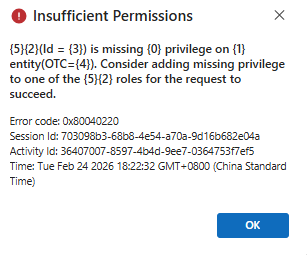
Insufficient Permissions
{
"error": {
"code": "0x80040220",
"message": "Principal user (Id=b06e8494-999f-f011-b41c-00224804a1a8, type=8, roleCount=8, privilegeCount=420, accessMode='0 Read-Write', AADObjectId='d3433988-17f9-40af-ba77-412705aaed0f', MetadataCachePrivilegesCount=12471, businessUnitId=e56c78fa-ad25-f011-8c4e-000d3a34767f), is missing prvReadOfficeDocument privilege (Id=a4986ba0-6c85-40a9-bb00-fd6000ac0f55) on OTC=4490 for entity 'officedocument' (LocalizedName='Office Document'). context.Caller=b06e8494-999f-f011-b41c-00224804a1a8. Consider adding missed privilege to one of the principal (user/team) roles.",
"@Microsoft.PowerApps.CDS.ErrorDetails.ApiExceptionSourceKey": "Plugin/Microsoft.Crm.ObjectModel.ExcelService",
"@Microsoft.PowerApps.CDS.ErrorDetails.ApiStepKey": "9edf2c3a-95f2-4d79-b623-beabe0d0d934",
"@Microsoft.PowerApps.CDS.ErrorDetails.ApiDepthKey": "1",
"@Microsoft.PowerApps.CDS.ErrorDetails.ApiActivityIdKey": "3b0e2f0a-ec39-4e7b-8c70-3b60baf87514",
"@Microsoft.PowerApps.CDS.ErrorDetails.ApiPluginSolutionNameKey": "System",
"@Microsoft.PowerApps.CDS.ErrorDetails.ApiStepSolutionNameKey": "System",
"@Microsoft.PowerApps.CDS.ErrorDetails.ApiExceptionCategory": "ClientError",
"@Microsoft.PowerApps.CDS.ErrorDetails.ApiExceptionMessageName": "PrivilegeDenied",
"@Microsoft.PowerApps.CDS.ErrorDetails.ApiExceptionHttpStatusCode": "403",
"@Microsoft.PowerApps.CDS.ErrorDetails.0": "prvReadOfficeDocument",
"@Microsoft.PowerApps.CDS.ErrorDetails.1": "Office Document",
"@Microsoft.PowerApps.CDS.ErrorDetails.2": "user",
"@Microsoft.PowerApps.CDS.ErrorDetails.3": "b06e8494-999f-f011-b41c-00224804a1a8",
"@Microsoft.PowerApps.CDS.ErrorDetails.4": "4490",
"@Microsoft.PowerApps.CDS.ErrorDetails.5": "Caller",
"@Microsoft.PowerApps.CDS.HelpLink": "http://go.microsoft.com/fwlink/?LinkID=398563&error=Microsoft.Crm.CrmException%3a80040220&client=platform",
"@Microsoft.PowerApps.CDS.InnerError.Message": "Principal user (Id=b06e8494-999f-f011-b41c-00224804a1a8, type=8, roleCount=8, privilegeCount=420, accessMode='0 Read-Write', AADObjectId='d3433988-17f9-40af-ba77-412705aaed0f', MetadataCachePrivilegesCount=12471, businessUnitId=e56c78fa-ad25-f011-8c4e-000d3a34767f), is missing prvReadOfficeDocument privilege (Id=a4986ba0-6c85-40a9-bb00-fd6000ac0f55) on OTC=4490 for entity 'officedocument' (LocalizedName='Office Document'). context.Caller=b06e8494-999f-f011-b41c-00224804a1a8. Consider adding missed privilege to one of the principal (user/team) roles."
}
}









 Share
Share Report
 All responses (
 Answers (
 3,017
3,017






