Hi Sumaira,
Thanks for your details.
Since so, I recommend you to use JS code instead.
We could add custom JS code in lead form onload event.
Please refer to the below steps.
1.The first thing we should do is get the datediff between now and createdon.
//get createdon time of the lead record
    var createdon=formContext.getAttribute("createdon").getValue();
    //get current datetime
    var currentDate=new Date();
2.Second thing is get the current user name to confirm if we should run the business rule.
//get current username
    var userSettings = Xrm.Utility.getGlobalContext().userSettings;
    var username=userSettings.userName;
3.Then we could add custom JS code to control the fields as your requirement, like hide/disable/readonly/set value....
Here's the complete code.
function runRule(executionContext){
    var formContext=executionContext.getFormContext();
    //get createdon time of the lead record
    var createdon=formContext.getAttribute("createdon").getValue();
    //get current datetime
    var currentDate=new Date();
    //get the datediff between times
    var days=getDateDiff(createdon,currentDate);
    //get months
    var months=days/30;
    //get current username
    var userSettings = Xrm.Utility.getGlobalContext().userSettings;
    var username=userSettings.userName;
    //start judge
    if(months>3){
        if(username=="A"||username=="B"||username=="C"){
            //set the rules here with JS code like hide/disable/setvalue....
        }
    }
}


function getDateDiff(sDate1,sDate2){
    function daysBetween(sDate1, sDate2) {
        var time1 = Date.parse(new Date(sDate1));
        var time2 = Date.parse(new Date(sDate2));
        var nDays = Math.abs(parseInt((time2 - time1) / 1000 / 3600 / 24));
        return nDays;
    }
}
You could set your rules through JS code as what you did in business rule, you could refer to this doc for more actions JS could do to control the attributes. You could also tell us your rules and we could provide sample code to you as well.
4.Then we should add this JS function to lead form onload event.
Go to form editor->form properties.
Add the whole JS code as a web resource into D365 by clicking the add button in "Form Libraries".
Add the JS fucntion "runRule" into form onload event bu clicking the add button in "Event Handlers".
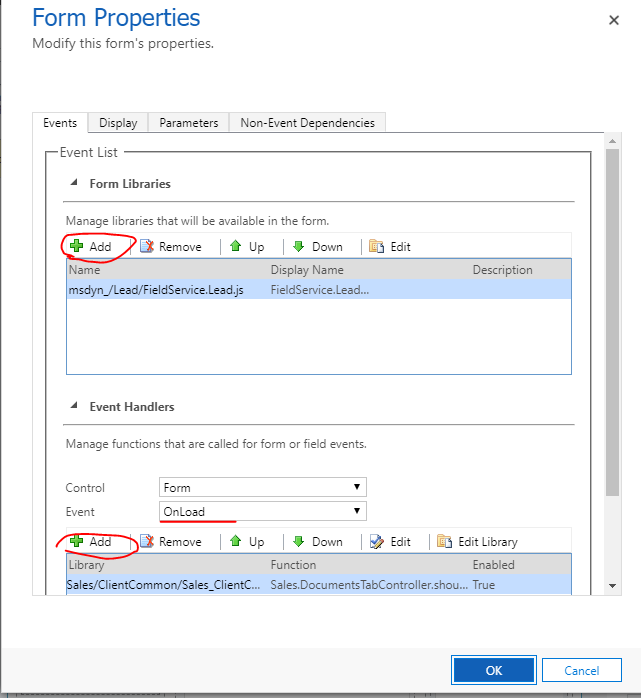
When adding functions, remember to select "Pass execution context as first parameter".

Hope it helps.
Best Regards,
Leo


