web
You’re offline. This is a read only version of the page.
close
Skip to main content

Announcements

No record found.

News and Announcements icon
Community site session details

Community site session details

Session Id :
Small and medium business | Business Central, N...
Answered

Financial Report Columns

(7) ShareShare
ReportReport
Posted on by 1,159
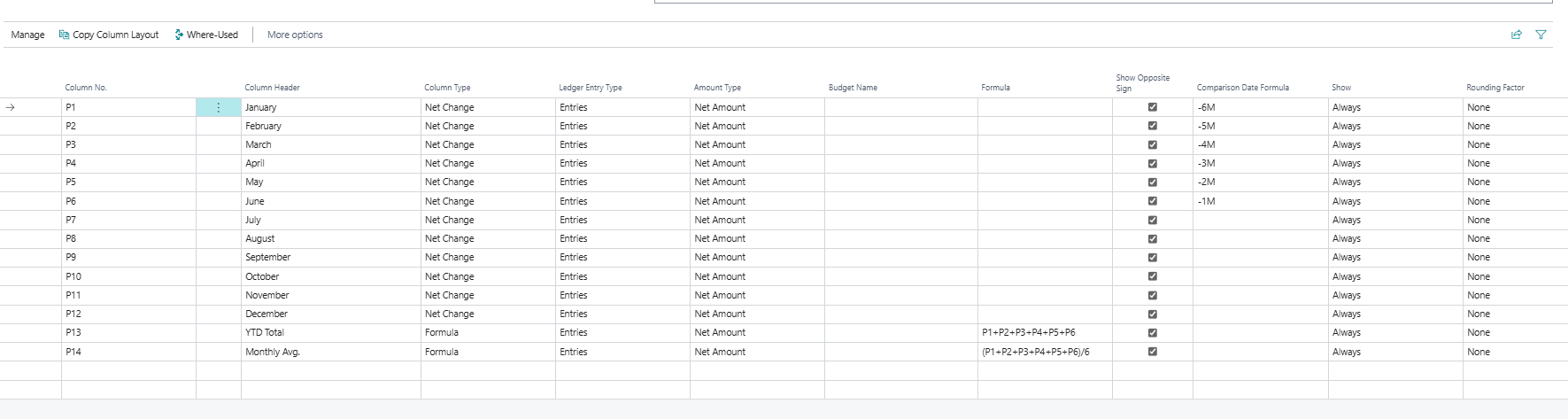
I'm trying to create a report with 14 columns.

Columns 1-12 are for the months of the year.

Column 13 is to be a YTD total.

Column 14, I want to display the average of the months I specify.
 
I've got Columns 13 and 14 working fine.

I'm a little confused about the formulas "-1M, -2M" and which columns to put them in.  Since they are dynamic, how do I align them with columns designated for specific calendar months?
 
Is this correct?  Do I need to adjust the report each month to keep the data aligned with the proper month?  Is there a way to not have to adjust each month?
I have the same question (0)
  • Verified answer
    AXEON Man Profile Picture
    1,159 on at
    OK, I worked this out for now -it gets me the results I want, just not sure if it's ideal since I'll have to "massage" it every month.

  • EO-15071029-0 Profile Picture
    185 on at
    The main issue is, when you generate the report pay attention to the Options: View By - should be Month, and Date Filter - should be month which will be used during calculation of totals in month fields where you Date Formula. For example, if you choose in Date Filter January, then +1M will be February, -1M will be December of the previous year.
     
    If you want to check is month filed calculated correctly, just drill down the number of the report and look to the Month filter on the left side.
  • AXEON Man Profile Picture
    1,159 on at
    Thank you for the clarifications on this formula expressions.  
  • Suggested answer
    YUN ZHU Profile Picture
    99,086 Super User 2026 Season 1 on at
    Just adding some info:
    Dynamics 365 Business Central: A simple Date Formula testing tool
     
    Thanks.
    ZHU
  • Suggested answer
    Sohail Ahmed Profile Picture
    11,169 Super User 2026 Season 1 on at
    Adding more details


    ✅ Mark this answer as verified if it helps you.

Under review

Thank you for your reply! To ensure a great experience for everyone, your content is awaiting approval by our Community Managers. Please check back later.

Helpful resources

Quick Links

Introducing the 2026 Season 1 community Super Users

Congratulations to our 2026 Super Stars!

Meet the Microsoft Dynamics 365 Contact Center Champions

We are thrilled to have these Champions in our Community!

Congratulations to the March Top 10 Community Leaders

These are the community rock stars!

Leaderboard > Small and medium business | Business Central, NAV, RMS

#1
OussamaSabbouh Profile Picture

OussamaSabbouh 1,993 Super User 2026 Season 1

#2
YUN ZHU Profile Picture

YUN ZHU 1,116 Super User 2026 Season 1

#3
Khushbu Rajvi. Profile Picture

Khushbu Rajvi. 557 Super User 2026 Season 1

Last 30 days Overall leaderboard

Featured topics

Product updates

Dynamics 365 release plans
