web
You’re offline. This is a read only version of the page.
close
Skip to main content

Notifications

Announcements

No record found.

Community site session details

Community site session details

Session Id :
Microsoft Dynamics 365 | Integration, Dataverse...
Answered

Set/review personal settings for another user

(4) ShareShare
ReportReport
Posted on by 12
I'm working on some documentation for some of our Dynamics admins and was wondering if there's a way for them to check on/do some things themselves without involving IT (or rather, me specifically). They do not have PowerShell training/capability, so I'm looking for something within Dynamics 365 itself.

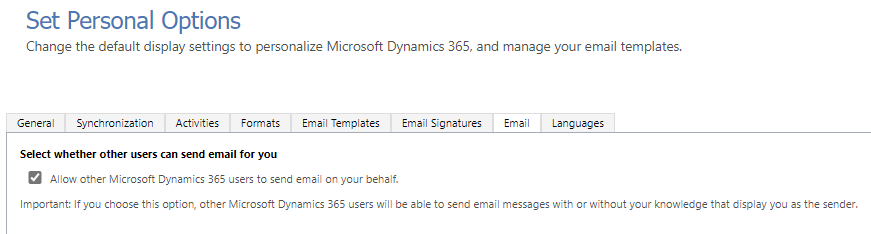
We have a number of accounts used in Dynamics for some workflows, and one of the troubleshooting steps is to make sure that a mailbox is set to allow other Dynamics 365 users to send mail on its behalf (and possibly even enable that if it isn't).
Currently I can only see how to do this by logging in as that user and going to Settings -> Personalization Settings. 

The problem with this is that these accounts are locked down with MFA, so the Dynamics users whom I want to be able to check this don't have access to log into Dynamics with that account.

Is there a way to at least view this setting for another user as a Dynamics admin? That way I can document where to check for it, and if it isn't enabled (and it's deemed necessary) I or someone on my team can log in and enable it for them. Bonus points if they can enable it themselves as needed, though I'm perfectly happy making them put in a ticket to turn it on.
Categories:
I have the same question (0)
  • Verified answer
    Jimmy Passeti Profile Picture
    665 Most Valuable Professional on at
    Hello,
     
    There is a tool that we can use to help with that.
    It is the Home  Â· XrmToolBox, download it and then use the pluguin User Security Manager  Â· XrmToolBox.
     
    It´s really simple to use it, but if you have any problems let us now.
    Regards,
    Jimmy Passeti | Microsoft MVP
    ✅ Please mark as Verified if this answered your question!
  • Verified answer
    Amit Katariya007 Profile Picture
    10,409 Super User 2025 Season 2 on at
    You will have to set this options in User Settings entity.
     
    For this you can use User setting utility from XRMTOOLBOX.
  • Suggested answer
    Amit Katariya007 Profile Picture
    10,409 Super User 2025 Season 2 on at
    If you don't have XRMToolbox access then you can follow below thread where I have explained about another ways I.e. Power automated flow and a console application.
     

Under review

Thank you for your reply! To ensure a great experience for everyone, your content is awaiting approval by our Community Managers. Please check back later.

Helpful resources

Quick Links

Responsible AI policies

As AI tools become more common, we’re introducing a Responsible AI Use…

Neeraj Kumar – Community Spotlight

We are honored to recognize Neeraj Kumar as our Community Spotlight honoree for…

Leaderboard > Microsoft Dynamics 365 | Integration, Dataverse, and general topics

#1
Siv Sagar Profile Picture

Siv Sagar 93 Super User 2025 Season 2

#2
#ManoVerse Profile Picture

#ManoVerse 76

#3
Martin Dráb Profile Picture

Martin Dráb 64 Most Valuable Professional

Last 30 days Overall leaderboard

Product updates

Dynamics 365 release plans
