web
You’re offline. This is a read only version of the page.
close
Skip to main content

Announcements

No record found.

News and Announcements icon
Community site session details

Community site session details

Session Id :
Microsoft Dynamics 365 | Integration, Dataverse...
Answered

MakePowerApps sitemap dyn crm hide Area/SubArea for Uses

(0) ShareShare
ReportReport
Posted on by 55

Classic UI: Is there a way to hide Areas, Grouds and SubAreas for users (or security role).

These settting provided for SubAreas, but I not works fine

0513.pastedimage1577084949787v1.png

I have the same question (0)
  • Verified answer
    LuHao Profile Picture
    40,892 on at

    Hi partner,

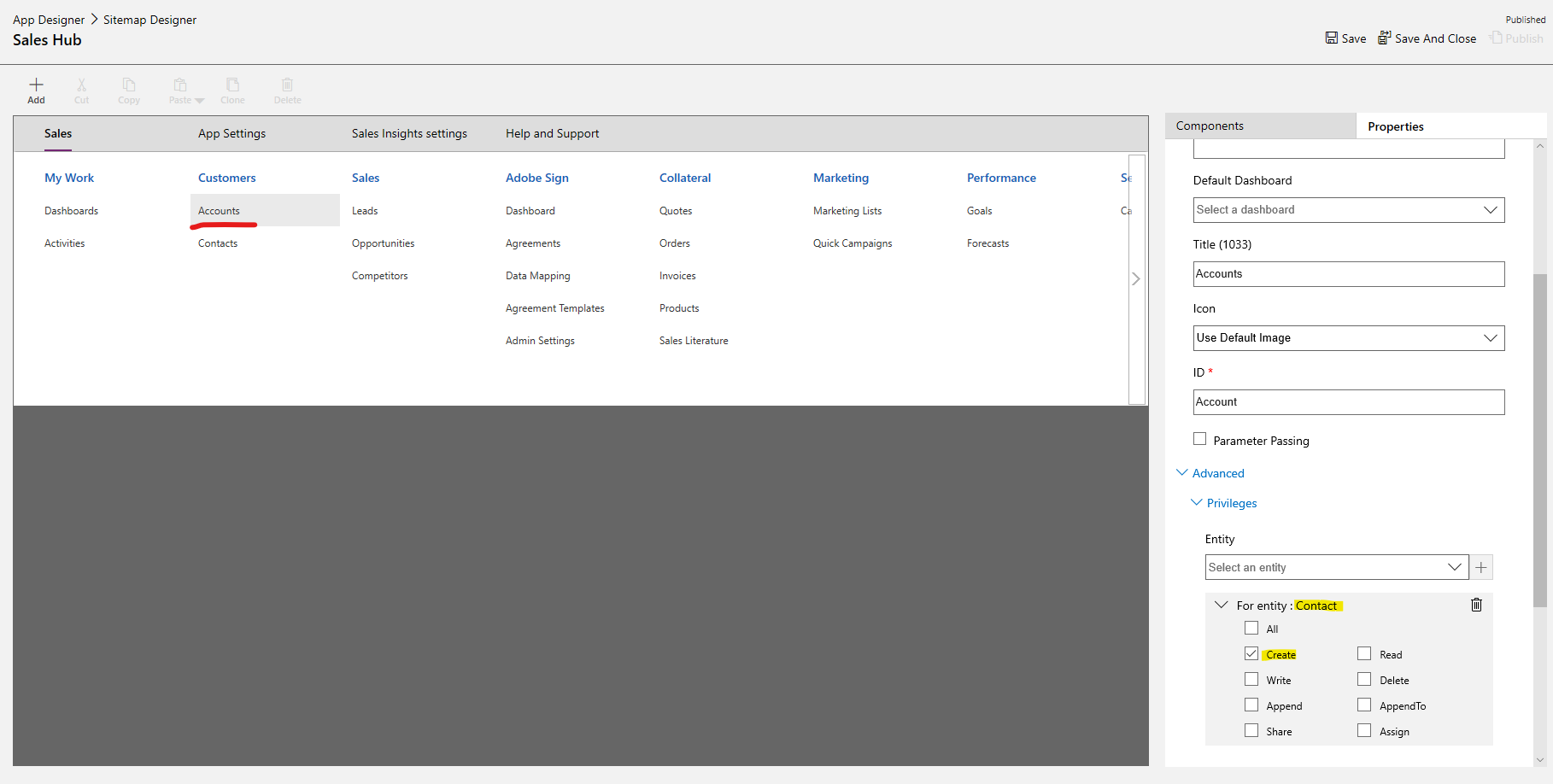
    The visibility of the site map area is not by directly selecting the security roles, but by selecting the entity's specific permissions to allow only security roles with these permissions to access the area.

    For example, I set a Privileges for a subarea Account of the site map, selected the Contact entity and its Create permission. Then, if the security role of the user have Create permission on the Contact entity, the user can see the subarea Account of site map. Otherwise the user cannot see Account.
    0511.pastedimage1577089680543v1.png

    Please refer to this blog for details: https://community.dynamics.com/crm/b/crminogic/posts/sitemap-privileges-feature-in-dynamics-365

    To hide a group, all sub-areas of this group need to be hidden first, and then this group will be automatically hidden.

    To hide an area, all groups of this area need to be hidden first, and then this area will be automatically hidden.

  • CRMDev18 Profile Picture
    55 on at

    Thanks, it works

  • David Musgrave MVP GPUG All Star Legend Moderator Profile Picture
    14,141 Most Valuable Professional on at

    Let me know if you still need help.

    In English please :-)

    Check out my blog as it has many answers

    http://WinthropDC.com/Blog

    David

Under review

Thank you for your reply! To ensure a great experience for everyone, your content is awaiting approval by our Community Managers. Please check back later.

Helpful resources

Quick Links

Introducing the 2026 Season 1 community Super Users

Congratulations to our 2026 Super Stars!

Meet the Microsoft Dynamics 365 Contact Center Champions

We are thrilled to have these Champions in our Community!

Congratulations to the April Top 10 Community Leaders

These are the community rock stars!

Leaderboard > Microsoft Dynamics 365 | Integration, Dataverse, and general topics

#1
11manish Profile Picture

11manish 135

#2
André Arnaud de Calavon Profile Picture

André Arnaud de Cal... 86 Super User 2026 Season 1

#3
Martin Dráb Profile Picture

Martin Dráb 58 Most Valuable Professional

Last 30 days Overall leaderboard

Product updates

Dynamics 365 release plans
