web
You’re offline. This is a read only version of the page.
close
Skip to main content

Notifications

Announcements

No record found.

Community site session details

Community site session details

Session Id :
Supply chain | Supply Chain Management, Commerce
Answered

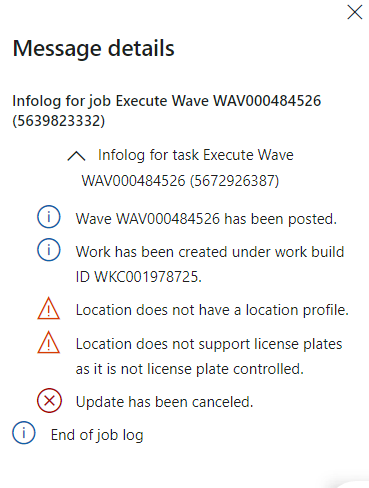
Location does not support license plates as it is not license plate controlled

(0) ShareShare
ReportReport
Posted on by 113

Whenever I process a wave from a newly created warehouse, I encounter this error message.
pastedimage1680456352354v1.png

New warehouse locations all have location profile IDs, and I haven't found any differences between newly created warehouses and other warehouses

Can anyone suggest a solution to this problem?

I have the same question (0)
  • Suggested answer
    Charlotte X Profile Picture
    on at

    Hi NavidNoori,

    Check if the 'User location' is defined, and that this location profile has 'Use license plate tracking' ticked.

    Please try to delete the location and create a new one with the type specified in Warehouse parameters as user location type.

    Warehouse Management > Setup > Warehouse management parameters > Under General tab > Location profiles > Select the User location profile link: "USER"

    And follow this MS Doc to check your configuration:

    Location license plate positioning - Supply Chain Management | Dynamics 365 | Microsoft Learn

  • NavidNoori Profile Picture
    113 on at

    Hi Charlotte,

    Thanks for your response.

    The "USER" location profile has been selected in the Warehouse management parameters and the license plate tracking has been enabled for the location.

    I deleted the USER location and re-added but still had the same issue.

    This only happens with the newly created warehouse, and I didn't find any difference between the newly created warehouse and other warehouses

  • Charlotte X Profile Picture
    on at

    Is the parameter 'Use license plate tracking' set to 'Yes' on the location profile of the location RECV? 

    Go to Warehouse management > Setup > Warehouse > Location profiles.

  • NavidNoori Profile Picture
    113 on at

    Hi Charlotte,

    Thanks for your response.

    In the warehouse parameter, the location profile selected is "USER" and license plate tracking is enabled on the USER and REC location profiles.

  • Verified answer
    Charlotte X Profile Picture
    on at

    I found an old thread mentioning a similar issue to yours. According to the discussion under this thread, this is most likely caused by data corruption.

    Please refer to this:

    License plate specified on a non-license plate controlled location. Update has been canceled. - Microsoft Dynamics AX Forum Community Forum

Under review

Thank you for your reply! To ensure a great experience for everyone, your content is awaiting approval by our Community Managers. Please check back later.

Helpful resources

Quick Links

Responsible AI policies

As AI tools become more common, we’re introducing a Responsible AI Use…

Neeraj Kumar – Community Spotlight

We are honored to recognize Neeraj Kumar as our Community Spotlight honoree for…

Leaderboard > Supply chain | Supply Chain Management, Commerce

#1
Siv Sagar Profile Picture

Siv Sagar 266 Super User 2025 Season 2

#2
Laurens vd Tang Profile Picture

Laurens vd Tang 213 Super User 2025 Season 2

#3
André Arnaud de Calavon Profile Picture

André Arnaud de Cal... 140 Super User 2025 Season 2

Last 30 days Overall leaderboard

Featured topics

Product updates

Dynamics 365 release plans
