web
You’re offline. This is a read only version of the page.
close
Skip to main content
Community site session details

Community site session details

Session Id :
Microsoft Dynamics 365 | Integration, Dataverse...
Answered

Menu items missing from Settings

(0) ShareShare
ReportReport
Posted on by 10

Hi 

I have a weird issue. As of last week some of the Settings Menu Items (Service Management, Mobile Offline, Sync Error, Security, etc, etc) have disappeared on my Sandbox instance. I am a system administrator and global admin, so definitely should have access to these items. Below is a screenshot of the menu on my Dev instance and then a screenshot of the menu on Production - you can see how many menu items are missing!
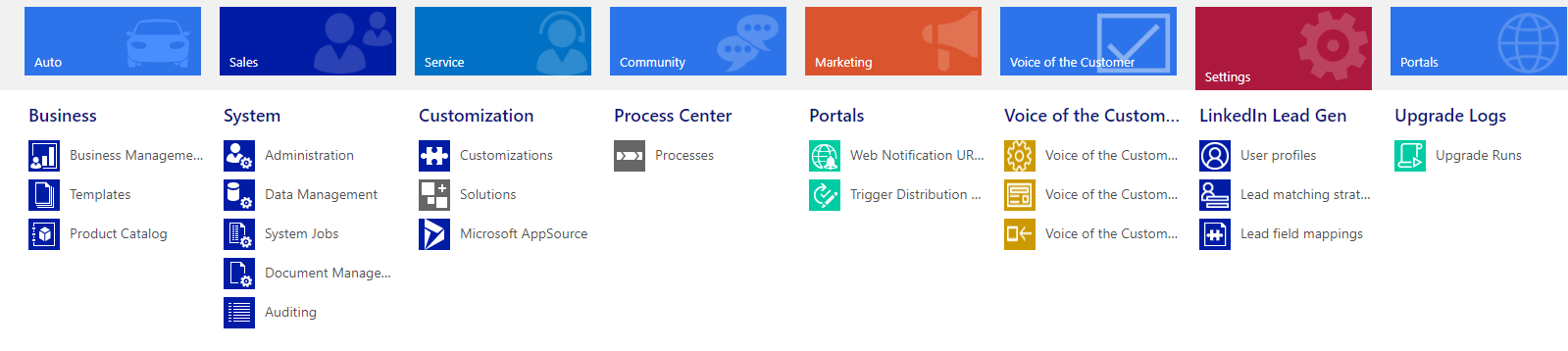
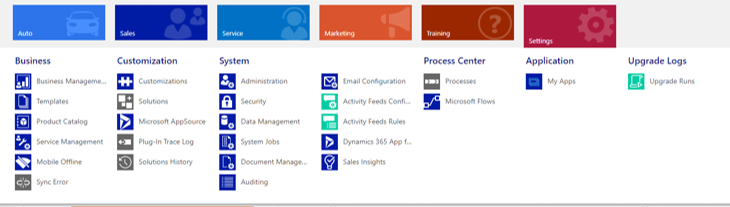
5543.Missing-Menu-Items.png

4341.Normal-Menu.png

Any advice would be enormously appreciated!

Thanks

I have the same question (0)
  • LuHao Profile Picture
    40,892 on at
    RE: Menu items missing from Settings

    Hi CeliaR,

    For missing items, we can add them back to the sitemap.

    Open two browser tabs, one to Sandbox instance and one to Dev instance.

    In both instances, go to Settings > Customizations > Customize the System, then Client Extensions, open Site Map.

    5165.pastedimage1580901785125v1.png    4152.pastedimage1580901882090v2.png

    Create the missing items in the Site Map of Sandbox instance as Dev instances, then copy the Entity, URL, Icon, and ID attributes of each item again. Save and publish.

    7776.pastedimage1580902157010v3.png

    In addition, in the future, the settings will be moved to the power platform.

    https://admin.powerplatform.microsoft.com/environments

  • Verified answer
    Gilmeyer Profile Picture
    on at
    RE: Menu items missing from Settings

    Hi,

    To add the missing items from Settings Menu, you can export the sitemap from the Production and import into Dev.

    Please refer to portal.iotap.com/.../en-us

    Thanks,

Under review

Thank you for your reply! To ensure a great experience for everyone, your content is awaiting approval by our Community Managers. Please check back later.

Helpful resources

Quick Links

Responsible AI policies

As AI tools become more common, we’re introducing a Responsible AI Use…

Pallavi Phade – Community Spotlight

We are honored to recognize Pallavi Phade as our Community Spotlight honoree for…

Leaderboard > Microsoft Dynamics 365 | Integration, Dataverse, and general topics

#1
#ManoVerse Profile Picture

#ManoVerse 103

#2
Siv Sagar Profile Picture

Siv Sagar 93 Super User 2025 Season 2

#3
Martin Dráb Profile Picture

Martin Dráb 67 Most Valuable Professional

Last 30 days Overall leaderboard

Product updates

Dynamics 365 release plans
