web
You’re offline. This is a read only version of the page.
close
Skip to main content

Announcements

No record found.

News and Announcements icon
Community site session details

Community site session details

Session Id :
Small and medium business | Business Central, N...
Answered

Shipping Agent and Shipping Agent Code in Navision 2018

(0) ShareShare
ReportReport
Posted on by 5,081

Hi Community,

I saw the link below of how we can enter Shipping Agent and Shipping Service Code.

pastedimage1635909296487v1.png

https://www.navug.com/communities/community-home/digestviewer/viewthread?GroupId=49&MessageKey=5ad19022-cc1d-450d-a6dc-7d72e2dfa9aa&CommunityKey=95503735-5a0b-4af1-8326-9bd7bb3b4d3d&tab=digestviewer

Can anyone advise where can I find all these codes from UPS/ DHL/ FEDEX?

I can't seems to locate them.

Thank you!

I have the same question (0)
  • Suggested answer
    Franziska Fiegler Profile Picture
    Microsoft Employee on at

    Hello Josh,

    not totally sure what you are exactly looking for.

    Do you want to know, where to set this up in BC?

    Search for Shipping Agent and you can see all existing one:
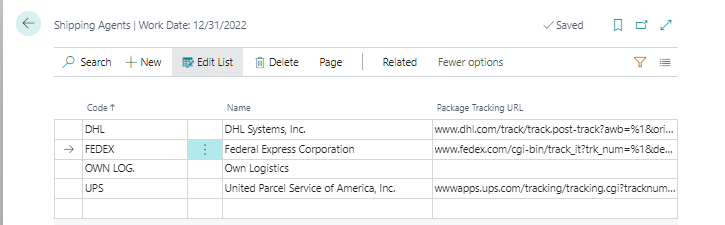
    pastedimage1635933749949v1.png
    If you click on "related" -> Line -> Shipping Agent Services
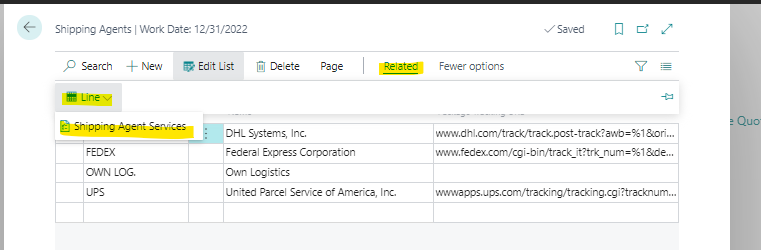
    pastedimage1635933866525v2.png
    You can see/add services for this shipping agent:
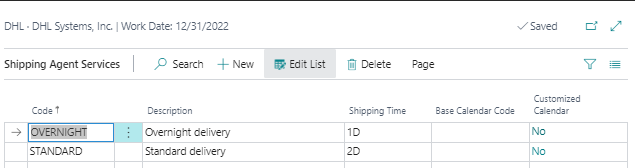
    pastedimage1635933986213v3.png

    Or are you looking for a way to automaticcally create/fill those Shipping Agents or Services?
    This is not possible.

    You have to find these information by yourself and than create a new Agent with its services manually.

    https://docs.microsoft.com/en-us/dynamics365/business-central/sales-how-to-set-up-shipping-agents

    Let me know, if this is ansering your question.

  • Suggested answer
    Community Member Profile Picture
    on at

    Josh,

    The Shipping Agent Code and Shipping Agent Service code samples are in CRIONUS company. Most users will borrow the sample and expand from there. If you cannot find a list email back.

    Thanks,

    Steve

  • Verified answer
    YUN ZHU Profile Picture
    101,126 Super User 2026 Season 1 on at

    Hi, in CRIONUS demo company
    Shipping Agents:

    Code Name Package Tracking URL
    DHL DHL Systems, Inc. www.dhl.com/en/express/tracking.html?AWB=%1&brand=DHL
    FEDEX Federal Express Corporation www.fedex.com/apps/fedextrack/?action=track&trackingnumber=%1
    OWN LOG. Own Logistics
    UPS United Parcel Service of America, Inc. wwwapps.ups.com/tracking/tracking.cgi?tracknum=%1

    Shipping Agent Services:

    Shipping Agent Code Code Description Shipping Time Base Calendar Code
    DHL OVERNIGHT Overnight delivery 1D
    DHL STANDARD Standard delivery 2D
    FEDEX NEXT DAY Next day delivery 1D
    FEDEX STANDARD Standard delivery 2D
    OWN LOG. NEXT DAY Next day delivery 1D

    Hope this will help.

    Thanks.

    ZHU

  • joshtechsolutions Profile Picture
    5,081 on at

    Hi Steve,

    I can't find a list. I assume the list is the one which Yun Zhu listed.

    Otherwise, appreciate if you can advise on what is the list or where I can find this list.

    Thank you!

  • joshtechsolutions Profile Picture
    5,081 on at

    Hi Franziska.

    Thank you for replying.

    As mentioned in my subject title, my NAV is Navision 2018 hence I don't have the information which you mentioned were in BC.

    I wonder if you could provide me with the relevant links and codes so that I can input them myself in my system.

    Thank you!

  • Verified answer
    Community Member Profile Picture
    on at

    Josh,

    Attached.

    Steve

    Default04_5F00_11_5F00_2021_5F00_12_5F00_28_5F00_29.xlsx

  • Suggested answer
    RockwithNav Profile Picture
    9,125 Super User 2026 Season 1 on at

    Setup a Cronus Company which is actually a Demo company and the you will find all these Data.

    All make this company Handy with you.

Under review

Thank you for your reply! To ensure a great experience for everyone, your content is awaiting approval by our Community Managers. Please check back later.

Helpful resources

Quick Links

Introducing the 2026 Season 1 community Super Users

Congratulations to our 2026 Super Stars!

Meet the Microsoft Dynamics 365 Contact Center Champions

We are thrilled to have these Champions in our Community!

Congratulations to the April Top 10 Community Leaders

These are the community rock stars!

Leaderboard > Small and medium business | Business Central, NAV, RMS

#1
OussamaSabbouh Profile Picture

OussamaSabbouh 2,138 Super User 2026 Season 1

#2
YUN ZHU Profile Picture

YUN ZHU 1,279 Super User 2026 Season 1

#3
AndrewThomas81 Profile Picture

AndrewThomas81 1,192

Last 30 days Overall leaderboard

Featured topics

Product updates

Dynamics 365 release plans
