web
You’re offline. This is a read only version of the page.
close
Skip to main content

Announcements

No record found.

News and Announcements icon
Community site session details

Community site session details

Session Id :
Microsoft Dynamics GP (Archived)

DBMS1934 running GP 10 Utilities

(0) ShareShare
ReportReport
Posted on by 1,692

This one has me stumped.  Hopefully someone else has run across it.

GP 10.0.903

SQL 2005

I am initializing AA for a client.  I updated the GP client fine.  When I run Utilities it will sto with the below error
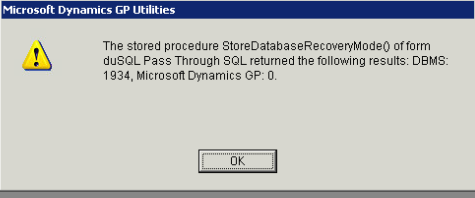
DEXSQL.LOG has the following error

SQLSTATE:(37000) Native Err:(1934) stmt(21053288):*/
[Microsoft][SQL Native Client][SQL Server]INSERT failed because the following SET options have incorrect settings: 'CONCAT_NULL_YIELDS_NULL, ANSI_WARNINGS, ANSI_PADDING'. Verify that SET options are correct for use with indexed views and/or indexes on co*/

I have checked all of the settings and they match my GP install. 

I have not changed the settings as the client had to leave.

Any ideas?


Perry

*This post is locked for comments

I have the same question (0)
  • Community Member Profile Picture
    on at

    Please verify that on your ODBC connection you have unchecked the ANSI NULLS and ANSI WARNINGS off

    Let us know

  • Perry Smith - CRi Profile Picture
    1,692 on at

    I forgot to mention that I verified odbc dsn.  All ANSI boxes are unchecked

  • Community Member Profile Picture
    on at

    Check the SQL database compatibility settings and the SQL Server 2005 whether it is on SP3 minimum?

    Also You didnt mention if all clients are having issue or this one alone and if the server is having the same issue logging in or no issue?

  • Perry Smith - CRi Profile Picture
    1,692 on at

    Janakiram,

    The db's were set to 90 compatibility. We tried 80 as well with the same error.

    I will verify SP today.  We only had time to try it from the Server.  I will be bringing db's in house for further testing.

    Thanks!

    Perry

  • Perry Smith - CRi Profile Picture
    1,692 on at

    The SQL Server was on SP3  9.0.4035

    I created a new SQL Server.  Restored DB's installed a new GP client.  Ran Utilities and get the same error.

    It seems to be the 3 db options.  I guess my next step is to reverse what the settings are and try it.  I am not sure what effect that will have on GP though.

    Thanks

    Perry

  • Perry Smith - CRi Profile Picture
    1,692 on at

    I changed the 3 db options as the error seems to indicate with no luck.

    Perry

  • Verified answer
    Perry Smith - CRi Profile Picture
    1,692 on at

    Finally figured this one out.

    My initial research indicated that there was an indexed view or table with a computed column in the database.  In my 17 years of installing and upgrading GP, I knew that Microsoft does not use either item in GP db's.  

    I asked the DBA if he created any indexed views or tables with computed columns.  He said no. I ran a SQL Profiler trace and discovered he had created a table with computed column and a database trigger that updated it when there was a schema change in the database.  I removed the trigger and the install went through with no errors.

    Perry

Under review

Thank you for your reply! To ensure a great experience for everyone, your content is awaiting approval by our Community Managers. Please check back later.

Helpful resources

Quick Links

Introducing the 2026 Season 1 community Super Users

Congratulations to our 2026 Super Stars!

Meet the Microsoft Dynamics 365 Contact Center Champions

We are thrilled to have these Champions in our Community!

Congratulations to the March Top 10 Community Leaders

These are the community rock stars!

Leaderboard > 🔒一 Microsoft Dynamics GP (Archived)

Last 30 days Overall leaderboard

Featured topics

Product updates

Dynamics 365 release plans
