web
You’re offline. This is a read only version of the page.
close
Skip to main content

Announcements

No record found.

News and Announcements icon
Community site session details

Community site session details

Session Id :
Small and medium business | Business Central, N...
Answered

The excel exported from BC layout does not display image on mobile device

(6) ShareShare
ReportReport
Posted on by 34
Hi Dynamic 365 community:
When we export layouts by using using the "send to" ->Microsoft Excel Document (data and layout) , the result looks fine on desktop but the images are not visible on the mobile devices.
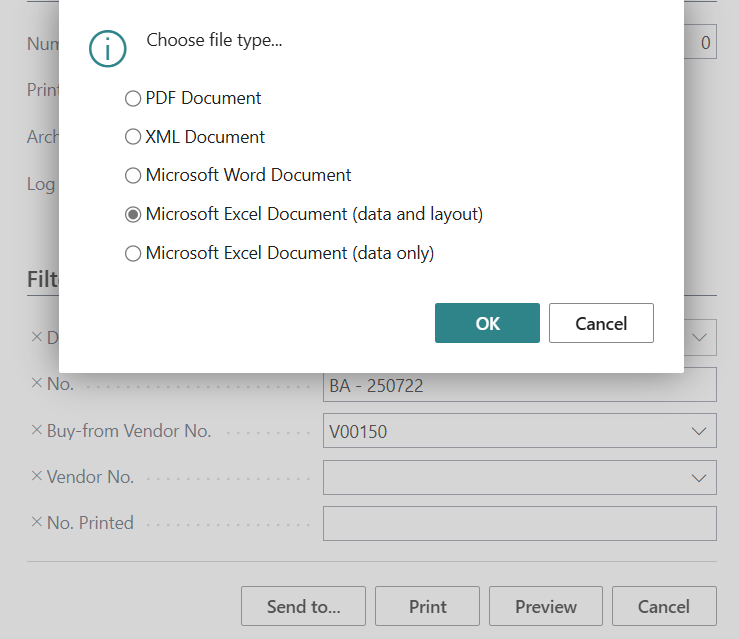
The layouts used to work just fine, this happened since the previous Major BC update(V26). 
I did some research online, here are what i tried:
1. Play with the img format in the layout file. None of them make a difference.
2. Resize the img. This does not make a difference.
2. Install MS Excel app and open the document with that. This work but since we will send the document to the clients, there is no way We ask them to do so.
3. Manually re-insert the images - This solve the problem, I created a script for it but since it happens so often, even using a script adding a lot of extra works.
 
Is there a way I can reliably solve the issue? 
I have the same question (0)
  • Suggested answer
    Sohail Ahmed Profile Picture
    11,171 Super User 2026 Season 1 on at

    This seems to be a regression or rendering issue introduced in BC v26 where Excel exports no longer show images on mobile unless reinserted manually. Since you've already validated that the Excel file works on desktop and not on mobile, and that reinserting the image solves it temporarily, the issue likely lies in the way BC embeds images into Excel via Word layouts in the new update.


    ✅ Suggested Next Step:

    Please report this to Microsoft via the Microsoft Yammer (Partner Community) — it's the best place to raise such platform-level bugs. Microsoft product engineers actively monitor that space for regression issues and can confirm whether it's a known bug or a behavior change in BC 26.


    Here’s the link to the Yammer community (if you’re a Microsoft Partner):

    🔗 https://www.yammer.com/partners.microsoft.com


    If you're not a partner, loop in your Microsoft Partner to escalate it on your behalf.


    ✅ Mark this answer as verified if it helps you.

  • Verified answer
    YUN ZHU Profile Picture
    99,859 Super User 2026 Season 1 on at
    This seems to be a Microsoft standard issue. I suggest you submit a SR to Microsoft.
    In addition, if you are sending it to a customer, I personally recommend sending a PDF Document to ensure that it will not be accidentally modified.
     
    Thanks.
    ZHU
  • Suggested answer
    Khushbu Rajvi. Profile Picture
    22,287 Super User 2026 Season 1 on at
    Yes. Its look like standard issue. Raising SR is the best approach.
  • Suggested answer
    Mansi Soni Profile Picture
    8,973 Super User 2026 Season 1 on at
    Hello,

    This issue may persist from a change in Business Central v26 where images in Excel exports are embedded using a method that is not fully supported by mobile Excel viewers. While exporting as PDF is a reliable workaround for consistent image rendering across devices, this may not suit all business needs. Since manual reinsertion or scripting adds extra overhead, the best long-term approach is to raise a support ticket with Microsoft. This ensures the issue is officially tracked and increases the chances of a hotfix or configuration setting being introduced in a future update to restore mobile compatibility for Excel exports with images.

    Hope this answer will help you!

    Regards,
    Mansi Soni
  • Suggested answer
    Jainam M. Kothari Profile Picture
    15,829 Super User 2026 Season 1 on at
    Hello,
     
    You should raise a ticket in Microsoft for the same.

Under review

Thank you for your reply! To ensure a great experience for everyone, your content is awaiting approval by our Community Managers. Please check back later.

Helpful resources

Quick Links

Introducing the 2026 Season 1 community Super Users

Congratulations to our 2026 Super Stars!

Meet the Microsoft Dynamics 365 Contact Center Champions

We are thrilled to have these Champions in our Community!

Congratulations to the March Top 10 Community Leaders

These are the community rock stars!

Leaderboard > Small and medium business | Business Central, NAV, RMS

#1
OussamaSabbouh Profile Picture

OussamaSabbouh 1,951 Super User 2026 Season 1

#2
YUN ZHU Profile Picture

YUN ZHU 1,141 Super User 2026 Season 1

#3
Teagen Boll Profile Picture

Teagen Boll 752 Super User 2026 Season 1

Last 30 days Overall leaderboard

Featured topics

Product updates

Dynamics 365 release plans
