web
You’re offline. This is a read only version of the page.
close
Skip to main content

Announcements

No record found.

News and Announcements icon
Community site session details

Community site session details

Session Id :
Supply chain | Supply Chain Management, Commerce
Suggested Answer

Transfer Order auto creates an unwanted Production Order

(0) ShareShare
ReportReport
Posted on by 10

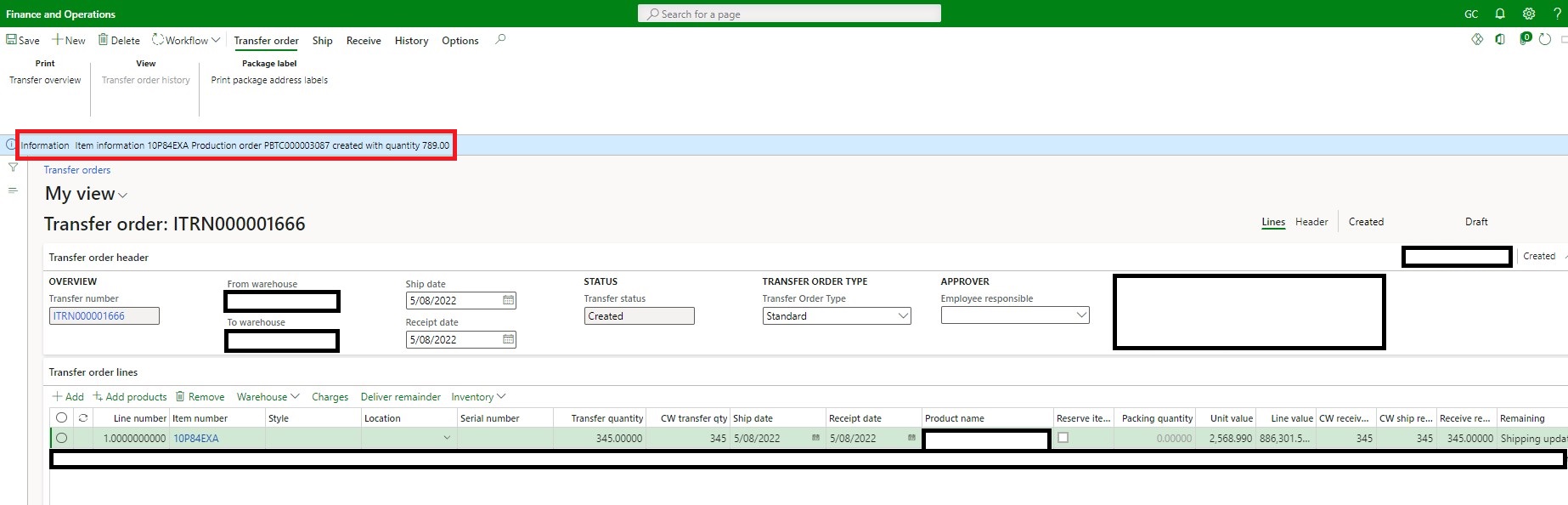
There is a business need to create a Transfer Orders for an item that is currently not in stock. The TO will be processed further along once the stock arrives in the specified From location.  This item is an item that can be produced by the company (it has an active formula etc), however the Production Order will be manually created, if and when needed.  When the line is saved on the Transfer Order it automatically triggers an unwanted Production Order - for the total quantity of demand currently in the system.  The default order setting is set as Production.

Is there a way to limit this behaviour on Transfer Orders specifically?  I have scratched around in the inventory parameters settings but can't find anything controlling this behaviour. If it is indeed demand driven, why doesn't the transfer journal also create a Production Order?   I have tested with a transfer journal (same item, same inventory dimensions) and when this journal line is saved, it doesn't trigger any unwanted Production Orders. 

Example of Transfer Order triggering an unwanted Production Order:
pastedimage1659586052315v2.jpeg

I have the same question (0)
  • Suggested answer
    Charlotte X Profile Picture
    Microsoft Employee on at

    Hi YellowDuck,

    The following article writes how to handle transfer orders, maybe you can find some useful information in it.

    Process a Transfer Order: D365 Finance and Operations – Dynamics Tips (dynamics-tips.com)

    Regards,

    Charlotte

  • Aparisi82 Profile Picture
    2,190 on at

    From the form I can see customisations on the Transfer order such as "Transfer Order Type" and "Employer Responsible"  and "Workflow History"

    Whatever form you are dealing is far from standard and so  the logic of triggering a production order.

  • YellowDuck Profile Picture
    10 on at

    Thanks Charlotte - that is an excellent reference article for TO functionality.  We have identified our issue by debugging the code and it was indeed a development validation that got updated in error.  Thanks again.

  • YellowDuck Profile Picture
    10 on at

    Thanks Alessandro, we have identified our issue by debugging the code and it was indeed a development validation that got updated in error.  Thanks!

Under review

Thank you for your reply! To ensure a great experience for everyone, your content is awaiting approval by our Community Managers. Please check back later.

Helpful resources

Quick Links

Introducing the 2026 Season 1 community Super Users

Congratulations to our 2026 Super Stars!

Meet the Microsoft Dynamics 365 Contact Center Champions

We are thrilled to have these Champions in our Community!

Congratulations to the April Top 10 Community Leaders

These are the community rock stars!

Leaderboard > Supply chain | Supply Chain Management, Commerce

#1
André Arnaud de Calavon Profile Picture

André Arnaud de Cal... 152 Super User 2026 Season 1

#2
Laurens vd Tang Profile Picture

Laurens vd Tang 116 Super User 2026 Season 1

#3
Zain Mehmood Profile Picture

Zain Mehmood 89 Most Valuable Professional

Last 30 days Overall leaderboard

Product updates

Dynamics 365 release plans
