web
You’re offline. This is a read only version of the page.
close
Skip to main content

Announcements

No record found.

News and Announcements icon
Community site session details

Community site session details

Session Id :
Small and medium business | Business Central, N...
Answered

How does Navision 2018 retrieve the Delivery date in Purchase Order?

(0) ShareShare
ReportReport
Posted on by 5,067

Hi,

I would like to find out how do I obtain the Delivery date?

I'm using Navision 2018.

I see in Navision Purchase Order that there is a Delivery Date, but I don't know how is it obtain.
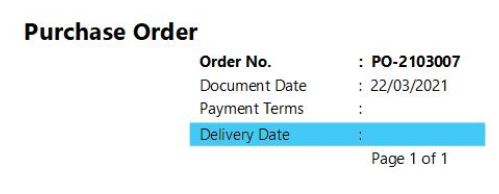
delivery-date.JPG

I see that in Navision there is the Document date, Order date, Due Date. But I don't see the Delivery Date.
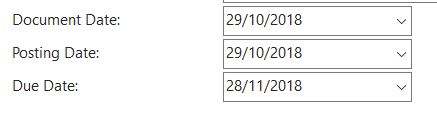

duedate.JPG

0777.orderdate.JPG

Please advise. Thank you!

I have the same question (0)
  • Community Member Profile Picture
    on at

    Hi Josh,

    Can you please let me know which report ID are you using for Purchase Order Like 405, 1322 etc?

    It looks this is the custom field in your report.

    Thanks.

  • Suggested answer
    Grzegorz Szwed Profile Picture
    55 on at

    Hi!

    It looks like you are missing field Expected Receipt Date (Shipping area).

  • Verified answer
    Community Member Profile Picture
    on at

    Josh,

    On your Purchase Order page, in the Header, you need to ADD Requested Receipt Date. It seems the document you are printing has changed the field shown to Delivery Date, which would point to the Requested Receipt Date.

    pastedimage1618336713210v1.png

    Hope this helps.

    Thanks,

    Steve

  • Suggested answer
    joshtechsolutions Profile Picture
    5,067 on at

    Hi Steve,

    Thanks for your answer. I have discovered that for Navision 2018, there is an Expected Reciept Date.

    expected-re.JPG

Under review

Thank you for your reply! To ensure a great experience for everyone, your content is awaiting approval by our Community Managers. Please check back later.

Helpful resources

Quick Links

Introducing the 2026 Season 1 community Super Users

Congratulations to our 2026 Super Stars!

Meet the Microsoft Dynamics 365 Contact Center Champions

We are thrilled to have these Champions in our Community!

Congratulations to the April Top 10 Community Leaders

These are the community rock stars!

Leaderboard > Small and medium business | Business Central, NAV, RMS

#1
OussamaSabbouh Profile Picture

OussamaSabbouh 2,002 Super User 2026 Season 1

#2
YUN ZHU Profile Picture

YUN ZHU 1,255 Super User 2026 Season 1

#3
AndrewThomas81 Profile Picture

AndrewThomas81 1,217

Last 30 days Overall leaderboard

Featured topics

Product updates

Dynamics 365 release plans
