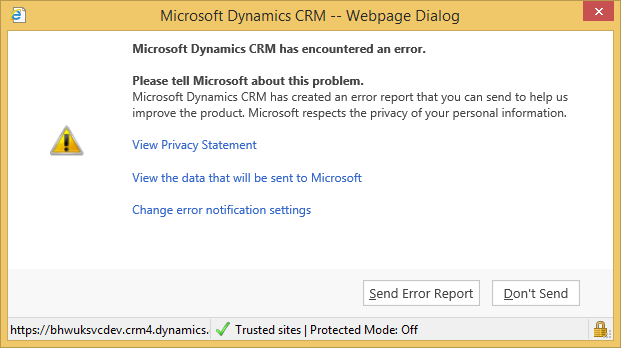
Im getting error attached below while using the Xrm.Utility.openEntityForm("customactivityform", null, parameters); to open a custom activity form. The custom activity form is getting some parameters from the contact form. all the parameters are passing fine. I have created code like below. The code works fine but before the form load of the custom activity i get the following error dialog. If i cancel the error, all parameters are passed to custom activity correctly. How do i get rid of this error as i can only trace it to the crm common/JsProvider.ashx. see code below
//On contact form load function
function OpenNewActivity() {
var parameters = {};
parameters["parentcustomerid_"] = Xrm.Page.data.entity.getId();
parameters["parentcustomeridname_"] = Xrm.Page.data.entity.getPrimaryAttributeValue()
parameters["parentcustomeridtype_"] = Xrm.Page.data.entity.getEntityName();
parameters["fullname_"] = Xrm.Page.data.entity.attributes.get("fullname").getValue();
Xrm.Utility.openEntityForm("customactivityname", null, parameters);
}
// on customactivityname form load function
function CustomActivityFormLoad(){
if (Xrm.Page.context.getQueryStringParameters().parentcustomerid_ != null && Xrm.Page.context.getQueryStringParameters().parentcustomerid_ != 'undefined') {
var recorid = Xrm.Page.context.getQueryStringParameters().parentcustomerid_;
var recordname = Xrm.Page.context.getQueryStringParameters().parentcustomeridname_;
var entityname = Xrm.Page.context.getQueryStringParameters().parentcustomeridtype_;
Xrm.Page.getAttribute("mycontactfield").setValue([{ id: recorid, name: recordname, entityType: entityname }]);
Xrm.Page.getAttribute("fullname_").setValue(Xrm.Page.context.getQueryStringParameters().fullname_);
}
}
Full error details
Microsoft Dynamics CRM Error Report Contents
<CrmScriptErrorReport>
<ReportVersion>1.0</ReportVersion>
<ScriptErrorDetails>
<Message>Unable to get property 'get_element' of undefined or null reference</Message>
<Line>1158</Line>
<URL>/_common/JsProvider.ashx?ids=1759665639-1968334880-202661451-1194605645-1039841082-1793205875-1314140682-1547461133-1992083491-1000289424-159335543-1376927455-1030632819-1181113682-1380222012-513446117-1625018438-1460109179-1088147315-706656670-232397045-468302605-1405388298-1731109441-2029667886-202888856-342519603-542820515-1946640899-1603536461-1220618931-511599809-1264077421-1188909594-783705869-374257838-1463979649-1391165063-1359517414-1781702827-2050812538-512064351&ver=-795932359</URL>
<PageURL>/_forms/read/page.aspx?dpLoaded_1=true&etc=2&id=%7baa30aa9f-2c76-e411-93f6-0003ff437dbf%7d&pagemode=iframe&postcode_4=true&theme=Outlook15White</PageURL>
<Function>anonymousr:Unabletogetproperty'get_element'ofundefinedornullreference</Function>
<CallStack>
<Function>anonymousr:Unabletogetproperty'get_element'ofundefinedornullreference</Function>
</CallStack>
</ScriptErrorDetails>
<ClientInformation>
<BrowserUserAgent>Mozilla/5.0 (compatible; MSIE 10.0; Windows NT 6.3; WOW64; Trident/7.0; .NET4.0E; .NET4.0C; .NET CLR 3.5.30729; .NET CLR 2.0.50727; .NET CLR 3.0.30729; InfoPath.3; McAfee; MALNJS)</BrowserUserAgent>
<BrowserLanguage>en-US</BrowserLanguage>
<SystemLanguage>en-GB</SystemLanguage>
<UserLanguage>en-GB</UserLanguage>
<ScreenResolution>1242x698</ScreenResolution>
<ClientName>Web</ClientName>
<ClientTime>2014-12-09T21:47:19</ClientTime>
</ClientInformation>
<ServerInformation>
<OrgLanguage>1033</OrgLanguage>
<OrgCulture>2057</OrgCulture>
<UserLanguage>1033</UserLanguage>
<UserCulture>2057</UserCulture>
<OrgID>{A051A28B-475C-4377-827B-4AC5E0F84687}</OrgID>
<UserID>{B7C0982B-673E-E411-8100-D89D67632EAC}</UserID>
<CRMVersion>6.1.1.1847</CRMVersion>
</ServerInformation>
</CrmScriptErrorReport>
<CrmScriptErrorReport>
<ReportVersion>1.0</ReportVersion>
<ScriptErrorDetails>
<Message>Unable to get property 'get_element' of undefined or null reference</Message>
<Line>1158</Line>
<URL>/_common/JsProvider.ashx?ids=1759665639-1968334880-202661451-1194605645-1039841082-1793205875-1314140682-1547461133-1992083491-1000289424-159335543-1376927455-1030632819-1181113682-1380222012-513446117-1625018438-1460109179-1088147315-706656670-232397045-468302605-1405388298-1731109441-2029667886-202888856-342519603-542820515-1946640899-1603536461-1220618931-511599809-1264077421-1188909594-783705869-374257838-1463979649-1391165063-1359517414-1781702827-2050812538-512064351&ver=-795932359</URL>
<PageURL>/_forms/read/page.aspx?dpLoaded_1=true&etc=2&id=%7baa30aa9f-2c76-e411-93f6-0003ff437dbf%7d&pagemode=iframe&postcode_4=true&theme=Outlook15White</PageURL>
<Function>anonymousr:Unabletogetproperty'get_element'ofundefinedornullreference</Function>
<CallStack>
<Function>anonymousr:Unabletogetproperty'get_element'ofundefinedornullreference</Function>
</CallStack>
</ScriptErrorDetails>
<ClientInformation>
<BrowserUserAgent>Mozilla/5.0 (compatible; MSIE 10.0; Windows NT 6.3; WOW64; Trident/7.0; .NET4.0E; .NET4.0C; .NET CLR 3.5.30729; .NET CLR 2.0.50727; .NET CLR 3.0.30729; InfoPath.3; McAfee; MALNJS)</BrowserUserAgent>
<BrowserLanguage>en-US</BrowserLanguage>
<SystemLanguage>en-GB</SystemLanguage>
<UserLanguage>en-GB</UserLanguage>
<ScreenResolution>1242x698</ScreenResolution>
<ClientName>Web</ClientName>
<ClientTime>2014-12-09T21:47:19</ClientTime>
</ClientInformation>
<ServerInformation>
<OrgLanguage>1033</OrgLanguage>
<OrgCulture>2057</OrgCulture>
<UserLanguage>1033</UserLanguage>
<UserCulture>2057</UserCulture>
<OrgID>{A051A28B-475C-4377-827B-4AC5E0F84687}</OrgID>
<UserID>{B7C0982B-673E-E411-8100-D89D67632EAC}</UserID>
<CRMVersion>6.1.1.1847</CRMVersion>
</ServerInformation>
</CrmScriptErrorReport>
*This post is locked for comments
I have the same question (0)


