web
You’re offline. This is a read only version of the page.
close
Skip to main content

Notifications

Announcements

No record found.

Community site session details

Community site session details

Session Id :
Small and medium business | Business Central, N...
Answered

Average Unit Cost Calculation

(0) ShareShare
ReportReport
Posted on by

Dear All,

How does the BC calculate the average unit cost of a inventory item?

In the Item card, when we go to Unit Cost. It will reflect the average unit cost. When we click in, we can see a list of cost movement.
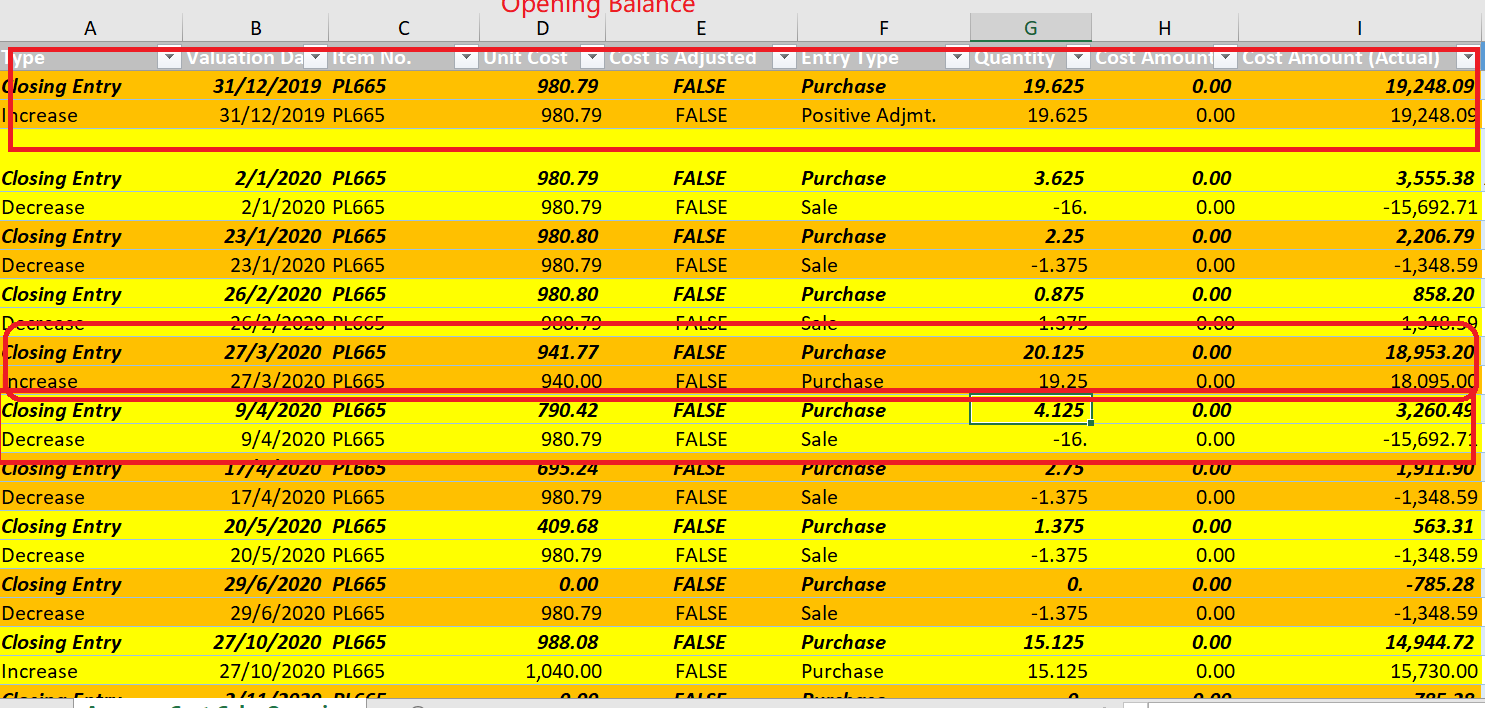
Average-Cost.png

based on the above, how does the system calculate the Average cost and shown in the closing entry?

on 27 March, we make a purchase with a lower purchase price, and it bring down the average cost to be 941.77.

in 9 April, we make a sell. However the system picked the unit cost 980.79 as the cost for this sales order. Why system does not use 941.77? How does the system decide which cost to use?

starting from this entry, the average cost all went wrong

How do we correct this issues?

we can see on 29 June, the closing quantity is 0, but we have a cost amount of - 785.28

I have the same question (0)
  • Suggested answer
    Bilal Haider Profile Picture
    412 on at

    Hi,

    You need to run report Adjust cost - Item entries and then this will be adjusted correctly.

  • Verified answer
    Community Member Profile Picture
    on at

    Hello,

    Below is a Average Cost Overview webinar I did awhile back. Hope this helps explain Average Cost, in addition to running your Adjust Cost and Item Entries. If this is not running daily, because it is not set to true on the Inventory Setup, I would create a Job Queue to run nightly.

    https://1drv.ms/w/s!AmRbkPn9LCQZnkYEtkgQsRhEWJfo?e=CMekJv

    Happy Holidays,

    Steve

  • Community Member Profile Picture
    on at

    Dear Steve,

    thank for your kind assistant.

    6036.Inventory-Setup.png

    Refer to the above inventory setup, can help to verify this is correctly setup?

    I had run the Cost Adjust - Item Entries, and the average cost is now correct. (including previous entries)

    The automatic cost adjustment was set to always. i was wondering what could go wrong that causes the average cost price that is less correct.

  • Suggested answer
    Community Member Profile Picture
    on at

    Happy New Year,

    Your Inventory Setup looks perfect and ready to go. You should not have the issue anymore.

    Thanks,

    Steve

Under review

Thank you for your reply! To ensure a great experience for everyone, your content is awaiting approval by our Community Managers. Please check back later.

Helpful resources

Quick Links

Responsible AI policies

As AI tools become more common, we’re introducing a Responsible AI Use…

Neeraj Kumar – Community Spotlight

We are honored to recognize Neeraj Kumar as our Community Spotlight honoree for…

Leaderboard > Small and medium business | Business Central, NAV, RMS

#1
OussamaSabbouh Profile Picture

OussamaSabbouh 3,226

#2
Jainam M. Kothari Profile Picture

Jainam M. Kothari 2,047 Super User 2025 Season 2

#3
YUN ZHU Profile Picture

YUN ZHU 1,257 Super User 2025 Season 2

Last 30 days Overall leaderboard

Featured topics

Product updates

Dynamics 365 release plans
