web
You’re offline. This is a read only version of the page.
close
Skip to main content

Announcements

No record found.

News and Announcements icon
Community site session details

Community site session details

Session Id :
Supply chain | Supply Chain Management, Commerce
Suggested Answer

If Item Weight is more then 40 then it should put in defined location directive level at the time of Work

(0) ShareShare
ReportReport
Posted on by 4

Hi Guys ,

I have a requirement  , If item weight is more then 40 pound then Item should Put in defined location directive level location at the time of Load receiving . 

Is there any option available in d365 F&O (Location directive ) to achieve this  requirement as per condition .

Please suggest.

Thanks    

I have the same question (0)
  • Suggested answer
    Danny Bilodeau Profile Picture
    4,934 Super User 2026 Season 1 on at

    Hi Naveen,

    The 40 lbs criteria is for a single unit of the item?  

    I had a customer who wanted heavy items to be kept at floor level locations, so we used a Product Filter = heavy for these items which was used as a criteria for a Purchase Order <Put> location directive (or Inventory Movement Location Directive). The lower level locations shared a Location Profile "Lower Level" to which these "heavy" items were directed.  Simple and worked great.

    Regards,

    Danny

  • Naveen Mishra Profile Picture
    4 on at

    Hi Danny,

    Thanks for the response .

    Yes . The 40 lbs criteria is for a single unit of the item.

    Can you please suggest any document or link to achieve this product filter code steps .

    I want brief information on this from scratch so that I can do setup accordingly in my system .

    Thanks

    Naveen Mishra

  • Suggested answer
    Danny Bilodeau Profile Picture
    4,934 Super User 2026 Season 1 on at

    Hello Naveen,

    You need to decide which Product Filter code will be used for what purpose. In my case, say that I decide that product filter code 1 will be used to determine where the locations to be used for a <put> work during Purchase Order reception. 

    So I would create a new Product Filter Code 1 = Heavy
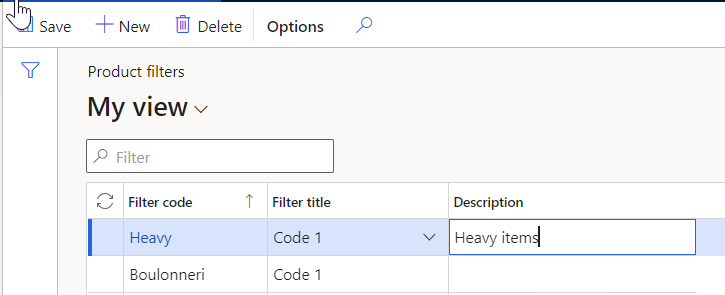
    8117.pastedimage1650489028584v1.png

    Then I would assign this value to all relevant items so that I can use that criteria to select which Location Directive will be used:

    6825.pastedimage1650489133705v2.png 

    Then for the related Loaction Directive, I would add this new criteria indicating that this Location Directive is used when <Code 1 = Heavy>.  In the Location Directive Actions, the query would also point to a specific Location, range of locations or Location Profile.  Note that the sequence number would have to be low enough so that the system consider the criteria before other Location Profile.  By this I mean that  system examines each location directives sequentially until it finds a Location Directive that qualifies, so you will want the more restrictive queries lower in the sequence so that system considers them before the less restrictive criteria. 
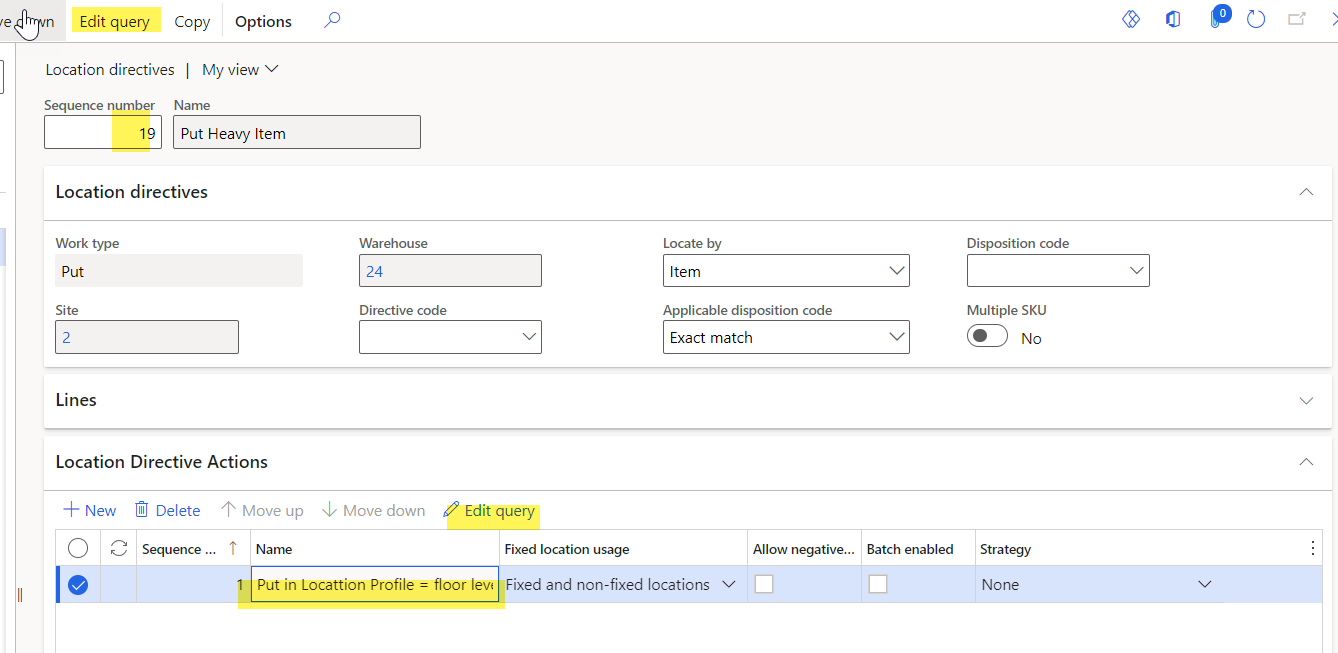
    5633.pastedimage1650489479749v4.png

    Here is a sample of Query at the Location Directive "header".
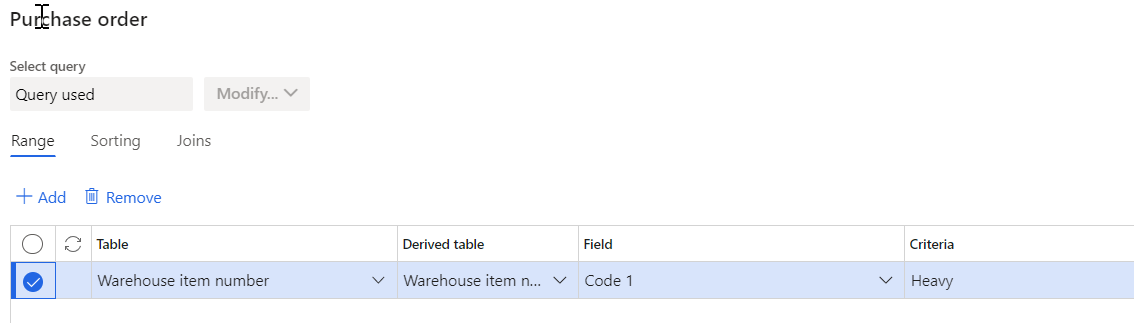
     7268.pastedimage1650489365526v3.png

    Hope that helps,

    Regards,


    Danny

  • Naveen Mishra Profile Picture
    4 on at

    Hi Danny,

    After set up filter code 40 LB It going to defined locations in location directive .

    But filter codes going in same locations  .

    How to restrict other filter codes for this location ?

    Please suggest .

    Thanks

    Naveen

  • Suggested answer
    Danny Bilodeau Profile Picture
    4,934 Super User 2026 Season 1 on at

    Hi Naveen,

    The setup I described is just to direct the 40 Lb items to the desired locations; directed put away using a filter code as a criteria. If your Location Directives are sequenced properly, other Filter Codes should not be directed using that Location Directive.  If you want that logic to apply to Inventory Movement work or Finished Goods put-away work (any type of directed put work), you will need to replicate that Location Directive set-up for these work types.  

    When you say <But filter codes going in same locations>, nothing will not prevent a worker to move (using movement function) an item with a different code into locations that should be reserved for the 40 lbs items.  There is no standard functionality to limit use of a location to an item or items that share a property.  In your Location Profiles, you can prevent mixing items (or inventory status) in a location.  But that is the extent of it.

    Hope that clarifies this point.

    Regards,

    Danny

Under review

Thank you for your reply! To ensure a great experience for everyone, your content is awaiting approval by our Community Managers. Please check back later.

Helpful resources

Quick Links

Introducing the 2026 Season 1 community Super Users

Congratulations to our 2026 Super Stars!

Meet the Microsoft Dynamics 365 Contact Center Champions

We are thrilled to have these Champions in our Community!

Congratulations to the March Top 10 Community Leaders

These are the community rock stars!

Leaderboard > Supply chain | Supply Chain Management, Commerce

#1
Mallesh Deshapaga Profile Picture

Mallesh Deshapaga 326

#2
Laurens vd Tang Profile Picture

Laurens vd Tang 233 Super User 2026 Season 1

#3
Syed Haris Shah Profile Picture

Syed Haris Shah 136 Super User 2026 Season 1

Last 30 days Overall leaderboard

Product updates

Dynamics 365 release plans
