web
You’re offline. This is a read only version of the page.
close
Skip to main content

Notifications

Announcements

No record found.

Community site session details

Community site session details

Session Id :
Small and medium business | Business Central, N...
Unanswered

Archive Purchase Orders

(0) ShareShare
ReportReport
Posted on by 65

I am looking to produce a report on Jobs, which needs to pull data from Purchase Orders, including both live and archived,

In https://community.dynamics.com/business/f/dynamics-365-business-central-forum/397185/need-a-report-to-list-both-archive-and-non-archive-purchase-order/1072847#1072847 the suggestion is that the report / query needs to loop through both purchase order headers/lines and archived headers/lines.  I can deal with this, but cannot find where the data is stored. I have been able to create a customer report detailing all archive POs (headers and lines), by modifying report ID 416, but cannot see how I can make this available to Power BI.

I would be grateful if someone out there could let me know what table numbers the two archive tables are, or how to expose the through API/OData to import into Power BI.

Thanks in advance.

Simon

I have the same question (0)
  • tlhgolfer Profile Picture
    23 on at

    Simon,

    As a rule if I am ever looking for what table the data is found in I usually will go to that list page by maybe searching the Tell Me.  I will then bring up that page and go to the question mark in the right corner and choose Help & Support.  I will then go to the link under TroubleShooting and choose Inspect pages and data you can also get to this by typing Ctrl + Alt + F1, but who remembers that!  it will open the page inspector and you can see the table where your data is stored.

    pastedimage1629866382727v2.png

    You can then take this number to the web services page and create an odata link to so that you can get to the data in Power Bi.

    Search Web Services in Tell Me.

    Add a New Web Service by entering the page and the number from the page inspector and you can use the odata in Power Bi to get to the data.  You may need multiple tables such as a header and detail possibly.

    pastedimage1629866469128v3.png

    Tanya

  • Simon A Profile Picture
    65 on at

    Hi Tanya

    Thank you for the comprehensive answer.  I am struggling to get at the archive line data.  I have created the link as you detail above, but it only draws back the header archive data.

    Looking at the info box, I can see that I need table 5110, from sub-form 5168 which feeds off of 5167.
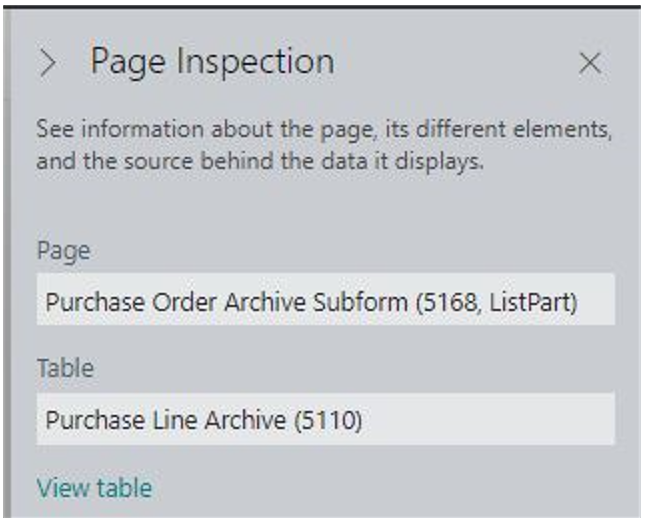
    pastedimage1629882331815v1.png

    However, when I try to create an OData link for 5167 (Header) or 5168 (Line) and link to it in Power BI, I get an error message (image edited to remove confidential data).  BC shows their page references as Purchase Order Archive (5167, Document) and Purchase Order Archive Subform (5168, ListPart) :
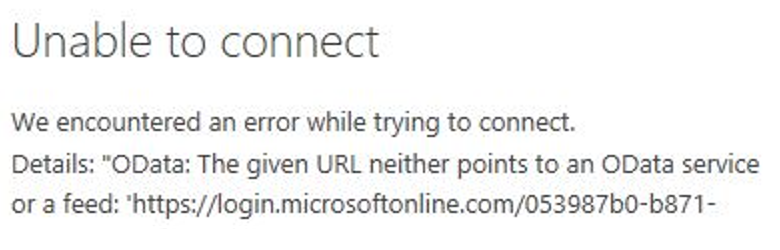

    pastedimage1629882674834v2.png

    pastedimage1629882720565v3.png

    I have created the link in exactly the same way as I have for other pages and they work fine, so I don't think I've done something wrong.  Is it because they are subform and document rather than straightforward pages and, if so, how can I get the table exposed to Power BI instead, please?

    Thank in advance.

    Regards

    Simon

Under review

Thank you for your reply! To ensure a great experience for everyone, your content is awaiting approval by our Community Managers. Please check back later.

Helpful resources

Quick Links

Responsible AI policies

As AI tools become more common, we’re introducing a Responsible AI Use…

Neeraj Kumar – Community Spotlight

We are honored to recognize Neeraj Kumar as our Community Spotlight honoree for…

Leaderboard > Small and medium business | Business Central, NAV, RMS

#1
OussamaSabbouh Profile Picture

OussamaSabbouh 2,990

#2
Jainam M. Kothari Profile Picture

Jainam M. Kothari 1,576 Super User 2025 Season 2

#3
YUN ZHU Profile Picture

YUN ZHU 1,028 Super User 2025 Season 2

Last 30 days Overall leaderboard

Featured topics

Product updates

Dynamics 365 release plans
