web
You’re offline. This is a read only version of the page.
close
Skip to main content

Announcements

No record found.

News and Announcements icon
Community site session details

Community site session details

Session Id :
Microsoft Dynamics 365 | Integration, Dataverse...
Answered

Run as Workflow won't show - except all Processes are disabled

(0) ShareShare
ReportReport
Posted on by 50

Hello community,

I think I'm gonna bite off a piece of my desktop soon...

We have the same problem as many people that the "Run as workflow" option isn't working correctly. All the mentioned solutions over the Forum have not worked yet.

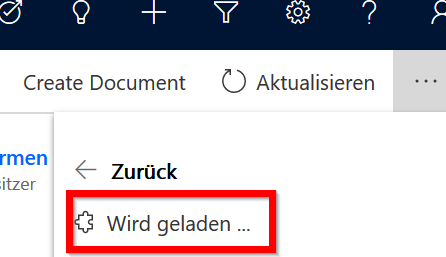
In general the workflow tab will show when all the Dynamics processes are disabled. Microsoft Flows are shown then. However, as soon if you only enable one Danymics process the complete tab shows only that it is loading something, but nothing ever shows up.

step one:
pastedimage1585141461015v1.png

and then it shows this forever:

pastedimage1585141499475v2.png

it is the german version running in the EU cloud.

Please help!!

I have the same question (0)
  • Suggested answer
    Henry J. Profile Picture
    5,237 on at

    This looks like a bug, as this works form. I get the list of Flows or Workflows shortly after the "Loading" part displays:

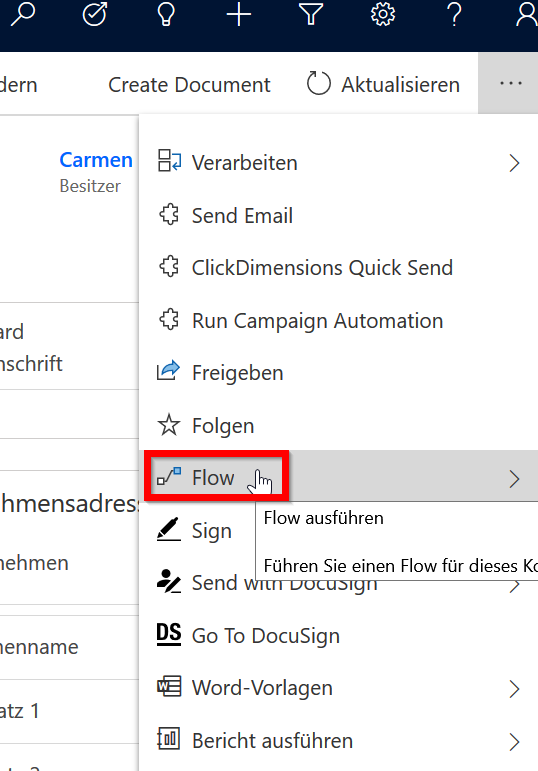
    Step 1: launch the Flow button:

    pastedimage1585142417875v3.png

    Step 2: Choose the Flow or Workflow to run:

    pastedimage1585142387904v1.png

    Please reach out to support here so we can help you troubleshoot that issue: https://admin.powerplatform.microsoft.com/support

  • DerAndreas Profile Picture
    50 on at

    i did that. now I'll have to wait. thank you for your answer

  • Verified answer
    DerAndreas Profile Picture
    50 on at

    Great!

    Microsoft Support solved the problem. It wasn't possible to do this from the user side.

    The problem was caused from a language setting, based on how the system was setup. Apparently there is no problem when the system is originally installed in english and german is added as language. However, if you have the system installed in german this somehow happens.

    In the end the disply language had to be re-provisioned which had to be done by a script from microsofts side.

    i suppose there will be coming more people having this same problem. solution is contact microsoft.

  • Henry J. Profile Picture
    5,237 on at

    Great to hear that you issue is fixed, thank you for sharing this!

Under review

Thank you for your reply! To ensure a great experience for everyone, your content is awaiting approval by our Community Managers. Please check back later.

Helpful resources

Quick Links

Introducing the 2026 Season 1 community Super Users

Congratulations to our 2026 Super Stars!

Meet the Microsoft Dynamics 365 Contact Center Champions

We are thrilled to have these Champions in our Community!

Congratulations to the March Top 10 Community Leaders

These are the community rock stars!

Leaderboard > Microsoft Dynamics 365 | Integration, Dataverse, and general topics

#1
11manish Profile Picture

11manish 172

#2
ManoVerse Profile Picture

ManoVerse 58 Super User 2026 Season 1

#3
Niki Patel Profile Picture

Niki Patel 42

Last 30 days Overall leaderboard

Product updates

Dynamics 365 release plans