web
You’re offline. This is a read only version of the page.
close
Skip to main content

Notifications

Announcements

No record found.

Community site session details

Community site session details

Session Id :
Small and medium business | Business Central, N...
Answered

Sales invoice doesn't convert $ amount to LCY

(0) ShareShare
ReportReport
Posted on by 10

Hi

Im very new to Dynamics

Ive created multiple sales invoices in various currencies. $, €, AED - the Base currency of the company is AED

On the main Insight pages, it shows the amount as a sum of all invoices but currency as AED without converting the other currencies into AED. Similarly the sales invoice list also shows the currency as $ but under LCY shows the amount as the $ amount instead of converting.

Exchange rates are setup

please help5756.Screenshot-2020_2D00_05_2D00_17-14.20.55.png7658.Screenshot-2020_2D00_05_2D00_17-14.18.38.png

I have the same question (0)
  • MartinNL Profile Picture
    480 on at

    Hi,

    Can you share a screenshot of the exchange rates that you have setup? Seems like it's a 1:1 exch rate. 

    P.S. when adding/changing exchange rates you will have to run the "Adjust Exchange Rates" job to take effect on the customer/vendor balances.

    Regards,

    Martin

  • mohsenask Profile Picture
    10 on at

    0564.Screenshot-2020_2D00_05_2D00_17-18.23.23.png5545.Screenshot-2020_2D00_05_2D00_17-18.22.36.png5344.Screenshot-2020_2D00_05_2D00_17-18.22.03.png0513.Screenshot-2020_2D00_05_2D00_17-18.22.23.png

    Hi Martin

    I have exchange rates for two dates defined. Ive run the Adjust Exchange Rates job too several times

    Nothing seems to be working. I think there's some basic configuration that I have missed.

    Appreciate your help

    Mohsen

  • Suggested answer
    MartinNL Profile Picture
    480 on at

    Hi,

    I see the issue, you have created the exchange rate at a ratio of 1:1. You need to have the rate for the currency code you are setting up to 1 or 100 depending on how you want to calculate the rates. You need to define the calculation of: 1 AED = 0.272253 USD.

    2020_2D00_05_2D00_19_5F00_0929.png

    This is my setup for reference, my base currency is EUR, this defines exchange rates against the USD, so the "exchange rate" = USD and Relational Exchange Rate = EUR (blank) and AED.
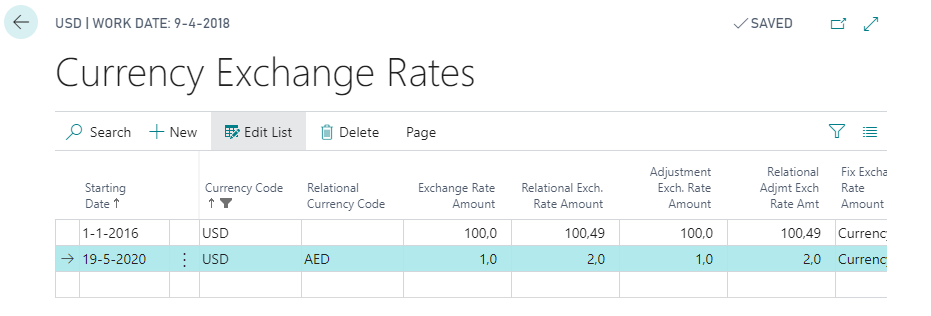
    pastedimage1589874527656v1.png

    Additional notes:

    1. The adjust exchange rates won't work because there is nothing to adjust (no difference between AED and USD).

    2. If AED is your base currency it is not necessary to have a currency setup for AED because a "blank" currency code = your base currency in BC. 

    I hope that helps, let me know how you get on 

    Regards,

    Martin

  • mohsenask Profile Picture
    10 on at

    Hi Martin

    I made the changes like you mentioned

    I ran the Adjust Exchange Rates job after this - still no luck. Any ideas. Thanks again mate. 

    Regards

    Mohsen

    Screenshot-2020_2D00_05_2D00_19-at-13.05.42.png

    Screenshot-2020_2D00_05_2D00_19-at-13.04.16.png

  • Verified answer
    MartinNL Profile Picture
    480 on at

    Hi Mohsen,

    So you still have a 1:1 exchange rate setup.

    If I talk about the lines you have in the screenshot for the "currency exchange rates", you have these 2 lines:

    Currency Code Relational Currency Code Exchange Rate Amount Relational Exch. Rate Amount Adjustment Exch. Rate Amount Relational Adjumt Exch Rate Amt Fix Exchange Rate Amount
    AED "Blank" (which means AED since its your base currency). 1 1 1 1 Currency
    AED USD 0.272259 0.272259 0.272259 0.272259 Currency

    Both of these lines are creating a 1:1 ratio and will not adjust anything. Try creating the lines like this:

    Currency Code Relational Currency Code Exchange Rate Amount Relational Exch. Rate Amount Adjustment Exch. Rate Amount Relational Adjumt Exch Rate Amt Fix Exchange Rate Amount
    "Blank" (which means AED since its your base currency) USD 1 0.272259 1 0.272259 Currency
    AED USD 1 0.272259 1 0.272259 Currency

    Remember:

    - The columns "Exchange Rate Amount" & "Relational Exch. Rate Amount" is the rate that will be used when a USD invoice/Journal is created.

    - The columns "Adjustment Exch. Rate Amount" & "Relational Adjumt Exch Rate AMT" is the rates that will be used during adjustment routine.

    Hope that makes sense.

    Martin

  • mohsenask Profile Picture
    10 on at

    Hi Martin

    I made the changes as advised. Really appreciate your efforts here. I also had to enter an exchange rate for USD to AED under the USD currency card.

    Ran the job again and it seems to have made some weird adjustments. Thanks again for your support here.

    Although Im still trying to understand that logic here but lets get it working then I can try and figure out the logic for other currencies when I have to add it

    Screenshot-2020_2D00_05_2D00_19-14.10.37.pngScreenshot-2020_2D00_05_2D00_19-14.09.42.pngScreenshot-2020_2D00_05_2D00_19-14.09.30.png

    Regards

    Mohsen

  • mohsenask Profile Picture
    10 on at

    Cant have the currency code BLANK while defining exchange. it always picks up the BASE CURRENCY which is AED

Under review

Thank you for your reply! To ensure a great experience for everyone, your content is awaiting approval by our Community Managers. Please check back later.

Helpful resources

Quick Links

Responsible AI policies

As AI tools become more common, we’re introducing a Responsible AI Use…

Neeraj Kumar – Community Spotlight

We are honored to recognize Neeraj Kumar as our Community Spotlight honoree for…

Leaderboard > Small and medium business | Business Central, NAV, RMS

#1
OussamaSabbouh Profile Picture

OussamaSabbouh 3,143

#2
Jainam M. Kothari Profile Picture

Jainam M. Kothari 1,694 Super User 2025 Season 2

#3
YUN ZHU Profile Picture

YUN ZHU 1,067 Super User 2025 Season 2

Last 30 days Overall leaderboard

Featured topics

Product updates

Dynamics 365 release plans
