web
You’re offline. This is a read only version of the page.
close
Skip to main content

Notifications

Announcements

No record found.

Community site session details

Community site session details

Session Id :
Small and medium business | Business Central, N...
Answered

How to add Vendor table in Change log entry to maintain vendor log entries. ?

(0) ShareShare
ReportReport
Posted on by 387

Dear Experts,

I want to add the "Vendor " table in Change log entry to maintain vendor log entries. Please help me to resolve it.

I have the same question (0)
  • Suggested answer
    JAngle Profile Picture
    133 on at

    Go to change log setup. From there you can add the tables you want to track changes for all fields or selected.

  • Verified answer
    Renato Fajdiga Profile Picture
    1,853 on at

    Hi,

    navigate to the Change Log Setup and then in action bar click on Tables. Find table 23 Vendor and then select what you want to track.

    Best regards,

    Renato

  • Suggested answer
    Nitin Verma Profile Picture
    21,708 Moderator on at

    Hi, 

    You can activate Change Log Setup by entering Table ID as 27, also you can activate particular field level too, Like Insertation, Delete or Modify.

    pastedimage1591180224807v1.png

  • Verified answer
    srttel Profile Picture
    on at

    Beside all other correct answer, just want to add the offical documenation.

    Auditing Changes in Business Central:

    docs.microsoft.com/.../across-log-changes

  • Suggested answer
    RockwithNav Profile Picture
    8,637 Super User 2025 Season 2 on at

    And what did you tried so far?

  • Verified answer
    Gulshan Shubham Profile Picture
    2,210 on at

    @RockWithNav: It's my request to you to not mark your response as "Suggested Answer" when it's not. I am noticing it from a very longer time that you get into any question thread which has already got a justified and a correct answer, still you just write something insignificant which is not even close to a genuine answer. Not a fair way to climb the badge ladder. So, request you to stop this. This community is to help , get help and learn and not to fulfill your personal interest. Just to promote this act of helping each other and sharing the knowledge and to motivate the persons who are doing so, microsoft is awarding badges. Don't misuse it only for your own interest. I wouldn't have said all this. But, I am noticing you from a very longer time and you just crossed the threshold. So, my kind request, stop this now.

  • Verified answer
    Rabin Profile Picture
    2,976 on at

    Hi,

    Change Log Entries is based on "AllObjWithCaption" table which is a Virtual Table. The virtual table is a lookup table of functions used to resolve function calls in a dynamic/late binding manner.

    This is a read only table and so you can not enter record into this table.

    All the basic default tables should already be present in this table and so you should be able to turn it on.  just make sure there are no filters on the page. 

    Please refer to the screenshot below:

    Departments/Administration/IT Administration/General/Change Log Setup
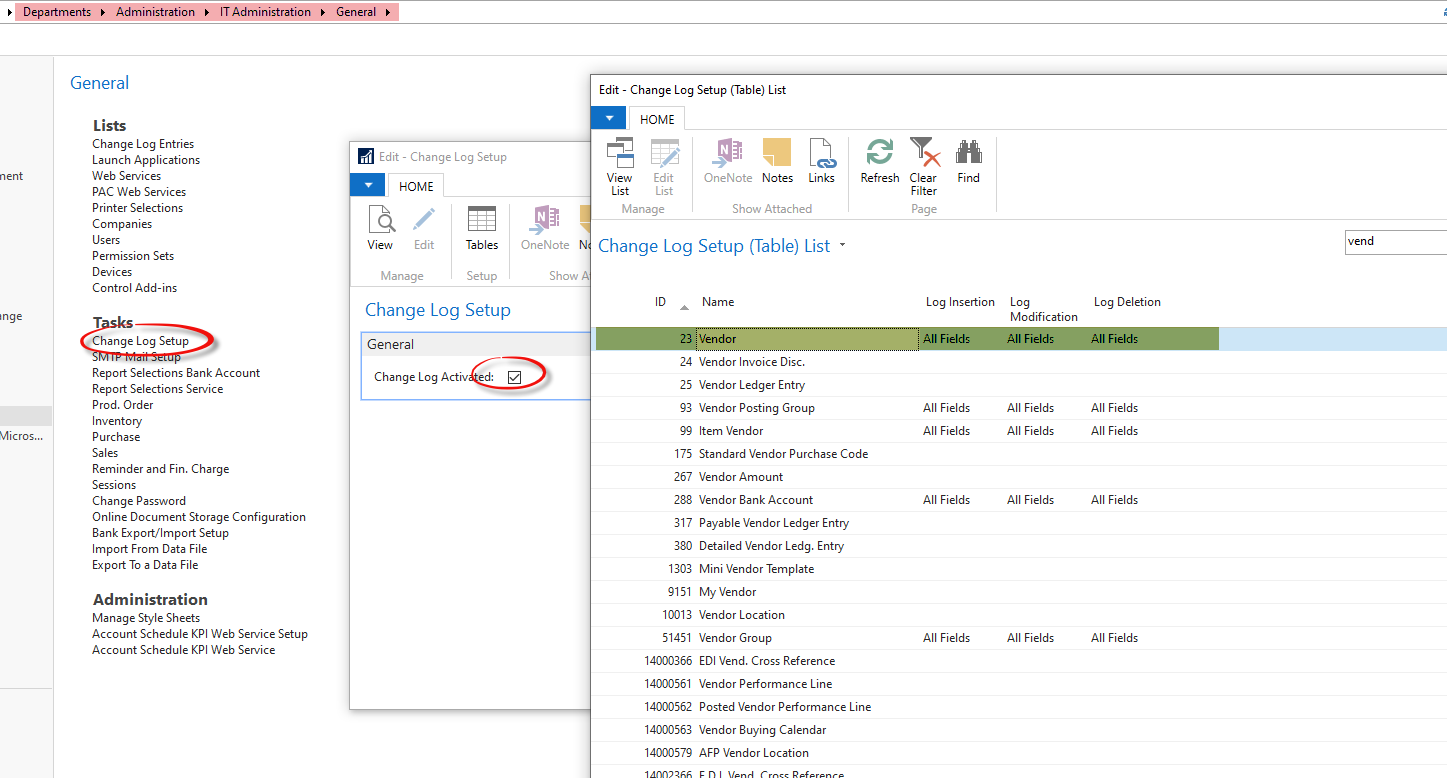
    CLE.png

  • navision begginers Profile Picture
    387 on at

    resolved

  • Suggested answer
    Nitin Verma Profile Picture
    21,708 Moderator on at

    Absolutely correct. Gulshan

Under review

Thank you for your reply! To ensure a great experience for everyone, your content is awaiting approval by our Community Managers. Please check back later.

Helpful resources

Quick Links

Responsible AI policies

As AI tools become more common, we’re introducing a Responsible AI Use…

Neeraj Kumar – Community Spotlight

We are honored to recognize Neeraj Kumar as our Community Spotlight honoree for…

Leaderboard > Small and medium business | Business Central, NAV, RMS

#1
OussamaSabbouh Profile Picture

OussamaSabbouh 2,238

#2
YUN ZHU Profile Picture

YUN ZHU 773 Super User 2025 Season 2

#3
Sumit Singh Profile Picture

Sumit Singh 630

Last 30 days Overall leaderboard

Featured topics

Product updates

Dynamics 365 release plans
