web
You’re offline. This is a read only version of the page.
close
Skip to main content

Notifications

Announcements

No record found.

Community site session details

Community site session details

Session Id :
Microsoft Dynamics CRM (Archived)

SSRS Instance is empty

(0) ShareShare
ReportReport
Posted on by 125

Dears,

i am new to setting up a server and all things come with it, i have followed a guide for installing MS Dynamic CRM 2013 on VM, and when it comes to the installing of CRM reporting Extension i get an empty SSRS Instance, i am using the following :

- Windows Server 2012 R2 x64

- Microsoft® SQL Server® 2012 Service Pack 1 (SP1) and tried also Microsoft® SQL Server® 2008 Express.

and this is the issue i am facing:
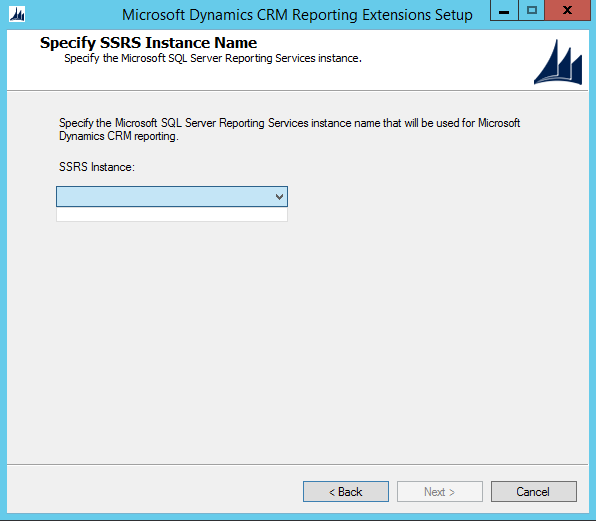
and these are my settings on Reporting service configuration manager:

*This post is locked for comments

I have the same question (0)
  • Suggested answer
    Aileen Gusni Profile Picture
    44,524 on at

    Hi, Do you install CRM and Database on 2 different servers, at least?

    If yes, then you should install the SSRS connector to the Database Server, not the CRM Apps Server.

    If you only install to one server, CRM + Database, then check the Reporting Service is that running in services.msc?

    Then you should use Brightstar\crm.admin as your login ID as well, if still cannot, then try to restart the server (both if you use more than 1)

    Hope it helps!

    Thanks.

  • Verified answer
    Mohamed Saknab Profile Picture
    125 on at

    thank you Aileen for your reply, i have both on same pc, i think it is because the sql server is x32, i will try to remove it an install sql server 2014 x64 but i don't know if it is compatible or not.

  • luoyong Profile Picture
    on at

    Maybe you installed unsupported SQL Server, such as X86 SQL Server, please use select @@version to check it.

  • Community Member Profile Picture
    on at

    I have a similar issue  CM2013\SQL2014( on a instance <Server\Instance>)... Any resolutions? or thoughts?

  • Ronny Van der Snickt - Profility Profile Picture
    10 on at

    We had SQL 2008 SP1, but you need at least SP3 (or R2 SP1)

    support.microsoft.com/.../installation-of-microsoft-dynamics-crm-reporting-extensions-fails-to-locate-ssrs-instance

    Microsoft Dynamics CRM 2013:

    Microsoft SQL Server 2008 x64 SP3

    Microsoft SQL Server 2008 x64 R2 SP2

    Microsoft SQL Server 2012 x64 SP1

  • Community Member Profile Picture
    on at

    Thank you @Alieen! I had same problem and it's solved!

Under review

Thank you for your reply! To ensure a great experience for everyone, your content is awaiting approval by our Community Managers. Please check back later.

Helpful resources

Quick Links

Responsible AI policies

As AI tools become more common, we’re introducing a Responsible AI Use…

Neeraj Kumar – Community Spotlight

We are honored to recognize Neeraj Kumar as our Community Spotlight honoree for…

Leaderboard > 🔒一 Microsoft Dynamics CRM (Archived)

#1
SA-08121319-0 Profile Picture

SA-08121319-0 4

#1
Calum MacFarlane Profile Picture

Calum MacFarlane 4

#3
Alex Fun Wei Jie Profile Picture

Alex Fun Wei Jie 2

Last 30 days Overall leaderboard

Featured topics

Product updates

Dynamics 365 release plans
