web
You’re offline. This is a read only version of the page.
close
Skip to main content

Announcements

No record found.

News and Announcements icon
Community site session details

Community site session details

Session Id :
Small and medium business | Business Central, N...
Suggested Answer

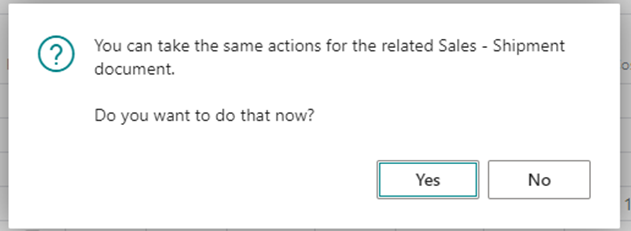
Ability to hide/default "You can take the same actions for the related Sales - Shipment document"

(0) ShareShare
ReportReport
Posted on by

We have an issue where often times we get the prompt when sending a sales order, "You can take the same actions for the related Sales - Shipment document with a prompt of yes or no. In our case, the answer is always going to No. Is there a way to default that/turn it off/etc?
pastedimage1662057782622v1.png

I have the same question (2)
  • Suggested answer
    Marco Mels Profile Picture
    Microsoft Employee on at

    Hello,

    I believe this comes from Codeunit 80 (SendShipmentAlsoQst), at least in BC. Maybe you can take a look in that codeunit and debug when this popup shows up and when not.

    Thank you.

  • Suggested answer
    Karan Mehta Profile Picture
    8 on at

    Hello,

    If this type of notification keeps on popping- You can try and check - My Notification (Type in Tell me bar)

    Turn of the below Line - i.e. Confirm after Posting Documents and see if the same works for you or not (Screenshot Below)

    pastedimage1662197089476v1.png

    If the same works for you, please let me know. 

    Regards

    Karan

  • Suggested answer
    Amit Baru Profile Picture
    3,037 on at

    Hi,

    Pls explain. You have issue with message or Yes or No. option.

    Regards

    Amit Sharma

    www.erpconsultors.com

    https://www.linkedin.com/in/amit-sharma-94542440/

  • kjjson Profile Picture
    on at

    The issue is that every time it pops open, the answer is always going to be No, so looking at the best way to handle that.

  • kjjson Profile Picture
    on at

    I will test this and see. The issue here is that this one also includes every message after posting of the "This order has been posted as invoice XXXXX do you want to open it" and seems to be an all-or-nothing selection.

Under review

Thank you for your reply! To ensure a great experience for everyone, your content is awaiting approval by our Community Managers. Please check back later.

Helpful resources

Quick Links

Introducing the 2026 Season 1 community Super Users

Congratulations to our 2026 Super Stars!

Meet the Microsoft Dynamics 365 Contact Center Champions

We are thrilled to have these Champions in our Community!

Congratulations to the March Top 10 Community Leaders

These are the community rock stars!

Leaderboard > Small and medium business | Business Central, NAV, RMS

#1
OussamaSabbouh Profile Picture

OussamaSabbouh 1,969 Super User 2026 Season 1

#2
YUN ZHU Profile Picture

YUN ZHU 1,143 Super User 2026 Season 1

#3
Khushbu Rajvi. Profile Picture

Khushbu Rajvi. 688 Super User 2026 Season 1

Last 30 days Overall leaderboard

Featured topics

Product updates

Dynamics 365 release plans
