web
You’re offline. This is a read only version of the page.
close
Skip to main content

Announcements

No record found.

News and Announcements icon
Community site session details

Community site session details

Session Id :
Microsoft Dynamics GP (Archived)

GP2018 Workflow Setup security

(0) ShareShare
ReportReport
Posted on by 18

Hi,

We have a GP user who is a Workflow Manager within the Payables Batch Workflow. He is not a GP Poweruser, but is an Accounting Manager. We've added all the Workflow selections.

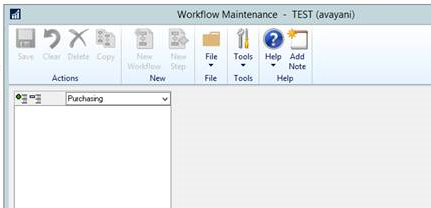
However, he does not see any of the workflows in the Workflow Maintenance window. Please see screenshot.

What are we missing?
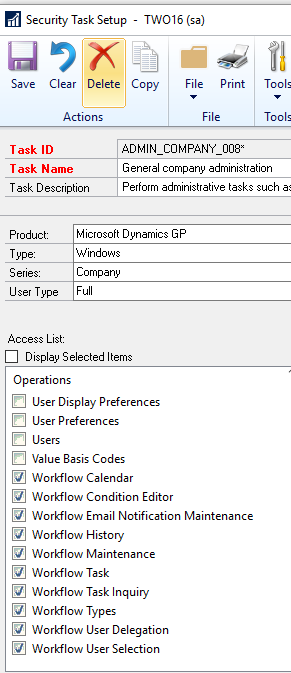
HOPE-WF-1.PNG

HOPE-WF-2.PNG

Thanks,

Linda

*This post is locked for comments

I have the same question (0)
  • Verified answer
    Derek Albaugh Profile Picture
    Microsoft Employee on at

    Hello Linda,

    By default, unless a user is a PowerUser, they will not see all of the Workflow types in the Workflow Maintenance window, they will only see those workflows for which they are assigned as a manager for.

    For example, you mentioned the user is a manager for the Payables Batch Approval workflow, so that would be the only workflow this user would/should see in the Workflow Maintenance window.

    If the user is assigned as a workflow manager for the Payables Batch Approval workflow, but doesn't see that workflow under the Workflow Maintenance window, have the user try logging out of Dynamics GP and back in, as it should show them that workflow. If it still doesn't, try removing them as a workflow manager, saving changes, then adding them back as a manager and test again.

    If it still doesn't work, then we may need to look at that user's Windows account in Active Directory as well as the Workflow tables to verify this user is being written as a workflow manager for the workflow type, especially if all other workflow managers that are not PowerUsers are working fine.

    Thanks,

  • Linda Brock Profile Picture
    18 on at

    Thank you Derek, that explains it perfectly.

    Linda

Under review

Thank you for your reply! To ensure a great experience for everyone, your content is awaiting approval by our Community Managers. Please check back later.

Helpful resources

Quick Links

Introducing the 2026 Season 1 community Super Users

Congratulations to our 2026 Super Stars!

Meet the Microsoft Dynamics 365 Contact Center Champions

We are thrilled to have these Champions in our Community!

Congratulations to the March Top 10 Community Leaders

These are the community rock stars!

Leaderboard > 🔒一 Microsoft Dynamics GP (Archived)

Last 30 days Overall leaderboard

Featured topics

Product updates

Dynamics 365 release plans