web
You’re offline. This is a read only version of the page.
close
Skip to main content

Notifications

Announcements

No record found.

Community site session details

Community site session details

Session Id :
Microsoft Dynamics CRM (Archived)

Business Process Flow - How to automatically select sales order when convert opportunity to order ?

(0) ShareShare
ReportReport
Posted on by

Hi i want to ask how to automatically select sales order in bussiness process flow when go to next stage from opportunity to stage in order ?

First i have business process flow that will show in lead, opportunity and than order. When im at opportunity, i create quote
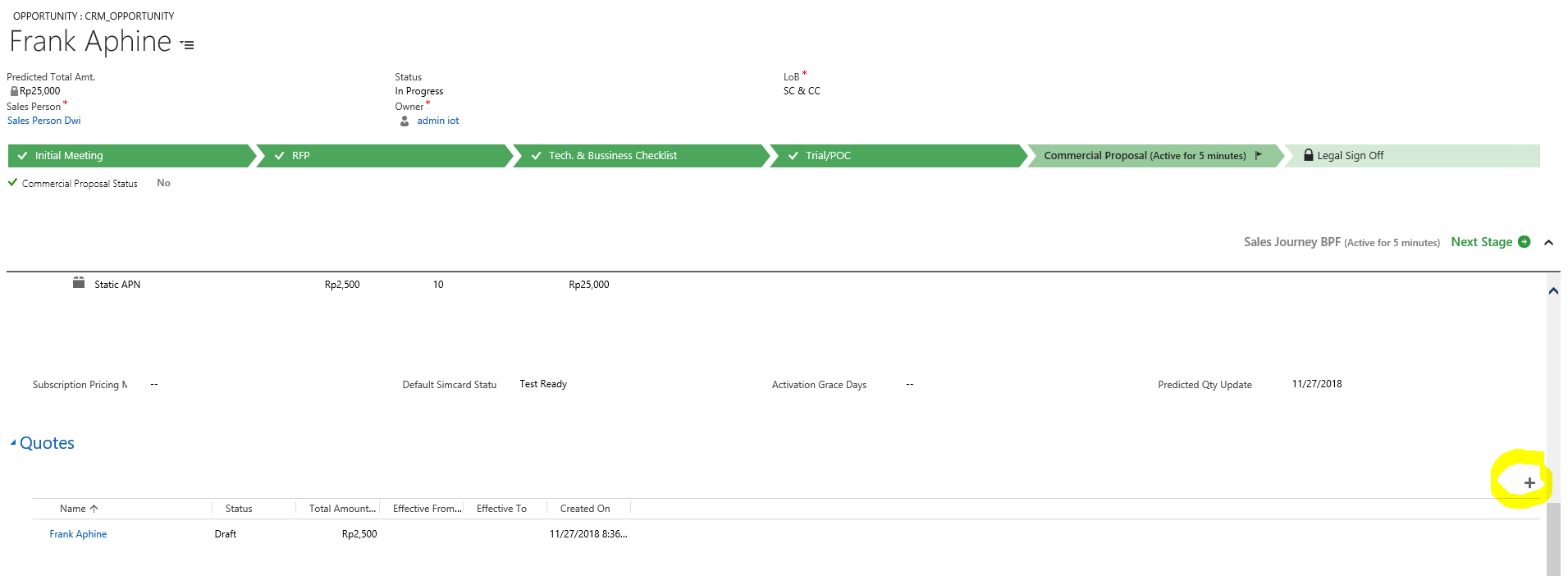
4532.opp.PNG

 and than convert that quote to sales order.
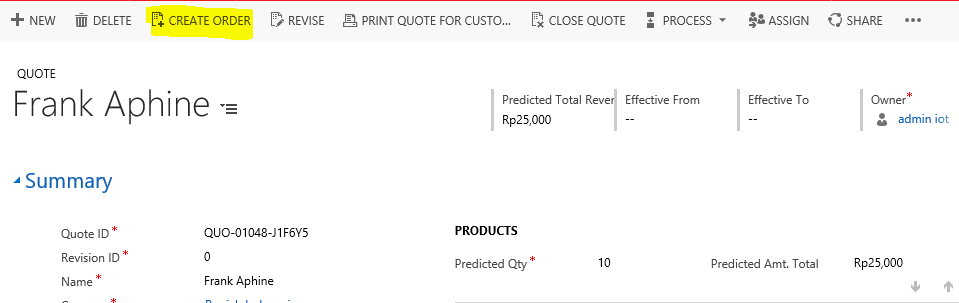
0312.quote.PNG

After order created, it doesn't automatically assign the business process flow to that order
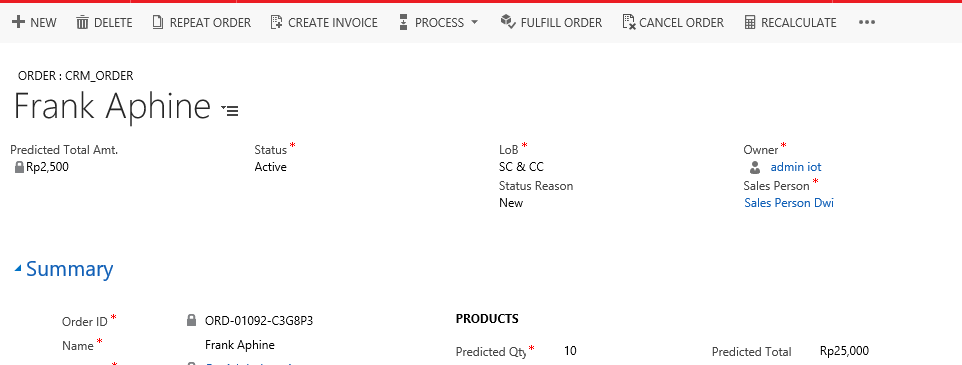
7750.order1.PNG

i must select the order manually from bussiness process flow when go to next stage to make the business process flow appears to that order
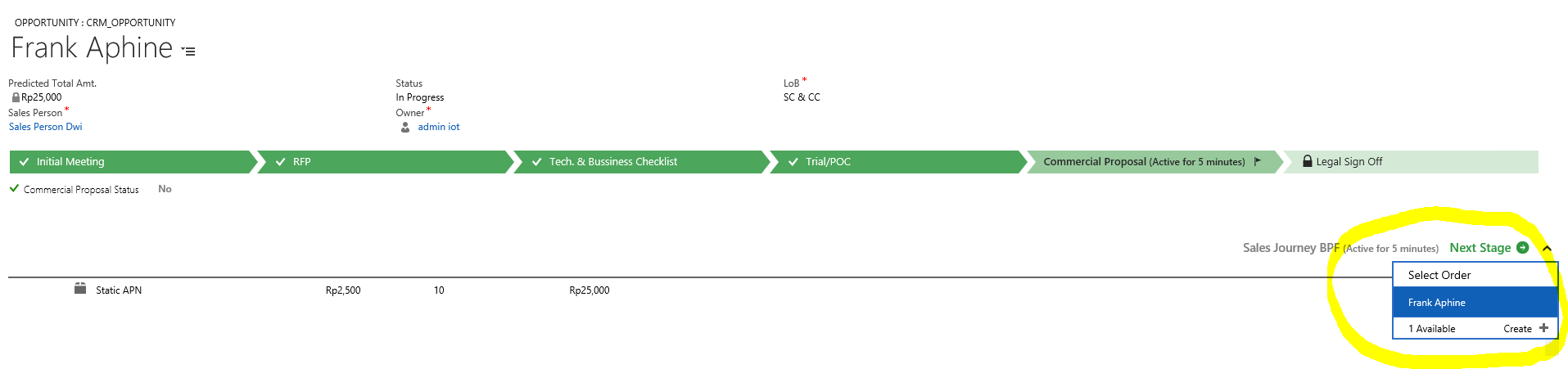
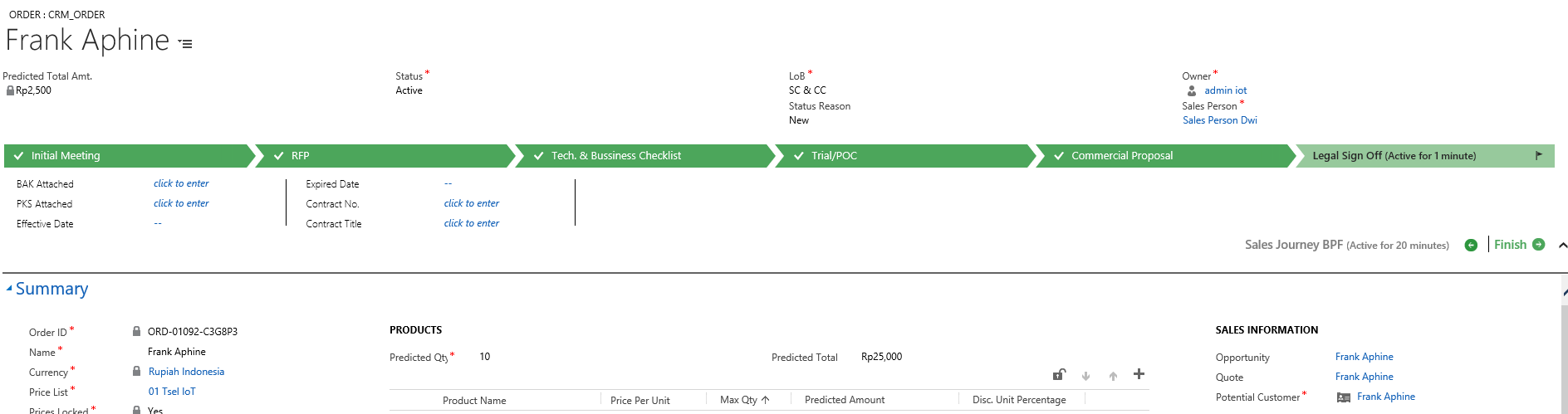
5102.bpf.PNG

opppp2.PNG

How to automatically assign sales order to that bpf without select it manually, so when convert to sales order the bpf will appear. In sales order, field opportunity has been filled but still no bpf appear.

Thank you for helping me

*This post is locked for comments

I have the same question (0)
  • Verified answer
    Alex Fun Wei Jie Profile Picture
    33,628 on at

    Hi,

    instead of create order from subgrid, create it via Business Process Flow.

    7288.10.PNG

    7288.10.PNG

    2260.11.PNG

  • Suggested answer
    RaviKashyap Profile Picture
    55,410 Moderator on at

    Hi,

    It appears that currently you have a BF which goes from Opportunity to Order. Instead of this change it to Opportunity >> Quote >> Order and as suggested above, use the BPF option to create Quote >> Create Order

    Hope this helps.

  • Community Member Profile Picture
    on at

    Hi Wei Jie Fun and Ravi Kashyap

    Thank you for your suggestion but if i create order via BPF and click new order it does not copy automatic opportunity value.

    When i create Quote from subgrid it will copy all Opportunity -> to Quote -> and copy Quote to Sales Order. It will copy header and detail value automatically.

    4452.t1.png

    When i create order from bpf, this feature does not work so i create quote from subgrid using (+) button and convert to sales order.

    But the problem, sales order that is generated does not show business process flow

  • Suggested answer
    Alex Fun Wei Jie Profile Picture
    33,628 on at

    Hi,

    I've tried to modify the bpf'record, it does not allow us to enter any values before enter to the order stage. So i guess, there is nothing we can do.

    4784.15.PNG

    4380.13.PNG

    unless, 

    you wan to update the traversedpath ( which mean you help user move to next stage).

    3441.14.PNG

    updated sales order and traversedpath

    4784.15.PNG

    Result.

    8765.16.PNG

    If you are ok with above solution, create a plugin, trigger on order created, and update the related bpf's record.

  • Community Member Profile Picture
    on at

    Hi Wei Jie Fun,

    before you suggestion to update traversedpath in BPF Entity, i have tried it.

    I update traversedpath, processid, stageid using plugin post create sales order but the order record still doesn't show the BPF.

    Have you tried create order from quotation subgrid like i show or create it using BPF option?

  • Suggested answer
    Alex Fun Wei Jie Profile Picture
    33,628 on at

    Hi,

    I've tried to create the order from quote, it behave like above picture, I can see the order in bpf.

    Did you update the sales order field in bpf's record?

    Which version you are using?

  • Community Member Profile Picture
    on at

    Yes i have update sales order lookup field and traversedpath (i'm copy traversedpath from BPF record that i have select order manually that bpf have show successfully in order).

    Im using Dynamic 365 On Premise 8.2.2.112 (Version 1612).

    Its strange that order record still does not show that BPF

  • Alex Fun Wei Jie Profile Picture
    33,628 on at

    Hi,

    can you show us the screenshot?

  • Suggested answer
    Alex Fun Wei Jie Profile Picture
    33,628 on at

    Hi,

    futhermore, i updated the traversedpath and sales order, before the order stage. Are you doing the same as I?

  • Community Member Profile Picture
    on at

    Hi.. i will show example screenshoot

    First picture (Frank, order is selected manually) and second picture (Wei, order no selected, but just update the bpf record like your recommendation)

    You can see the traversed path and order lookup

    bj2.PNG

    but when i open the order bpf not show for Wei

    bj2.PNG

    fyi, when i switch process.. for Wei order it doesn't show the bpf

    bj3.PNG

    im update sales order and traversed path after the order is created using plugin with 'post create' pipeline

Under review

Thank you for your reply! To ensure a great experience for everyone, your content is awaiting approval by our Community Managers. Please check back later.

Helpful resources

Quick Links

Responsible AI policies

As AI tools become more common, we’re introducing a Responsible AI Use…

Neeraj Kumar – Community Spotlight

We are honored to recognize Neeraj Kumar as our Community Spotlight honoree for…

Leaderboard > 🔒一 Microsoft Dynamics CRM (Archived)

#1
SA-08121319-0 Profile Picture

SA-08121319-0 4

#1
Calum MacFarlane Profile Picture

Calum MacFarlane 4

#3
Alex Fun Wei Jie Profile Picture

Alex Fun Wei Jie 2

Last 30 days Overall leaderboard

Featured topics

Product updates

Dynamics 365 release plans
