web
You’re offline. This is a read only version of the page.
close
Skip to main content

Announcements

No record found.

News and Announcements icon
Community site session details

Community site session details

Session Id :
Microsoft Dynamics CRM (Archived)

Double Default Public View in Entity

(0) ShareShare
ReportReport
Posted on by

Hello,

I was migrated an "Email Entity" from a development environment to production environment by solution.

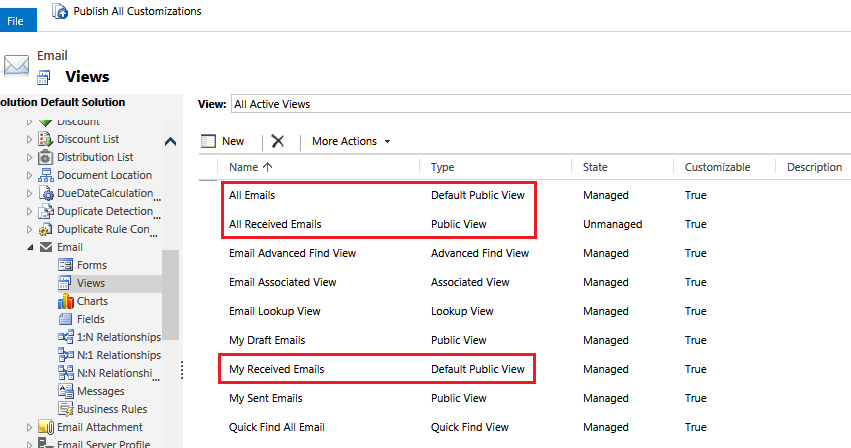
When I check the "Views" of Email, there were two "Default Public View"

"All Emails" and "My Received Emails"
6064.a.png

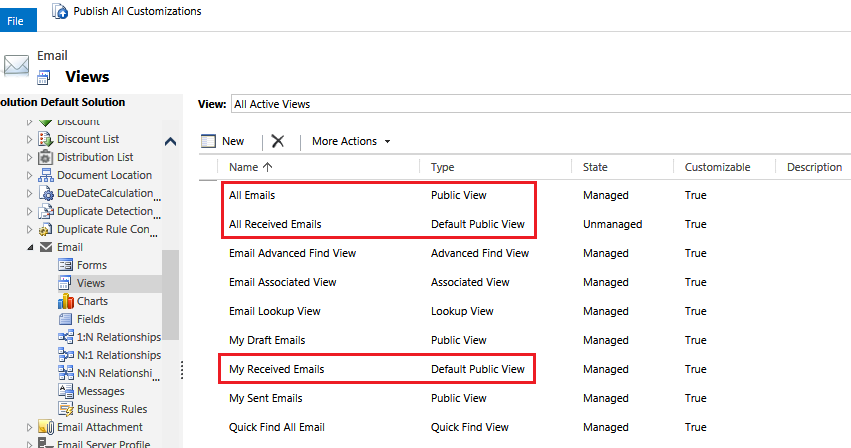
I try to set "All Received Emails" as a default view, but "My Received Emails" remain unchanged
8535.b.png

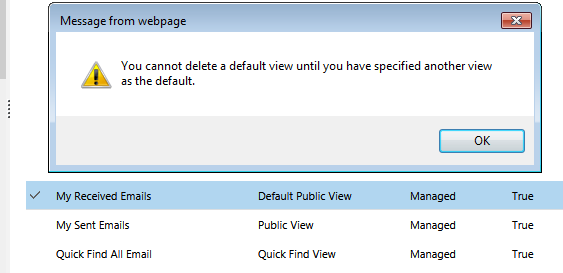
I try to delete "My Received Emails", but I got the following warning.
2350.c.png

Is there a method to remove/delete this extra views?

Thank you!

*This post is locked for comments

I have the same question (0)
  • Suggested answer
    Mahendar Pal Profile Picture
    45,095 on at

    Hi Doll,

    It won't allow you to delete this from UI, you need to change view property from DB or you need to do it by modifying customization.xml file.

    Try to create solution and add email entity, then export your solution, unzip solution and search for isdefault and  

    <isdefault name="Yes">1</isdefault> to <isdefault name="No">0</isdefault> in any of the view. Zip your solution again and import back to CRM.

    Thanks

  • Community Member Profile Picture
    on at

    Hi Mahen,

    Thanks for your prompt reply.

    The exported customization.xml contains only "Unmanaged" view,

    but the "My Received Emails" is a managed view, is it possible to export it?

    If I change it from DB, which table should I edit?

    Regards,

    Doll

  • Mahendar Pal Profile Picture
    45,095 on at

    Just try to do some changes to this view, for example add a new column and then export and see if you are able to find this view.

    Thanks

  • Suggested answer
    BackToTheCrm Profile Picture
    on at

    Hello Doll,

    You cannot delete a OOB system view but you can deactivate it if you want, check the More Actions menu.

  • Verified answer
    Community Member Profile Picture
    on at

    Even if you deactivate one of the default views, you can still have problems, such as adding components to dashboards.

    Not sure if any of the ideas in this other thread might help you:

    https://community.dynamics.com/crm/f/117/p/164685/425842#425842

  • Verified answer
    Community Member Profile Picture
    on at

    Thank you all your reply, especially to Adam.

    I try the suggestion by "Chris Chan responded on 4 Sep 2015 1:41 AM" on the link you gave.

    The result is positive.

  • Community Member Profile Picture
    on at

    I had the same view and I followed below solution:

    Problem: If you have 2 views which are default public view and you can't delete them

    1. Create 3rd view Temp

    2. Make it Default public view

    3. Now one of 2 views which was made default first, gets converted to public view

    4. Delete that view

    5. Now Temp is still Default public view

    6. Open Temp view

    7. Use delete view option from inside the view

    link I followed:

    pragmaticpizza.blogspot.com/.../microsoft-dynamics-crm-correcting.html

  • Community Member Profile Picture
    on at

    I'll add one more step - if you cannot see the "Delete" option from inside the view, remove "&default=1" from the URL and reload the page. I hate this kind of hacking but it seems to work.

Under review

Thank you for your reply! To ensure a great experience for everyone, your content is awaiting approval by our Community Managers. Please check back later.

Helpful resources

Quick Links

Introducing the 2026 Season 1 community Super Users

Congratulations to our 2026 Super Stars!

Meet the Microsoft Dynamics 365 Contact Center Champions

We are thrilled to have these Champions in our Community!

Congratulations to the March Top 10 Community Leaders

These are the community rock stars!

Leaderboard > 🔒一 Microsoft Dynamics CRM (Archived)

#1
JS-09031509-0 Profile Picture

JS-09031509-0 3

#2
AS-17030037-0 Profile Picture

AS-17030037-0 2

#2
Mark Eckert Profile Picture

Mark Eckert 2

Last 30 days Overall leaderboard

Featured topics

Product updates

Dynamics 365 release plans
