web
You’re offline. This is a read only version of the page.
close
Skip to main content

Announcements

No record found.

News and Announcements icon
Community site session details

Community site session details

Session Id :
Microsoft Dynamics CRM (Archived)

Closing an appointment changes the "Show As"-Field in Outlook to Free

(0) ShareShare
ReportReport
Posted on by

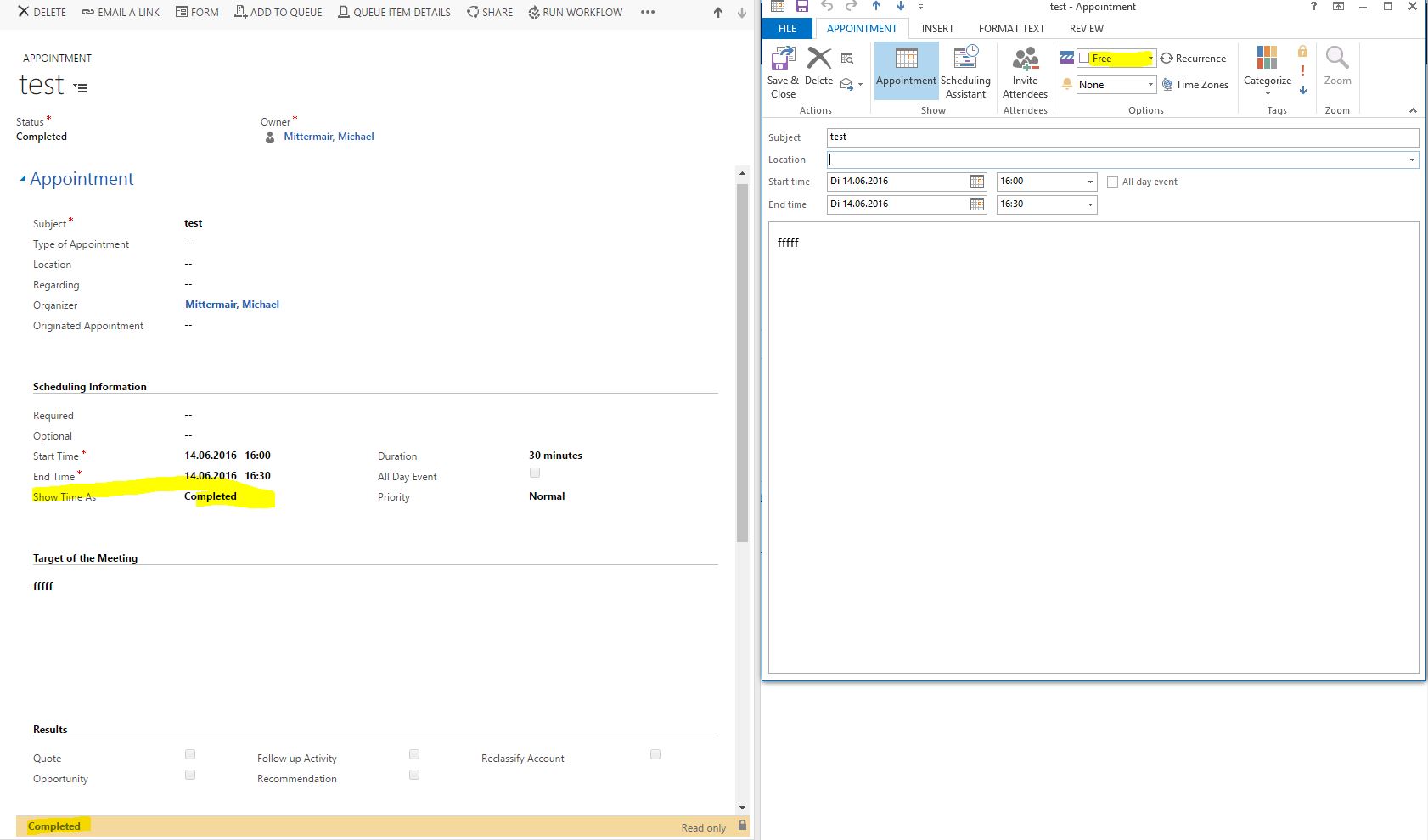
I've created an appointment in crm, which is synced to my mailaccount. In the calendar view of outlook the appointment appears and the "Show As"-field is set to busy. Perfekt.

But if the complete the appointment in crm, the statecode is set to 1 (complete) and the statuscode is set to 3 (complete). That's ok, but now the server-side-sync isn't able to find an equivalent field in the "Show As"-field in outlook and therefore uses the first it can find => in this case the value "Free".

Now the appointment is shown as free and that's my problem.

Are there any options in CRM to configurate that?
8371.Capture.JPG

*This post is locked for comments

I have the same question (0)
  • Community Member Profile Picture
    on at

    Entity

    Status (statecode)

    Associated Status Reason (statuscode)

    Appointment (appointment)

    0 Open

    1 Free

    2 Tentative

    1 Completed

    3 Completed

    2 Canceled

    4 Canceled

    3 Scheduled

    5 Busy

    6 Out of Office

    Has nobody a idea, how to solve this?

  • Verified answer
    Community Member Profile Picture
    on at

    I ask Microsoft about that case and got the following answer:

    The “Show Time As” field is actually the Status Reason (statuscode) field from the Appointment entity.  The Status Reason displays values based on the Status (statecode) of the record.  When a record is created, the status is set to ‘Open’.  As a result, the only corresponding statuscodes available are ‘Free’ and ‘Tentative’.  Therefore, within workflow you need to add a step after the appointment is created to change the record status to 'Scheduled - Busy'.


    As you already know with the state code and status code correctly set to complete on the appointment, the below article shows this:

    https://msdn.microsoft.com/en-us/library/gg309665.aspx


    CRM will set the appointment accordingly to this as once the appointment has been completed, for sure the user is no longer “busy” and is set to “free”, like users and businesses want it to be.


    The Field "Show Time As" is the "statuscode" field.
    If you want to change the default when you create an appointment you need to add custom code/ SDK in an onload event, as such an example of:

    var formType = Xrm.Page.ui.getFormType();
    if (formType == 1) {
      Xrm.Page.getAttribute("statuscode").setValue(1);


    But this would not change the design of CRM for this and there is no method to change the “show time as” value in Outlook as that is an Exchange property and CRM is hard wired and not able to make any changes to this value once an appointment has been completed and statuscode and state code set.


    So you know also, it is not possible to create, for example, a workflow on the Appointment entity that when the value is set to completed, it changes the value; as this is not possible as the only value to change to keep as “busy” would be  for a workflow to set the State to 1 and Statuscode to 5 (busy) but code of CRM does not push this to Outlook/ Exchange as stated above.

Under review

Thank you for your reply! To ensure a great experience for everyone, your content is awaiting approval by our Community Managers. Please check back later.

Helpful resources

Quick Links

Introducing the 2026 Season 1 community Super Users

Congratulations to our 2026 Super Stars!

Meet the Microsoft Dynamics 365 Contact Center Champions

We are thrilled to have these Champions in our Community!

Congratulations to the April Top 10 Community Leaders

These are the community rock stars!

Leaderboard > 🔒一 Microsoft Dynamics CRM (Archived)

#1
ScottDurow Profile Picture

ScottDurow 2

#2
GJones Profile Picture

GJones 1

Last 30 days Overall leaderboard

Featured topics

Product updates

Dynamics 365 release plans
