web
You’re offline. This is a read only version of the page.
close
Skip to main content

Announcements

No record found.

News and Announcements icon
Community site session details

Community site session details

Session Id :
Microsoft Dynamics SL (Archived)

Change item from non-stock to stock - System Message 143

(0) ShareShare
ReportReport
Posted on by 962

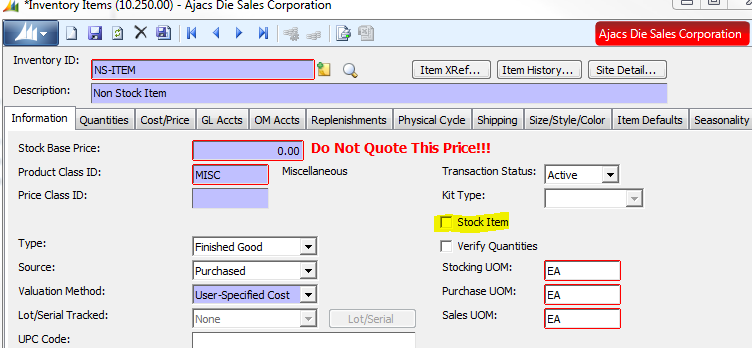
Does anyone know the criteria required to produce system message 143 when changing an inventory item from non-stock (inventory.stkitem) to stock by checking the "Stock Item" checkbox on Inventory Item 10.250.00. 

The stored proc or query that is called would be helpful.  I know that any open Purchase Orders, Sales Orders and transaction batches will cause this issue.  This item has all transactions closed.  However, the "On purchase Order" quantity is 4.  Unfortunately, inventory integrity check - recal on order quantities does not recalc items that are flagged as non-stock. stkitem.PNG
Update ItemSite Set QtyonPO = Coalesce(Round((Select Sum(Case When d.QtyOrd > d.QtyRcvd Then Case When d.CnvFact = 0

                                 Then d.QtyOrd - d.QtyRcvd

                                 Else Case When d.UnitMultDiv = 'D'

                                                Then Round((d.QtyOrd - d.QtyRcvd) / d.CnvFact, @DecPlQty)

                                                Else Round((d.QtyOrd - d.QtyRcvd) * d.CnvFact, @DecPlQty)

                                           End

                            End Else 0 End)

                From PurchOrd p Join PurOrdDet d

                On p.PONbr = d.PONbr

                Join Inventory i

                On d.Invtid = i.Invtid

                Where   d.Invtid = ItemSite.InvtId and d.Siteid = ItemSite.SiteId and p.Status IN ('O','P')

                And p.POType IN ('OR','DP') And i.Stkitem = 1 And d.OpenLine = 1), @DecPlQty), 0)

*This post is locked for comments

I have the same question (0)
  • Suggested answer
    Mark E Profile Picture
    6,451 on at

    I don't believe there is a proc that does this.  There is a function coded in the screen that looks for any Qty values in the bTempInvtTot buffer that has a value <> 0, then throws the error in various field check events when the field is attempted to be changed.

  • Suggested answer
    Community Member Profile Picture
    on at

    I think you should delete that item on that PO or close that PO rather than modify it by SQL. After PO close or that item is deleted on open PO you can change it.

Under review

Thank you for your reply! To ensure a great experience for everyone, your content is awaiting approval by our Community Managers. Please check back later.

Helpful resources

Quick Links

Introducing the 2026 Season 1 community Super Users

Congratulations to our 2026 Super Stars!

Meet the Microsoft Dynamics 365 Contact Center Champions

We are thrilled to have these Champions in our Community!

Congratulations to the March Top 10 Community Leaders

These are the community rock stars!

Leaderboard > 🔒一 Microsoft Dynamics SL (Archived)

Last 30 days Overall leaderboard

Featured topics

Product updates

Dynamics 365 release plans
